Template details
Blog Template
Free 2-column HTML/CSS blog layout from TemplateMo that you can edit and convert into a Blogger theme or another blog CMS.
About this template
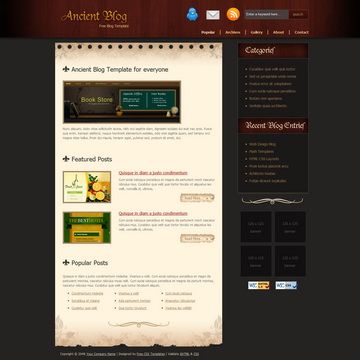
Blog Template is a free HTML/CSS blog layout from TemplateMo, built as a 2-column page with a dark gray palette that you can download, edit, and convert into a Blogger theme or another blog CMS.
What is Blog Template?
Blog Template, catalogued as TemplateMo 030 Blog, is a static HTML and CSS page designed as a simple blog layout. It takes plain HTML and CSS files as input and renders a two-column web page with a main content area and a sidebar, styled in dark gray. The template runs directly in any browser with no server-side requirements, and TemplateMo added it to its free CSS template collection on 22 October 2008. It is distributed as a ZIP download from templatemo.com and relies only on standard HTML and CSS, with no JavaScript framework named on the page.
Key Features
- Free license — The template is 100% free to download for anyone, and TemplateMo permits editing and use for commercial or non-commercial sites without payment.
- 2-column blog layout — It is tagged as "2-column", providing a main article column and a sidebar area typical of blog designs.
- Dark gray color scheme — The "darkgray" tag describes the color palette, giving the page a subdued, text-focused look.
- Plain HTML and CSS — No build tools, frameworks, or server dependencies are needed; you can edit the files directly in a text editor.
- Blogger/CMS conversion — The page explicitly says the template can be converted into Blogger or another blog CMS, so it serves as a starting point for dynamic blog platforms.
- Live view and screenshot — TemplateMo offers a live preview and a full-size screenshot on the template page so you can inspect the layout before downloading.
- Track record — The page shows 76,797 views and 17,437 downloads, indicating a long-used free resource.
Who is it for?
This template suits bloggers, web designers, and learners who want a lightweight, manually editable blog layout instead of a full content management system. It is also aimed at users who plan to move a static design into Blogger or another CMS.
- Personal bloggers — set up a static HTML blog and publish posts by editing the HTML files and uploading them to any web host.
- Web designers — use the layout as a clean starting point for client projects, changing colors and content via CSS.
- Blogger users — convert the HTML/CSS into a Blogger theme to manage posts through Blogger's own dashboard.
- Students of web development — study the structure of a simple, two-column HTML/CSS page.
What can you do with Blog Template?
- Start a no-frills blog: publish a two-column site with a dark gray design by editing the HTML content directly and hosting the static files.
- Convert it to a CMS theme: transform the template into a Blogger layout, using the page's stated compatibility as a guide for adapting the code.
- Practice template customization: modify the palette, column widths, and typography in CSS to create a personal or client-facing design.
Pricing
The template is entirely free. TemplateMo makes it available for download with no cost, and the page states you may use it for commercial or non-commercial sites without restrictions, so there are no paid editions, watermarks, or trial limits.
Alternatives
- Tooplate — a separate free HTML/CSS template gallery that TemplateMo links on the same page, offering a range of similar blog and corporate layouts.
- Other TemplateMo templates — if you prefer a different look, the same catalog includes 033 Tomato (red color, company style) and 032 Travel (travel company layout), both visible on the template page.
FAQ
Is Blog Template really free?
Yes, it is 100% free to download for anyone. TemplateMo allows editing and use for commercial or non-commercial sites without any payment, so there is no cost to use it on your own project.
Can I convert Blog Template to Blogger?
TemplateMo explicitly states that this template can be converted into Blogger or another blog CMS. To do so, you would adapt the static HTML to include Blogger's templating tags and then paste it into Blogger's theme editor.
What layout does Blog Template use?
It uses a 2-column structure with a dark gray color scheme. The main column holds blog posts, and the sidebar provides space for widgets or links, matching the tags "2-column" and "darkgray" from the TemplateMo listing.
How do I download and start using Blog Template?
On the TemplateMo page for 030 Blog, click the Download button to receive a ZIP file containing the HTML and CSS files. Extract the files, open the main HTML file in a browser to preview the layout, then edit the code with a text editor before uploading it to your server.