Template details
Jekyll YAT Theme
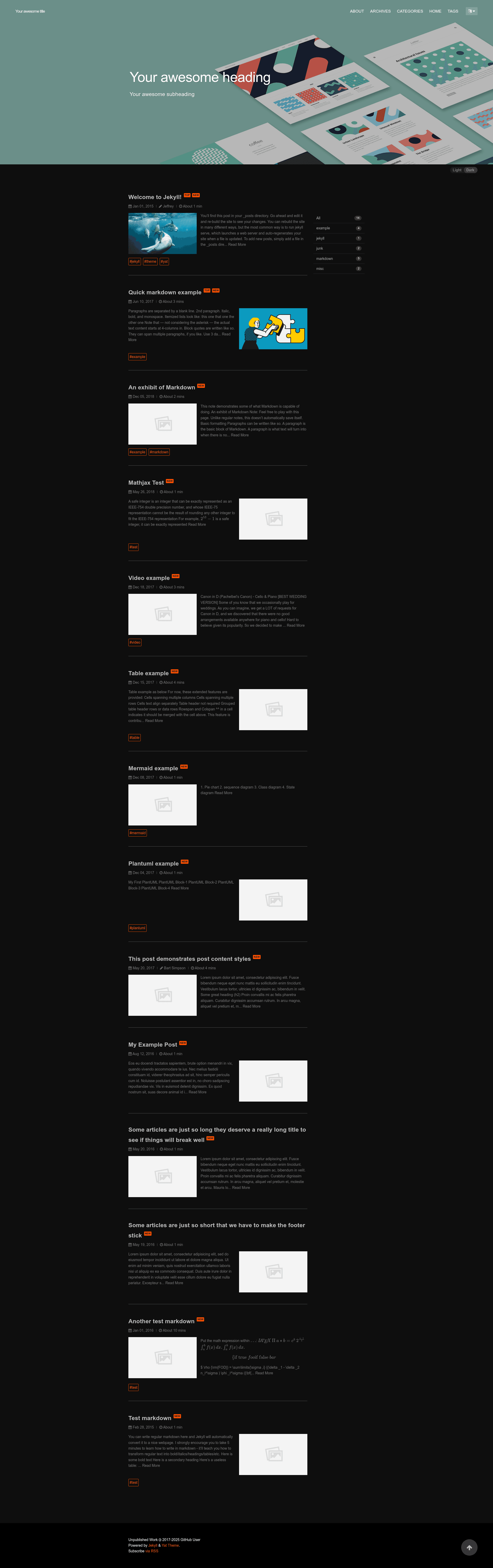
A modern responsive Jekyll theme for elegant writers with night mode and flat design.
About this template
Jekyll YAT Theme (Yet Another Theme) is a modern, responsive Jekyll theme for elegant writers, featuring automatic night mode, flat design, and full GitHub Pages support.
What is Jekyll YAT Theme?
Jekyll YAT Theme is a free, open-source Jekyll theme created by JeffreyTse and contributors, distributed as a Ruby gem. It accepts standard Jekyll content — Markdown posts, pages, and configuration — and generates a static site with five built-in layouts: home, post, tags, archive, and about. The theme runs on any Jekyll site and can be installed via Gemfile, as a remote theme on GitHub Pages, or by forking the repository.
Key Features
- Night mode — Automatically switches between light and dark palettes based on the visitor's system preference.
- Five full layouts — Includes home, post, tags, archive, and about pages, covering a standard blog structure.
- Font Awesome 5 icons — Ships with Font Awesome 5 for iconography in navigation and content.
- Page banners — Supports both image and video banners at the top of posts and pages.
- highlight.js syntax highlighting — Code blocks are highlighted with the highlight.js library, supporting many languages.
- PhotoSwipe 5 gallery — Image galleries open in a full-screen previewer with swipe gestures.
- Jekyll Spaceship integration — Adds complex table rendering, MathJAX/LaTeX math, embedded media (YouTube, Spotify), and diagrams (PlantUML, Mermaid) directly in Markdown.
- SEO, feed, and sitemap — Integrates the Jekyll SEO Tag, Jekyll Feed, and Jekyll Sitemap gems for search engine optimization and RSS.
Who is it for?
Writers and bloggers who want a clean, content-forward design with minimal visual distraction will find YAT's flat layout suitable. Jekyll developers who need advanced formatting — such as LaTeX math, Mermaid diagrams, or embedded media — can use the built-in Jekyll Spaceship integration. Site owners hosting on GitHub Pages can use the remote theme method without modifying their Gemfile, though full plugin support requires a deployment action.
What can you do with Jekyll YAT Theme?
- Technical writers: publish posts with LaTeX equations, Mermaid diagrams, and code snippets highlighted by highlight.js.
- Media-rich blogs: embed YouTube videos and Spotify players in posts through Jekyll Spaceship's media support.
- Portfolio and about pages: use the about layout and PhotoSwipe gallery previewer to showcase images.
- Multi-language sites: turn on Google Translation to allow readers to translate the page automatically.
How does Jekyll YAT Theme work?
Install the theme by adding the gem to your Gemfile and setting theme: jekyll-theme-yat in _config.yml, then run bundle. For GitHub Pages, set remote_theme: jeffreytse/jekyll-theme-yat and add the jekyll-remote-theme plugin. After installation, write content normally in Jekyll's _posts folder; the theme's layouts and includes render it.
Pros and cons
Pros: free and open source under the MIT license; responsive design with dark mode; active development with a live demo; flexible installation options. Cons: GitHub Pages' safe mode only whitelists certain plugins, so the third-party Jekyll Spaceship features require deploying with the provided jekyll-deploy-action GitHub Action instead of default Pages builds.
Pricing
Jekyll YAT Theme is free and open source, released under the MIT license. The author accepts donations via Liberapay, Patreon, and Ko-fi, but there is no purchase cost for the theme.
FAQ
Is Jekyll YAT Theme free?
Yes, the theme is licensed under the MIT license and can be used for personal or commercial projects without charge. Donations are optional via Liberapay, Patreon, or Ko-fi.
Does Jekyll YAT Theme support GitHub Pages?
Yes, it supports GitHub Pages via the remote theme method. Add remote_theme: jeffreytse/jekyll-theme-yat to your _config.yml and install the jekyll-remote-theme plugin.
How do I install Jekyll YAT Theme?
You can install it as a Ruby gem by adding gem "jekyll-theme-yat" to your Gemfile, use it as a remote theme on GitHub Pages, or fork the repository. All three methods are documented in the README.
What is Jekyll Spaceship?
Jekyll Spaceship is a Jekyll plugin that adds advanced features like complex tables, MathJAX/LaTeX, media embeds, and diagrams (PlantUML, Mermaid). YAT integrates it, but these features won't work under GitHub Pages' safe mode.
Does Jekyll YAT Theme have dark mode?
Yes, it supports night mode that automatically matches the visitor's system color scheme, and it can be controlled via the theme's settings.