Template details
Gatsby All Pack Theme Starter
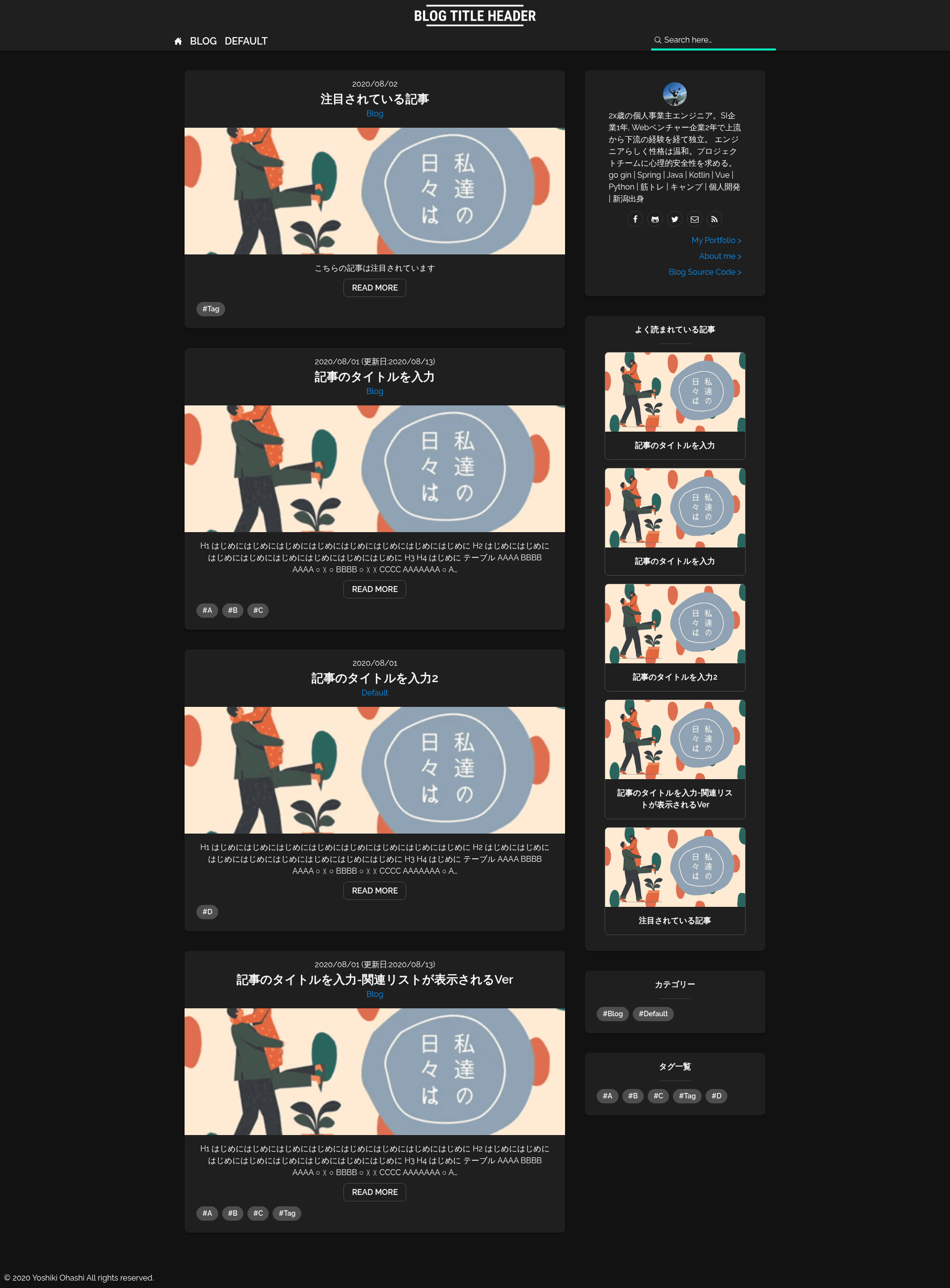
A Gatsby blog theme with Algolia search, Google Analytics ranking, and Netlify CMS GUI configuration.
About this template
Gatsby All Pack Theme Starter is a GatsbyJS blog theme that bundles search, ranking, RSS, and CMS features into one deployable Netlify starter.
What is Gatsby All Pack Theme Starter?
Gatsby All Pack Theme Starter is an open-source GatsbyJS blog theme created by GitHub user yoshiki-0428. It turns a standard Gatsby content directory of Markdown posts into a static blog with Algolia-powered full-text search, a Google Analytics page-view ranking widget, related-post links, RSS feed, sitemap, tags, categories, and a responsive hamburger menu. The author claims it is the only Gatsby theme where all settings can be completed through a GUI — specifically via Netlify CMS — rather than by editing code.
Key Features
- Algolia article search — Full-text search of posts powered by Algolia, configured with the ALGOLIA_ADMIN_KEY environment variable.
- Google Analytics ranking — A popular-posts widget driven by page-view data from Google Analytics, requiring a GA_CRED Google Cloud API credentials JSON.
- Related article links — Each post can have related-post links set manually, displayed on the article page.
- Netlify CMS configuration — Site name, title, blog image, header image, author info, and color theme are editable through the Netlify CMS admin interface at /admin.
- Responsive design with hamburger menu — Mobile-friendly layout includes a hamburger navigation menu implementation.
- Tag and category system — Posts can be organized with tags and categories for better navigation.
- RSS and sitemap generation — Automatically generates an RSS feed and an XML sitemap for the blog.
- Dark and light color themes — Sample palettes for both dark mode and light mode are provided, with seven color variables that can be customized via the CMS.
Who is it for?
- Non-technical bloggers who want a fully-featured blog platform without touching code — they can configure everything through the Netlify CMS GUI and just write posts.
- Developers who need a Gatsby starter with pre-wired integrations — they save time on setting up Algolia, Google Analytics, RSS, and sitemap functionality from scratch.
- Content teams using third-party CMS tools — the theme supports posting via Netlify CMS or through an external CMS like esa.io using the provided Lambda integration.
- Japanese and English-speaking users — while the README is in Japanese, the blog itself is language-agnostic and usable for any content.
What can you do with it?
- Content writers: add and edit articles through the Netlify CMS admin at your-domain.com/admin without needing to modify source files.
- Site owners: customize brand colors — primary, accent, background, and font colors — in both dark and light modes using the GUI color settings.
- SEO-conscious bloggers: publish with auto-generated RSS and sitemap, plus tags and categories that help with discoverability.
- Analytics-driven bloggers: display a “popular posts” ranking based on real Google Analytics page views to guide readers to top content.
How does it work?
Deployment is a Git-based Netlify workflow: clone the starter with gatsby new, add your own Git remote, connect the repository to Netlify, set the required environment variables (ALGOLIA_ADMIN_KEY and GA_CRED), and deploy. For posting, you can either log into Netlify CMS at /admin or configure an external CMS like esa.io via a separate Lambda source project linked in the README.
FAQ
Is Gatsby All Pack Theme Starter free?
The repository is publicly available on GitHub under the yoshiki-0428 account, and the README describes a fully open-source installation flow using Gatsby and Netlify, so it is free to use.
What environment variables do I need?
Two are required: ALGOLIA_ADMIN_KEY for Algolia search and GA_CRED, the Google Cloud API credentials JSON for Analytics. If you skip them, the search and ranking features won’t work, but the rest of the theme will still function.
How do I write a new post?
After deploying, visit your-domain.com/admin, log in to Netlify CMS, go to the Posts tab, and edit or create articles. Alternatively, you can use a third-party CMS like esa.io with the integration provided in the README.
Does it support dark mode?
Yes, the theme includes sample color configurations for both dark and light modes, with seven color variables (white, primary, accent, baseBack, baseFont, baseGray, baseGrayLight) that you can change through the CMS.
Can I customize colors without code?
The theme is designed specifically for GUI configuration: colors, site name, title, images, and author info are all adjustable through Netlify CMS, so no code editing is required for basic customization.