Template details
Greenircnepal
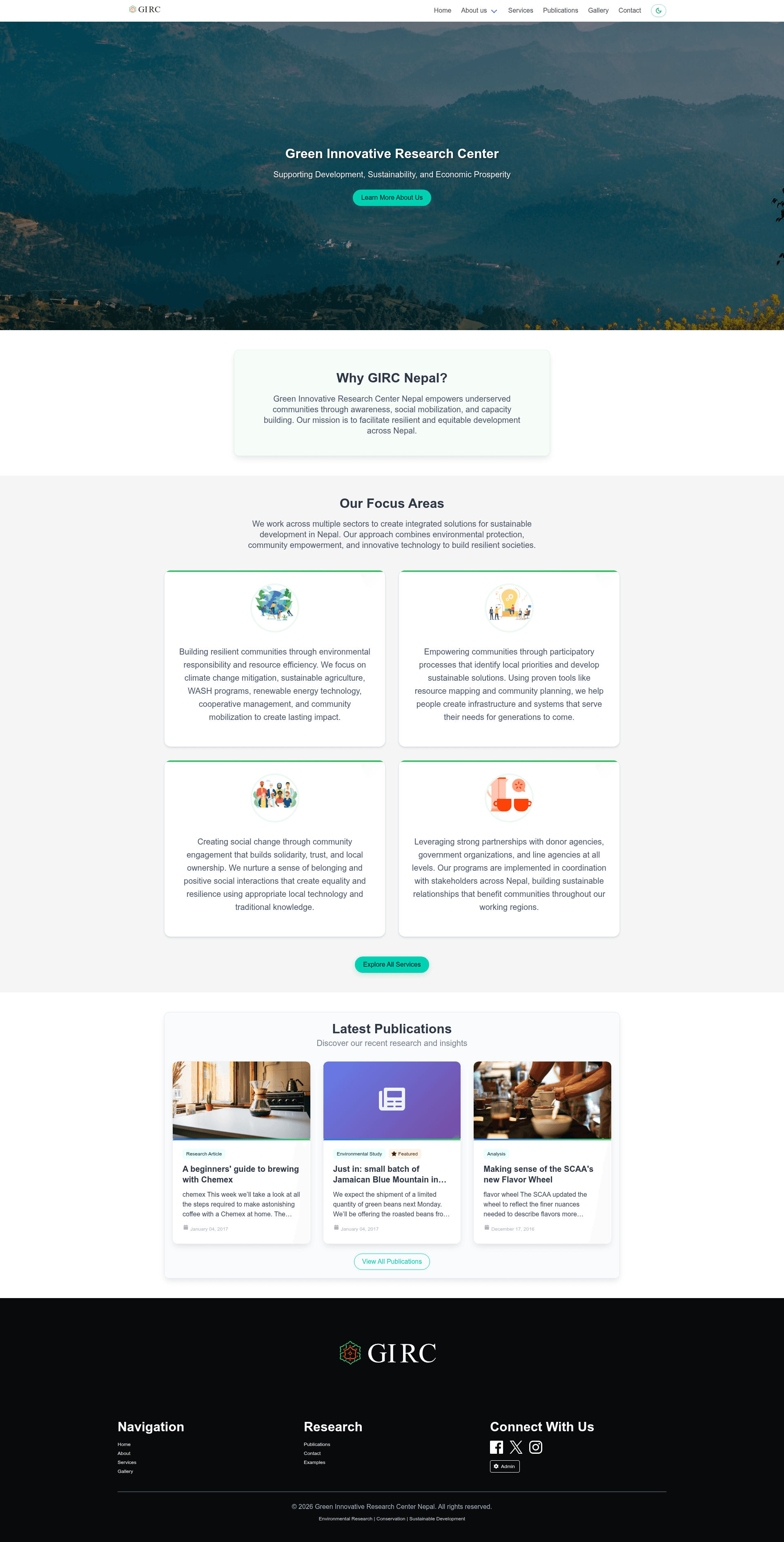
Gatsby 5 + Netlify CMS website template for an environmental research organization, featuring blog, photo gallery, dark mode, and PurgeCSS-optimized styling.
About this template
Greenircnepal is a Gatsby 5 website template for the Green Innovative Research Center Nepal, an environmental research organization, built to deliver a static JAMstack site with Netlify CMS content management and Bulma-based styling.
What is Greenircnepal?
Greenircnepal is the official website codebase for the Green Innovative Research Center Nepal (GIRC Nepal), an environmental research and conservation organization based in Kathmandu, Nepal. As a template, it takes content written in Markdown — pages, blog posts, gallery images, and site settings — and generates a fully static HTML site through Gatsby's build process. The site runs on Gatsby 5 with React 18, uses Netlify CMS for content editing, Bulma CSS with custom SASS modules for styling, and is designed to be hosted on Netlify with automatic deploys from the master branch. The project is adapted from the Gatsby Starter Netlify CMS template by Netlify.
Key Features
- Netlify CMS integration — Editors can create and edit pages, blog posts, gallery images, and site settings from an admin interface at the /admin route without touching code; local CMS development uses netlify-cms-proxy-server.
- Blog system — Includes blog index and post templates with categories, tags, and featured posts, processed through gatsby-transformer-remark.
- Photo gallery — A gallery page with filtering, sorting, and a modal lightbox, with images handled by Gatsby Image for lazy loading and responsive resizing.
- Contact forms — Netlify Forms integration with built-in form validation on the contact page.
- Dark mode — System-aware theme with a manual toggle, using CSS variables defined in src/style/bulma-custom.sass for light and dark palettes.
- Performance optimizations — PurgeCSS cuts Bulma CSS from roughly 170 KB down to around 17 KB, code splitting loads JavaScript chunks per route, and pre-rendered HTML is served from a CDN.
- Responsive design — Mobile-first layout with breakpoints at 375, 480, 768, 1024, and 1216 pixels, plus WCAG AAA contrast ratios and keyboard navigation.
- Developer tooling — Modular React components, custom SASS modules with variables and mixins, hot reload via Gatsby, Netlify Functions support in the lambda folder, and a git-based workflow for all content.
Who should use Greenircnepal?
- Environmental and research NGOs — Organizations that need an official website with a manageable CMS to publish research findings, news, and photo documentation without a dedicated development team.
- Non-technical content editors — Staff members who want to update site pages, blog posts, and gallery items through the Netlify CMS admin panel instead of editing code.
- Gatsby developers — Developers looking for a JAMstack starter with Netlify CMS, Bulma styling, and Netlify deployment already configured; they can customize components, SASS variables, and add serverless functions.
What can you do with Greenircnepal?
- Publish research and advocacy content — Editors create blog posts in Netlify CMS with categories and tags, and the site renders them as a blog with featured posts.
- Manage a photo gallery of fieldwork — Upload and categorize gallery images in the CMS, and visitors can filter, sort, and view them in a lightbox.
- Collect inquiries and feedback — Use the contact page with Netlify Forms to receive submissions, which appear in the Netlify dashboard or can be forwarded to an email.
- Customize branding — Change theme colors by editing CSS variables in src/style/bulma-custom.sass, including separate palettes for light and dark modes.
How does Greenircnepal work?
- Clone the repository and run npm install to install dependencies.
- Use npm start or gatsby develop to launch the development server at http://localhost:8000.
- For local CMS access, run npm run build, then npx netlify-cms-proxy-server in one terminal and gatsby develop in another, then visit http://localhost:8000/admin.
- Run npm run build for a production build, and npm run serve to preview it; pushing to the master branch triggers an automatic Netlify deployment.
FAQ
Which Node.js version does Greenircnepal require?
The template requires Node.js v18.0.0 or higher, with v20.x recommended. npm v9.0.0 or higher and Git are also needed. On Windows, node-gyp errors can be resolved by setting python to python2.7 and installing windows-build-tools.
How do I access the Netlify CMS admin?
In production, the CMS is available at https://[your-site].netlify.app/admin. Locally, you must first build the project with npm run build, start the proxy server with npx netlify-cms-proxy-server, and run gatsby develop to access the admin at http://localhost:8000/admin.
Does Greenircnepal include a blog and gallery?
Yes, it ships with a full blog system supporting categories, tags, and featured posts, plus a photo gallery with filtering, sorting, and a modal lightbox. Both are managed as content types in Netlify CMS.
What CSS framework does the template use?
The template uses Bulma CSS as the base framework, customized with SASS modules and variables. PurgeCSS removes unused styles, reducing the CSS file size from roughly 170 KB to about 17 KB.