Template details
Hexo Theme M
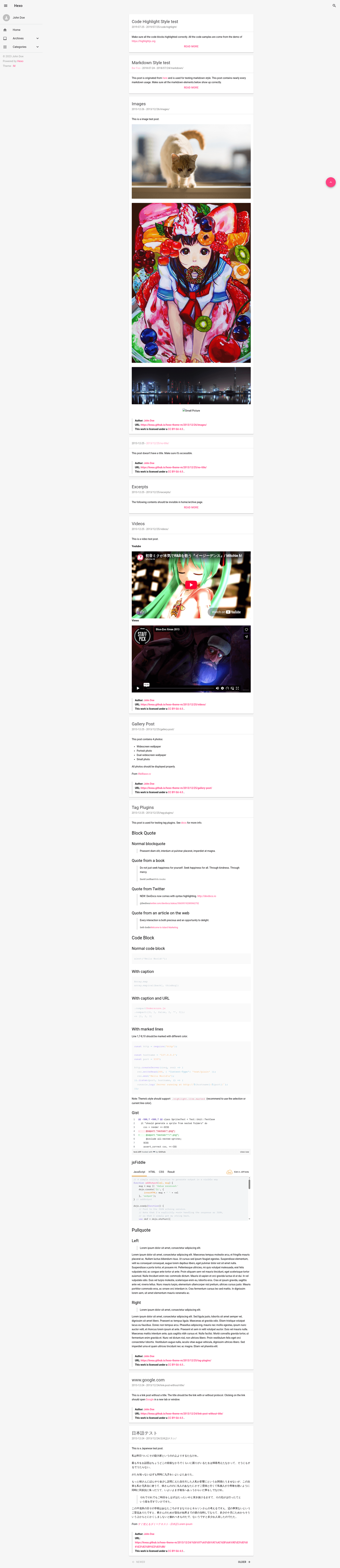
A Material Design theme for the Hexo static site generator, built with MDUI and PrismJS.
About this template
Hexo Theme M is a Material Design theme for the Hexo static site generator, turning Markdown posts into a static site with an MDUI-based interface. It is distributed as the npm package hexo-theme-m and from the kwaa/hexo-theme-m GitHub repository, and it requires PrismJS for syntax highlighting.
What is Hexo Theme M?
Hexo Theme M is an open-source theme that converts Hexo's Markdown content and _config.yml settings into a static HTML site styled with Material Design. It runs inside any Hexo installation, and its main input is your Hexo content plus configuration. The theme is not compatible with HighlightJS, so you must disable HighlightJS and enable PrismJS in Hexo's config when using it.
Key Features
- Material Design UI — Uses MDUI, a Material Design front-end framework, to provide a flat, responsive layout with elevation and adapted components.
- PrismJS syntax highlighting — Code blocks are highlighted with PrismJS; the theme is built specifically for this highlighter, so HighlightJS must be turned off in
_config.yml. - Simple installation — Install as a dependency with
npm i hexo-theme-m, or pull the theme folder withnpx degit kwaa/hexo-theme-m/theme themes/m. - Theme configuration — Enable the theme by setting
theme: min Hexo's_config.yml, with a clear diff showing the required changes for highlighting. - Open-source license — Released under the WTFPL license, allowing free use and modification without restrictions.
Who is it for?
- Hexo bloggers — Users who want a Material Design look for their static blog without building a theme from scratch.
- Front-end developers — Developers comfortable editing
_config.ymland running npm commands can quickly wire this theme into a Hexo project. - Static site publishers — Anyone hosting a static site who wants a lightweight, dependency-light theme (PrismJS and MDUI-adjacent styling) with Material Design aesthetics.
What can you do with Hexo Theme M?
- Launch a blog: Install the theme, adjust
_config.yml, and generate a Material-styled blog with Hexo's standard build commands. - Customize code highlighting: Configure PrismJS line numbers and preprocessing in
_config.ymlto control how code blocks appear. - Run a personal site: The theme's responsive Material components adapt to articles, pages, and archives on desktop and mobile.
How does Hexo Theme M work?
Installation goes through npm or degit. After installing, modify _config.yml: set highlight.enable to false, set prismjs.enable to true (with preprocess: true and line_number: true), and change theme to m. Then Hexo builds the site using PrismJS for code and MDUI for styling.
Pricing
Hexo Theme M is free. The repository is published under the WTFPL license, so there are no license fees or paid tiers.
FAQ
Is Hexo Theme M free?
Yes, Hexo Theme M is free and open source. The repository is licensed under the WTFPL, which permits unrestricted use, modification, and redistribution.
Does Hexo Theme M work with HighlightJS?
No. The theme is only compatible with PrismJS. You must disable HighlightJS in _config.yml (set highlight.enable to false) and enable PrismJS for syntax highlighting.
How do I install Hexo Theme M?
Run npm i hexo-theme-m in your Hexo project (or pnpm add hexo-theme-m), then set theme: m in _config.yml and adjust the highlighter settings. Alternatively, use npx degit kwaa/hexo-theme-m/theme themes/m to clone the theme folder directly from GitHub.
How do I update Hexo Theme M?
If installed via npm, use your package manager's update command (for example, npm update). If installed from GitHub, remove the themes/m directory and re-run the degit command.