Template details
Hydeout
Refreshed Hyde theme for Jekyll 3.x/4.x with tags, categories, search, Disqus, and Google Analytics.
About this template
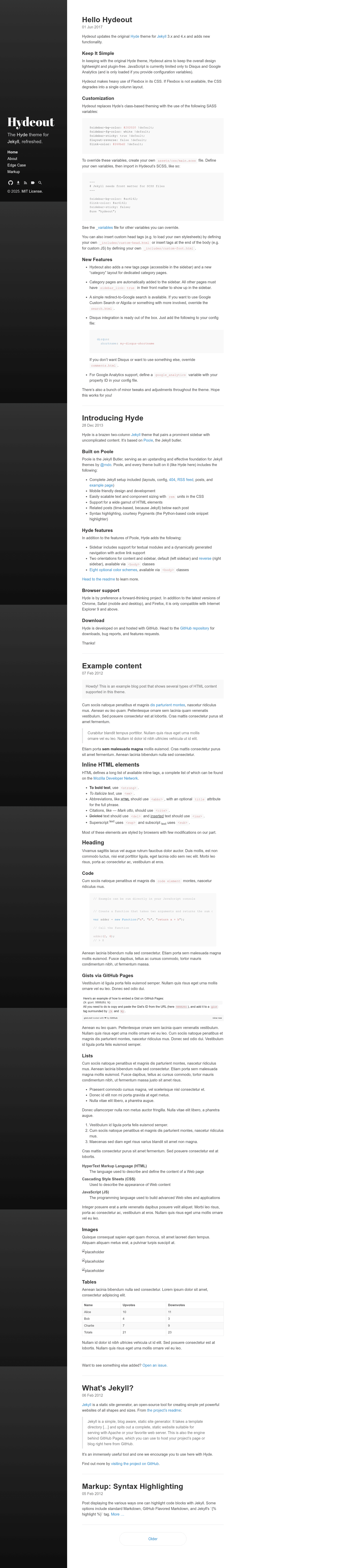
Hydeout is a Jekyll theme that modernizes the classic Hyde theme for Jekyll 3.x and 4.x, adding tag and category pages, a Google search layout, and pre-wired Disqus and Google Analytics integration.
What is Hydeout?
Hydeout is a refreshed version of Poole's Hyde theme, maintained by fongandrew, designed for Jekyll 3.x and 4.x. It takes standard Jekyll site content — posts, pages, and configuration in _config.yml — and renders a two-column blog layout with a sticky sidebar. The theme is distributed as a Ruby gem and can also be used as a remote theme on GitHub Pages via remote_theme: fongandrew/hydeout. It ships with a master branch for Jekyll 3.x and a recommended jekyll-v4 branch for new projects on Jekyll 4.x.
Key Features
- Tag pages — Add a page with the
tagslayout to get a sidebar-accessible archive of all site tags. - Category pages — Create a category page with the
categorylayout; category pages appear automatically in the sidebar. - Sidebar sorting — Control the order of sidebar links with the
sidebar_sort_orderfront-matter parameter; non-category pages sort first. - Google search layout — Create a page with the
searchlayout to add a redirect-to-Google search box. - Disqus integration — Enable comments by setting
disqus.shortnamein_config.yml; overridecomments.htmlto swap in another provider. - Google Analytics — Add a
google_analyticsproperty ID in the config to load analytics only when the variable is present. - SASS variable theming — Customize sidebar colors, sticky positioning, layout direction, and link color by overriding variables like
$sidebar-bg-colorand$link-colorin a customassets/css/main.scss. - Replaceable partials — Drop-in overrides for copyright, custom head/foot snippets, navigation links, icon links, favicons, and font loading via files in
_includes.
Who is it for?
Jekyll bloggers who want a lightweight, plugin-free theme with a sidebar and built-in taxonomy pages. GitHub Pages users who rely on Jekyll 3.x on legacy deployments can keep using the master branch, while new projects should switch to the jekyll-v4 branch for full Jekyll 4 compatibility. Theme customizers who are comfortable editing SCSS and front matter can restyle the entire look by overriding a handful of SASS variables and partials.
What can you do with Hydeout?
- Publish a categorized blog — Set up a
categorypage for each topic you write about, and they automatically appear in the sidebar without extra configuration. - Add a search entry point — Create a
searchlayout page to give readers a simple Google search that queries your site. - Enable reader comments — Plug in a Disqus shortname and every post gets a comment thread; replace
comments.htmlif you prefer a different service. - Rebrand the sidebar — Change the sidebar background, text color, and link color with SCSS variables to match your personal brand.
How does Hydeout work?
Hydeout is installed like any Jekyll theme: add it to your Gemfile or use remote_theme: fongandrew/hydeout in _config.yml. It relies on Jekyll's pagination, so an index page must use the index layout and the config must include a paginate value (for example, paginate: 5). JavaScript stays out of the page unless you set the Disqus or Google Analytics variables.
FAQ
Which Hydeout branch should I use?
For all new projects, use the jekyll-v4 branch, which is actively maintained and supports Jekyll 4.x. The master branch exists for legacy Jekyll 3.x sites, particularly those deployed on GitHub Pages that still pin Jekyll 3.
How do I add Disqus comments?
Add disqus: shortname: your-shortname to your _config.yml file. The theme loads Disqus only when that variable is present; to use a different comment system, override the comments.html partial.
How do I change the sidebar colors?
Create an assets/css/main.scss file with front matter, define new values for SASS variables like $sidebar-bg-color and $link-color, then @import "hydeout";. See the _variables.scss file for the full list.
Does Hydeout include any JavaScript?
Hydeout keeps JavaScript to a minimum: it loads only Disqus and Google Analytics scripts, and only when you provide the corresponding configuration variables. Otherwise the theme is plugin-free and CSS-only.