Template details
Jekyll Picture Tag
Easy responsive images for Jekyll.
About this template
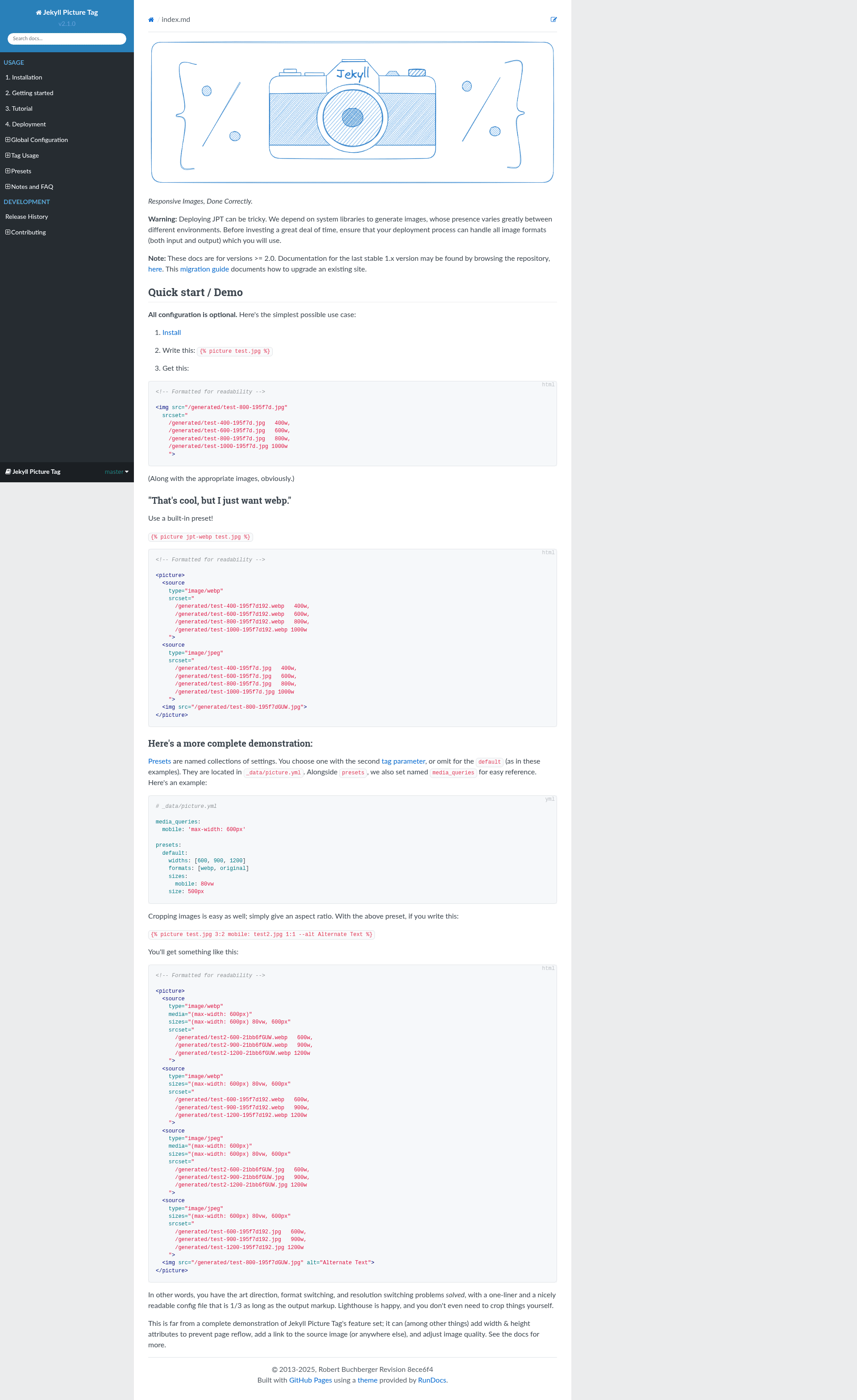
The Jekyll Picture Tag plugin for Jekyll automatically generates cropped, resized, and reformatted responsive images from a single source image and a simple Liquid template tag, with optional YAML configuration. It is an open-source project maintained on GitHub, with 628 stars, and is designed to solve both art direction and resolution switching for responsive web pages.
What is Jekyll Picture Tag?
Jekyll Picture Tag is a Ruby plugin that runs during the Jekyll build process. It accepts a source image and a small set of instructions (via a Liquid tag and YAML presets) and outputs a set of optimized images plus the HTML markup needed to serve them. Since version 2.0, the plugin uses libvips for image processing, which is significantly faster than ImageMagick, and it falls back to ImageMagick for formats libvips cannot handle. It requires Ruby 2.6 or higher and Jekyll 4.0 or higher.
Key Features
- Automated image generation — Creates cropped, resized, and format-converted image files automatically, so you do not have to prepare each variant by hand.
- libvips-based processing — Uses the libvips library for speed (much faster than ImageMagick), with an automatic fallback to ImageMagick for unsupported formats.
- Smart cropping — Uses libvips smartcrop to retain the most interesting part of an image when cropping to an aspect ratio; the
keepoption controls this behavior. - Format quality defaults — Ships with default
format_qualitysettings for WebP, AVIF, and JPEG 2000, and supports per-format write options. - Configurable or zero-config — Offers extensive configuration through YAML presets, but also provides stock presets and media queries under the
jpt-prefix so you can use it with no setup. - Windows support — Latest release 2.1.3 intelligently chooses between
magickandconvert, adding Windows support without breaking Ubuntu or other distributions with older ImageMagick.
Who is it for?
- Jekyll developers who want to add responsive images to static sites without manually generating dozens of resized files or writing verbose
srcsetmarkup. - Performance-conscious site owners who need to serve appropriately sized images to mobile and desktop users to keep page weight low and Lighthouse scores high.
- Designers and art directors who need different crops or completely different images at different breakpoints, using the
cropandkeepsettings for art direction.
What can you do with it?
- Blog posts — Drop a single Liquid tag into a post template to produce WebP and AVIF variants with the correct
srcset, so browsers download only what they need. - Responsive hero images — Define breakpoint-specific crops with media queries, ensuring a landscape desktop image becomes a properly cropped portrait on mobile.
- Image-heavy portfolios — Automate generation of thumbnails, previews, and full-size images from one master file, reducing manual labor and build errors.
How does it work?
In your Jekyll template, you place a Liquid tag that names a source image and, optionally, a YAML preset. At build time, the plugin reads the configuration, generates the required image variations into the site's output directory, and replaces the tag with the appropriate <picture> and <img> markup. The 2.0 rewrite simplified cropping to aspect ratios only, removed the old markup_presets and media_presets in favor of presets and media_queries, and added input validation for clearer error messages.
Pricing
Free — Jekyll Picture Tag is open source and available on GitHub. There are no paid tiers or subscription plans.
FAQ
Is Jekyll Picture Tag free?
Yes, it is open source and distributed through GitHub. You can use it in any Jekyll project without paying a license fee.
What are the system requirements?
Jekyll Picture Tag 2.0 and later require Ruby 2.6 or higher and Jekyll 4.0 or higher. The image processing backend is libvips, with ImageMagick used as a fallback. Version 2.1.3 also fully supports Windows.
What image formats can it output?
The plugin includes default quality settings for WebP, AVIF, and JPEG 2000, and can output any format supported by libvips or ImageMagick. PNG output is handled without a quality argument, which avoids issues on older vips versions.
Does it support Windows?
Yes, since version 2.1.3, Jekyll Picture Tag decides whether to call magick or convert based on the environment, which adds Windows support without breaking Linux distros that ship older ImageMagick.
What changed in the 2.0 release?
The 2.0 release switched from ImageMagick to libvips, introduced smartcrop, renamed markup_presets and media_presets to presets and media_queries, added stock jpt- presets, and dropped support for the old naming. It also raised the minimum Ruby version to 2.6 and Jekyll to 4.0.