Template details
Jesse Miller Resume
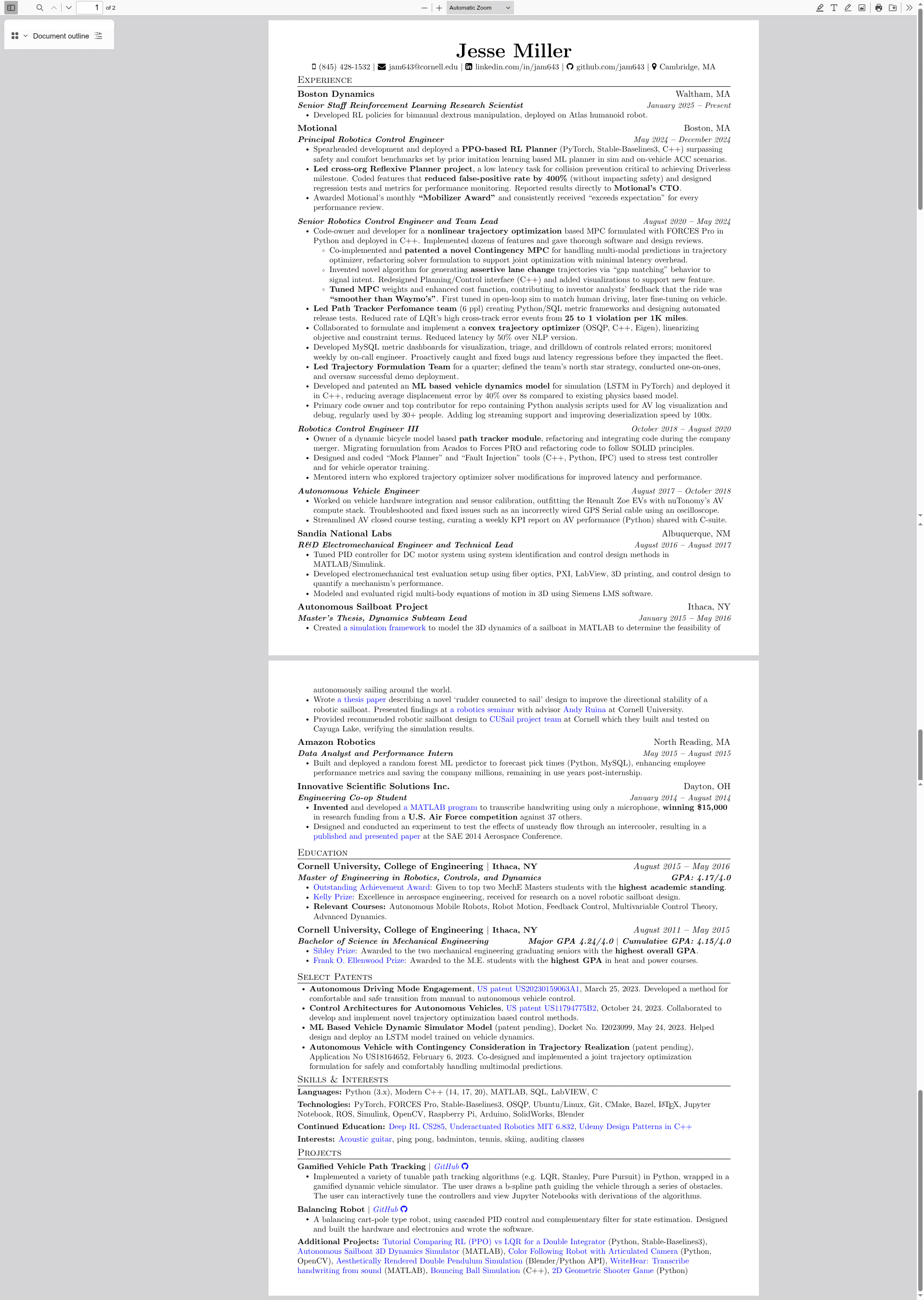
My personal resume compiled with LaTeX with toggles and comment-based section control.
About this template
Jesse Miller Resume is a LaTeX-based resume template that takes a single .tex file as input and produces a print-ready, hyperlink-enabled PDF curriculum vitae, with content controlled by conditional toggles and git branches for different job applications.
What is Jesse Miller Resume?
Jesse Miller Resume is a personal curriculum vitae written in LaTeX, designed to be compiled with pdfLaTeX on Overleaf or a local Mac environment. It takes a .tex file and outputs a clean PDF resume with sections like contact details, work experience, education, and skills. The template is maintained by Jesse Miller on GitHub under the repository jam643/resume, which has 27 stars.
What makes Jesse Miller Resume stand out?
- Conditional toggles — The .tex file contains toggles that let you include or exclude blocks of content with boolean switches, so one source file can produce multiple resume variations.
- Comment-based trimming — Sections can be commented out rather than deleted, preserving the information in the source while removing it from the rendered PDF.
- Branch-based versions — Different resume variations are kept on separate git branches, and the README links to the PDF on the branch named
resume_shortened. - Browser PDF viewing — A link uses Mozilla's pdf.js viewer to render the raw PDF from GitHub in a browser without downloading.
- One-click cloud compile — Copy the .tex file to Overleaf and save as PDF for an online build path.
- Local Mac compilation — Install MacTeX or BasicTeX, use the LaTeX Workshop plugin in VSCode, or run
pdflatex jesse_miller_resume.texin the terminal. - Screenshot automation — The
update_images.shscript generates PNG screenshots of the resume pages into theimages/folder. - README automation — The
update_readme.shscript updates hyperlinks in the README to match the current git branch.
Who is Jesse Miller Resume for?
- Job seekers who use LaTeX — Candidates comfortable with LaTeX can customize the resume layout and output professional PDFs without fighting a WYSIWYG editor.
- Developers and technical professionals — The template suits developers who appreciate clean typography and integrated hyperlinks to GitHub, LinkedIn, or personal sites.
- People applying to multiple roles — With conditional toggles, an applicant can maintain one .tex file and quickly switch sections on and off for each application.
What can you do with Jesse Miller Resume?
- Tailor a resume per application — Edit the .tex file to enable or disable sections via toggles, then compile a custom PDF for each job.
- Maintain a trimmed resume — Comment out less relevant items while keeping them in the source for future versions.
- Preview the PDF in a browser — Use the provided pdf.js viewer link to see the compiled resume without downloading the file.
- Automatically update screenshots — Run
update_images.shto regenerate the PNG previews displayed in the README after making changes.
How does Jesse Miller Resume work?
To compile, copy the .tex file to Overleaf and save as PDF, or install MacTeX or BasicTeX locally. On a Mac, you can use the LaTeX Workshop plugin in VSCode or run pdflatex jesse_miller_resume.tex in a terminal. Before committing changes, run update_images.sh and update_readme.sh to regenerate screenshots and refresh hyperlinks for the current branch.
FAQ
Is Jesse Miller Resume free to use?
The repository is publicly available on GitHub; the README does not mention any pricing or license, so you can clone or download the template for personal use.
Can I compile it on Windows or Linux?
The README explicitly covers compilation on Overleaf (cloud) and locally on a Mac with MacTeX or BasicTeX. Since pdfLaTeX is cross-platform, it should also work on Windows or Linux with a TeX distribution like TeX Live, but those platforms are not documented in the README.
How can I create different resume variations?
The .tex file uses conditional toggles to include or exclude content, and the README notes that different variations may be maintained on separate git branches. For example, the repository uses a branch named resume_shortened for a trimmed version.
Does the template support hyperlinks?
Yes, the compiled PDF includes hyperlinks. The README warns that hyperlinks won't work when viewing the embedded screenshots, but they do work in the PDF viewer link provided.
How do I update the screenshots in the README?
Run update_images.sh, which generates PNG screenshots of the resume pages and saves them to the images/ folder. Then run update_readme.sh to update the hyperlink paths in the README to match the current git branch.