Template details
JigsawStack Next.js Template
Open-source AI-powered Next.js starter kit with pre-configured JigsawStack API routes for image generation, TTS, OCR, translation, and search.
About this template
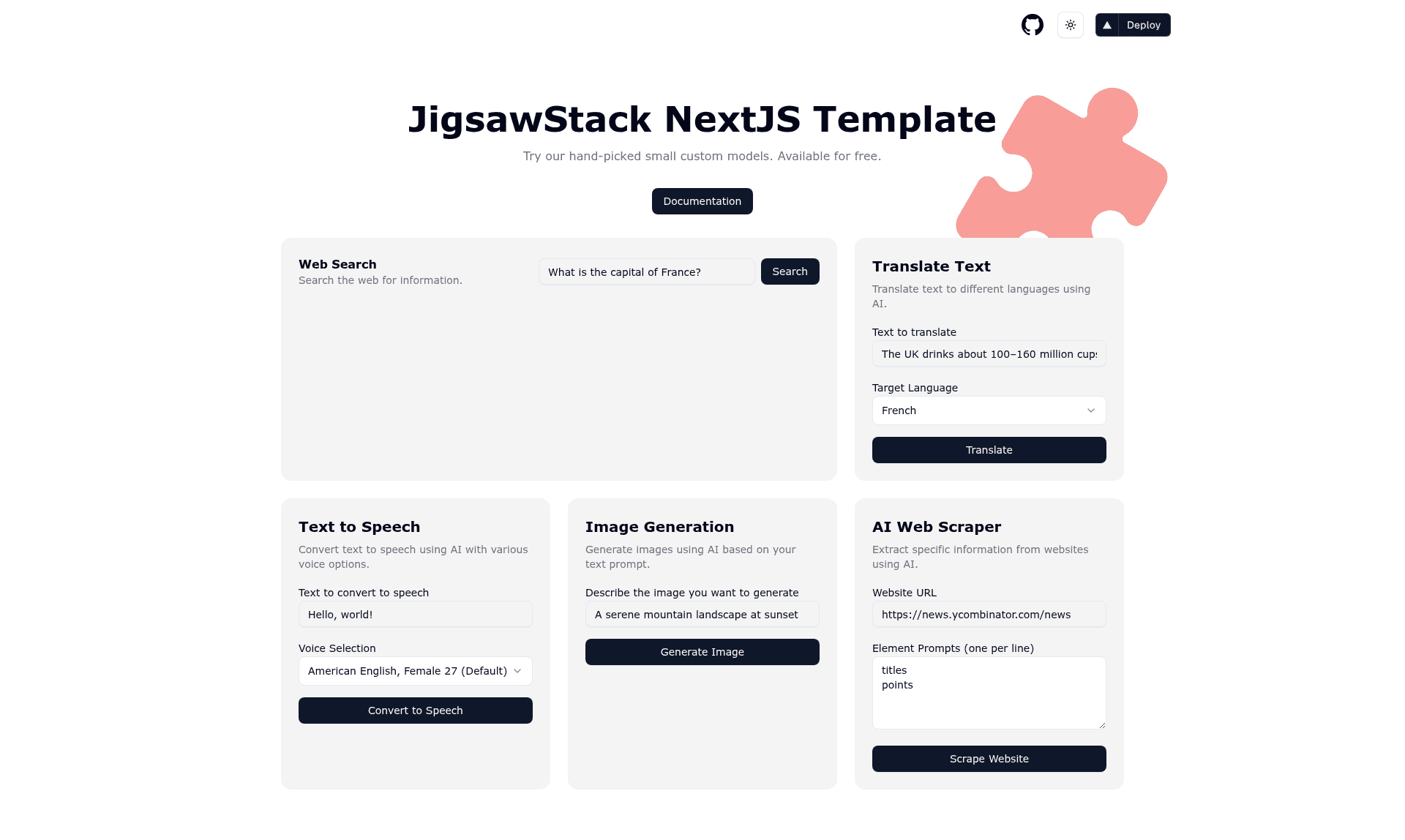
JigsawStack Next.js Template is an open-source AI-powered starter kit that pairs Next.js 15 with pre-configured JigsawStack AI API routes so you can ship image generation, speech, translation, OCR, scraping, and search features in minutes.
What is JigsawStack Next.js Template?
JigsawStack Next.js Template is an open-source boilerplate for building AI applications on top of the JigsawStack platform. It takes a JigsawStack API key as its main configuration input and exposes ready-to-use API routes in the app/api/jigsawstack directory, so your frontend can call AI features without writing backend logic. The template uses the Next.js 15 App Router, React 19, Tailwind CSS, and shadcn/ui for the UI layer, and it ships with TypeScript throughout. The repository is maintained by JigsawStack and released under the MIT License.
Key Features
- Seven pre-configured AI API routes — The
app/api/jigsawstackfolder contains routes for image generation, text-to-speech, speech-to-text, translation, visual OCR, AI web scraping, and web search. - Modern UI stack — Components are built with shadcn/ui and styled with Tailwind CSS, giving you a polished starting point.
- Next.js 15 with Turbopack — The template targets the latest App Router and includes Turbopack for faster local development builds.
- Dark mode included — next-themes handles theme switching out of the box.
- Type-safe codebase — TypeScript is enabled across the project, including the API routes and components.
- One-click Vercel deployment — A deploy button clones the repository and wires up the project name automatically.
Who is it for?
- Next.js developers who want to integrate JigsawStack AI services into an app without writing the integration plumbing.
- AI product prototypes that need working image generation, TTS, or OCR endpoints quickly for demos or MVPs.
- Indie hackers and startups looking to spin up an AI SaaS starter on Vercel with minimal setup.
What can you do with JigsawStack Next.js Template?
- Generate images from prompts — Call the image generation route with a text description and receive AI-generated visuals in your response.
- Add text-to-speech — Convert text to natural-sounding audio that can be played in the browser or served as a file.
- Transcribe audio — Send audio to the speech-to-text route and get a text transcription back.
- Translate content — Use the translation route to convert text between languages.
- Extract text from images — Run Visual OCR on uploaded images to pull out printed or handwritten text.
- Scrape websites and search — Use AI scraping to get structured data from a URL, or the web search route for AI-powered search results.
How does JigsawStack Next.js Template work?
After cloning the repository, you install dependencies with your preferred package manager (npm, yarn, pnpm, or bun), create a .env.local file with your JigsawStack API key set as JIGSAWSTACK_API_KEY, and start the dev server on localhost:3000. Each AI service is pre-wired as an API route, so you can hit it from your frontend immediately. The template is set up for Vercel deployment with a one-click clone.
FAQ
What AI APIs are included in the template?
The template includes image generation, text-to-speech, speech-to-text, translation, visual OCR, AI web scraping, and web search — each exposed as a ready-to-use route in the app/api/jigsawstack directory.
How do I get a JigsawStack API key?
You sign up at jigsawstack.com to receive an API key, then place it in your .env.local file as JIGSAWSTACK_API_KEY. Instructions are in the Running Locally section of the README.
Is the template free?
The template itself is open source under the MIT License. JigsawStack's AI API is a paid service after free trial or quota; see their website for current pricing.
Does the template support dark mode?
Yes, dark mode is built in using next-themes, so you can toggle light and dark themes without extra configuration.