Template details
Just the Docs
A modern, highly customizable, responsive Jekyll theme for documentation with built-in search, easily hosted on GitHub Pages.
About this template
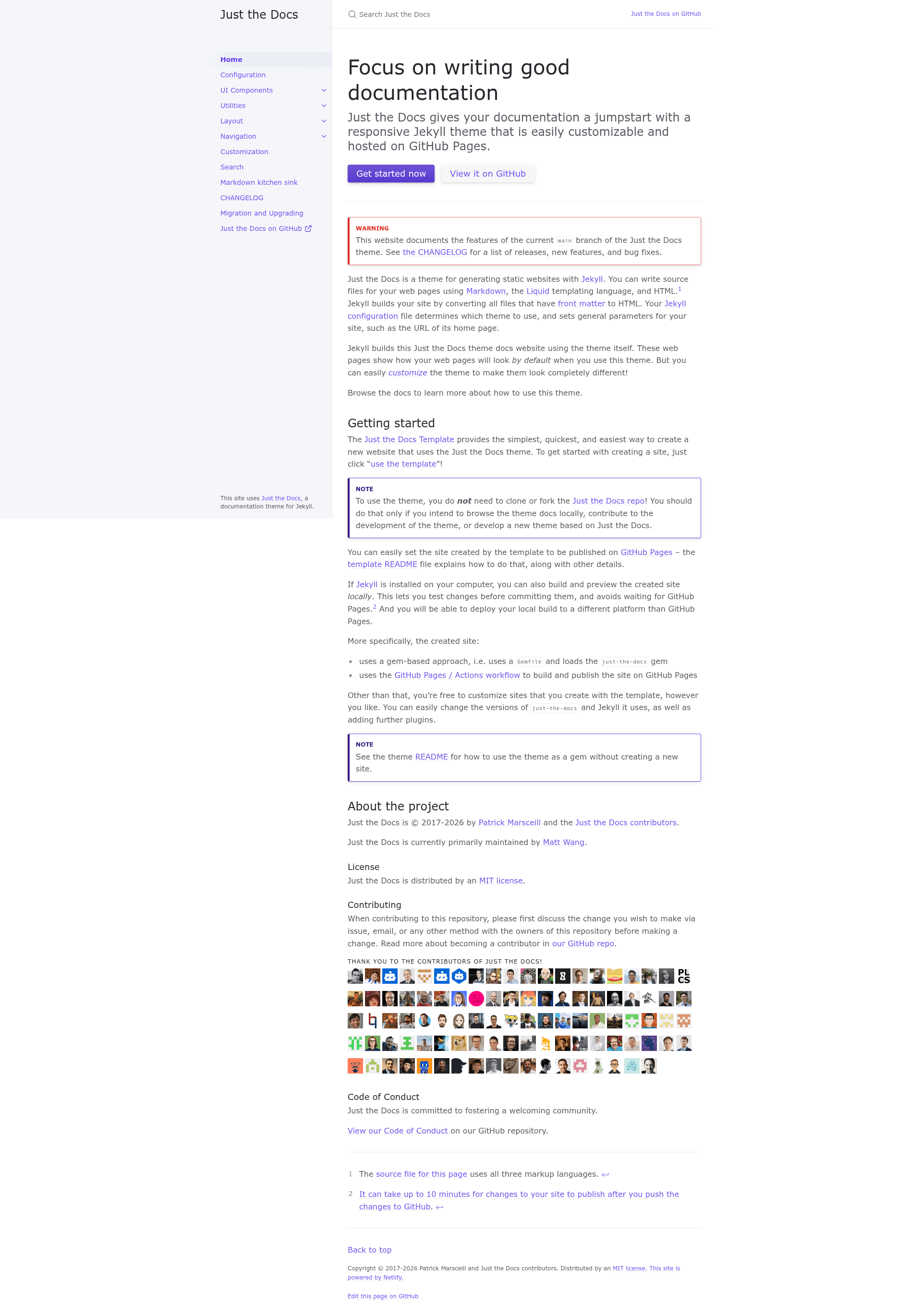
Just the Docs is a Jekyll theme for documentation sites that provides built-in search and a responsive layout, designed to be deployed on GitHub Pages with minimal dependencies.
What is Just the Docs?
Just the Docs is a modern, responsive Jekyll theme specifically built for documentation websites. It takes Markdown content written for Jekyll and produces a static documentation site with a clean visual style and integrated search. The theme is distributed as an open-source Ruby gem under the MIT License and is maintained by the just-the-docs community on GitHub. It can be used either by generating a new site from the Just the Docs Template repository or by installing it into an existing Jekyll project through a Gemfile.
Key Features
- Built-in search — search is included in the theme itself, so visitors can find documentation content immediately without integrating a third-party search service.
- GitHub Pages ready — the template uses a GitHub Pages / Actions workflow to build and publish the site automatically, and the README explains exactly how to set that up.
- Low dependency footprint — one of the theme's stated design principles is to use as few dependencies as possible and to require no build script beyond standard Jekyll commands.
- Mobile-first responsive design — the theme explicitly aims for a first-class mobile experience as a design principle.
- Gem-based installation — you can add a single line to your Gemfile (
gem "just-the-docs") and settheme: just-the-docsin_config.ymlto apply it to an existing Jekyll site. - Customizable versions and plugins — sites created from the template can freely change the
just-the-docsand Jekyll versions and add further Jekyll plugins. - Clean file organization — when released, the gem includes only the
_layouts,_includes, and_sassdirectories, keeping the codebase focused and easy to override.
Who is Just the Docs for?
- Documentation maintainers — who want a no-fuss theme with search built in, so they can focus on writing content rather than configuring site features.
- Open source projects — that host their documentation on GitHub Pages and want a theme that deploys automatically via a GitHub Actions workflow.
- Technical writers — who write in Markdown and need a static site that can be versioned and deployed quickly.
- Developers building product docs — who want a quick start by using the Just the Docs Template to generate a repository preconfigured with the theme.
What can you do with Just the Docs?
- Create a documentation site in minutes — click "use the template" on the Just the Docs Template repository to generate a new site already configured with the theme and a GitHub Pages deployment workflow.
- Give users instant search — the built-in search lets visitors locate topics across your documentation without needing an external search engine or account.
- Preview changes locally before deploying — with Jekyll installed, run
bundle exec jekyll serveto see the site athttp://localhost:4000and test changes before pushing to GitHub Pages. - Deploy to any static host — because the output is a plain static site, you can build locally and publish the files to platforms other than GitHub Pages.
How does Just the Docs work?
The theme supports two installation paths. For a new site, use the Just the Docs Template repository on GitHub: click "use the template" to generate a repository that includes a Gemfile and a GitHub Pages / Actions workflow, and after pushing changes, the site builds on GitHub Pages. For an existing Jekyll site, add gem "just-the-docs" to the Gemfile, set theme: just-the-docs in _config.yml, and run bundle to install dependencies. Local development is the same as any Jekyll project: bundle exec jekyll serve starts a server that regenerates the site on file changes.
Pros and cons
- Pros — built-in search; very few dependencies; no custom build script required; first-class mobile experience; MIT licensed; free to use.
- Cons — GitHub Pages can take up to 10 minutes to publish changes after a push; local builds require Ruby and Jekyll to be installed on your machine.
Pricing
Just the Docs is free and open source under the MIT License, so there are no license fees for personal or commercial use.
Alternatives
- MkDocs — a Python-based static site generator oriented toward documentation, with its own theme ecosystem.
- Hugo — a Go-based static site generator known for very fast build times that also offers documentation themes.
FAQ
Is Just the Docs free?
Yes, Just the Docs is released under the MIT License, so you can use it freely in personal and commercial projects without paying a license fee.
How do I install Just the Docs?
You can either generate a new site from the Just the Docs Template repository on GitHub, or add gem "just-the-docs" to your existing Jekyll site's Gemfile and set theme: just-the-docs in your _config.yml file.
Does Just the Docs have built-in search?
Yes, search is included in the theme itself. This means visitors to your documentation site can search your content without needing to configure a separate search service.
Can I use Just the Docs with GitHub Pages?
Yes, the theme is designed for GitHub Pages. The Just the Docs Template includes a GitHub Pages / Actions workflow that builds and publishes your site automatically when you push changes.
Do I need Ruby to use Just the Docs?
To build the site locally, you need Ruby and Jekyll installed on your computer. If you rely on GitHub Pages, GitHub handles the Jekyll build for you, so you only need Ruby if you want to preview locally or deploy to a different host.