Template details
Massively Jekyll Theme
A Jekyll version of HTML5 UP's Massively theme with Formspree contact form and configurable social profiles.
About this template
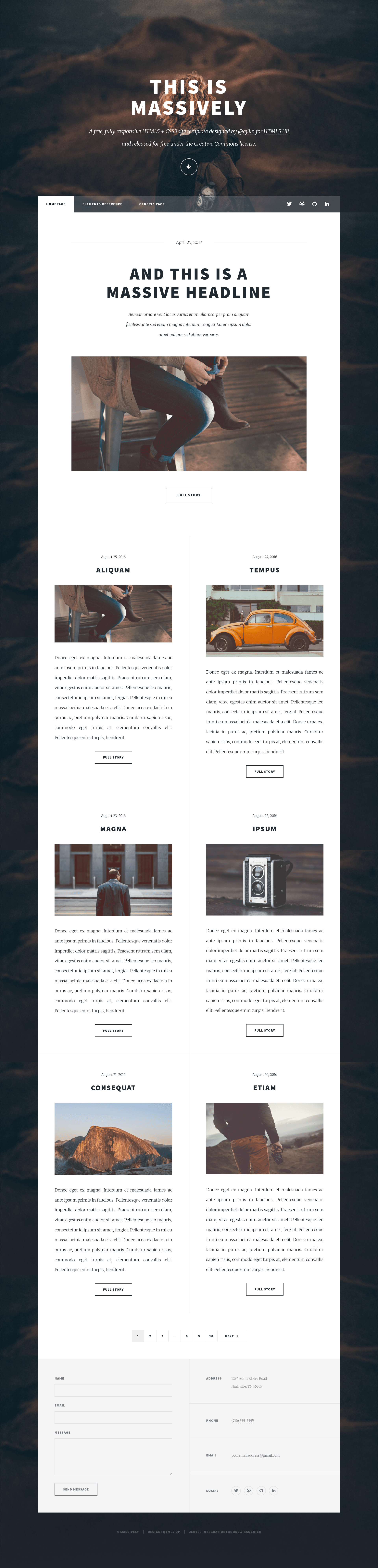
Massively Jekyll Theme is a Jekyll port of HTML5 UP's Massively template that produces text-heavy, article-oriented static sites with a full-screen parallax background image and scroll effects.
What is Massively Jekyll Theme?
Massively Jekyll Theme is a Jekyll theme that converts Jekyll posts and pages into a text-focused website layout originally designed by HTML5 UP. It takes _config.yml settings and front matter (including featured images) as input and generates a static HTML site ready for deployment on GitLab Pages or GitHub Pages. The theme is maintained by Andrew Banchich, with the original HTML5 UP design by AJ (ajlkn). It is distributed free for personal and commercial use under the CCA 3.0 license.
Key Features
- Formspree contact form — Integration with Formspree.io that activates when you add your email address to
_config.yml, so the contact form works without building a backend. - Configurable social profiles — Social buttons are driven by
_config.yml; only the profiles you enter appear in the site footer. - Featured images in front matter — Each post or page can set its own featured image, giving per-article hero visuals.
- Parallax background image — The design uses a large background image with a parallax effect, taken from the HTML5 UP original.
- Scroll effects with Scrollex — Smooth scroll-based animations are powered by Scrollex, a jQuery plugin by HTML5 UP's author.
- Built on Jekyll — Runs on the Jekyll static site generator, using Liquid templates, Sass styling, Font Awesome icons, and jQuery.
- GitLab and GitHub Pages ready — Fork on GitLab to publish directly; on GitHub, create a
gh-pagesbranch to deploy.
Who is it for?
- Jekyll users — People already comfortable with Jekyll who want a visually distinctive, article-first theme without starting from scratch.
- Bloggers and writers — Anyone publishing long-form text content who wants a large background image and a clean reading layout.
- Portfolio owners — Creatives who want a single-page-feel design with scroll effects to showcase projects or writing.
- Developers needing a contact form — Teams that want a working contact form fast by plugging in a Formspree email.
What can you do with it?
- Publish articles: Create Jekyll posts with front matter that includes a featured image, and the theme renders a hero image plus the article body.
- Launch a portfolio: Build a text-heavy portfolio page with the parallax background and social footer links.
- Set up a contact page: Add your email to
_config.ymland the Formspree integration handles form submissions.
How does it work?
To use the theme, fork the repository on GitLab (or on GitHub and create a branch named gh-pages), then edit _config.yml to set your site details, social profile URLs, and your Formspree email address. Existing Jekyll knowledge of front matter and posts is recommended; the README links to Jekyll's docs on front matter, posts, and pages.
Pricing
The theme is free for personal and commercial use under the CCA 3.0 license, as stated in the original HTML5 UP README. No paid tier is mentioned.
FAQ
Is Massively Jekyll Theme free?
Yes, it is free for personal and commercial use under the CCA 3.0 license. You can fork and use it without a paid license, though the original design requires retaining the license notice.
How do I deploy it on GitHub Pages?
Fork the repository and create a branch named gh-pages, then edit _config.yml. The README notes the GitHub repository is a mirror of the GitLab repo, so issue tracking happens on GitLab.
How do I set up the contact form?
Add your email address to _config.yml. The included Formspree.io integration activates the form without needing a custom backend or server-side code.
Does the theme require JavaScript?
The scroll effects rely on jQuery plugins, including Scrollex, and Font Awesome icons are used for social buttons, so JavaScript must be enabled for those interactions.
Can I use this without Jekyll experience?
The README recommends reading Jekyll's documentation on front matter, posts, and pages before use. Basic familiarity with Jekyll's _config.yml and post file format is expected.