Template details
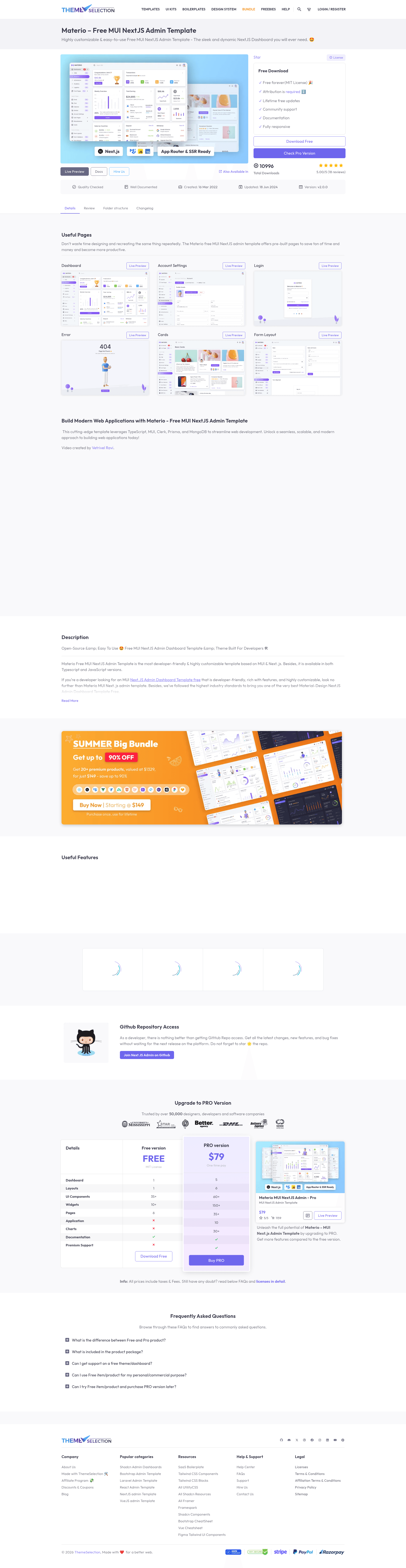
Materio - Free MUI NextJS Admin Template
Free MIT-licensed Next.js admin dashboard template by ThemeSelection with MUI, Tailwind CSS, TypeScript, and preconfigured tooling.
About this template
Materio is a free, open-source admin dashboard template from ThemeSelection that pairs Next.js 14 (App Router) with Material UI and Tailwind CSS to give developers a production-ready starting point for web applications.
What is Materio?
Materio is a free, MIT-licensed admin dashboard template for Next.js built by ThemeSelection, a provider of premium and free admin templates. It takes a standard Next.js project scaffold and adds a Material UI component layer, Tailwind CSS utility styling, preconfigured linting and formatting, and a set of ready-made pages and layouts. The template is available in both TypeScript and JavaScript versions, each stored in its own folder within the repository. It runs on any machine with Node.js LTS installed and outputs a fully responsive web application that works in Chrome, Firefox, Safari, and Microsoft Edge.
Materio is explicitly designed for developers who want to skip the boilerplate of setting up a modern React admin panel. The project includes a single vertical sidebar menu, a navbar, a dashboard page, and several starter pages, all styled consistently with MUI's design language. It is the free counterpart to ThemeSelection's premium Materio product, which adds more dashboards, applications, and customization options.
Key Features
- Next.js 14 with App Router — Built on the modern App Router file structure, with separate folders for the TypeScript and JavaScript variants of the template.
- MUI and Tailwind CSS — Integrates Material UI's component library with Tailwind CSS utility classes, allowing developers to use either styling approach.
- Developer tooling preconfigured — Ships with ESLint for linting, Prettier for code formatting, VSCode settings, custom snippets, and absolute import aliases.
- Multiple layouts and pages — Includes Blank, Full, and Boxed layout modes, plus Dashboard, Account Settings, Login, Register, Forgot Password, Error, and Under Maintenance pages.
- Iconify icons — Comes with the Iconify icon library, giving access to thousands of icons with tree-shaking support.
- Production build features — Offers live reload during development, minification of HTML and CSS, cache busting, and an .env.example file for environment variables.
- MIT license with attribution — Free for personal and commercial use; ThemeSelection requests a link back to their site in the application footer.
Who is Materio for?
- React and Next.js developers — Use the preconfigured project structure to start building a new admin panel or web application without spending time on setup.
- Agencies and freelancers — Customize the MUI theme, Tailwind utilities, and page templates to deliver client projects faster while keeping a consistent, responsive design.
- Startups and product teams — Leverage the included authentication pages and account settings screen as a foundation for a SaaS product or internal tool.
- Developers learning Next.js — Study how MUI and Tailwind CSS can be combined with the App Router, with ESLint and Prettier already wired up.
What can you do with Materio?
- Build an admin dashboard: Use the included Blank, Full, or Boxed layouts and the dashboard page as the shell for metrics, charts, and data tables.
- Add user authentication: Wire the Login, Register, and Forgot Password pages to a backend, a third-party auth provider, or a headless CMS.
- Create a user profile area: Start from the Account Settings page to add profile editing, password changes, and notification preferences.
- Prototype a web app: Fork the TypeScript or JavaScript version, rename environment variables, and deploy to production with a SEO-friendly, server-rendered Next.js setup.
How does Materio work?
The template is installed by navigating to the typescript-version or javascript-version folder and running a package manager. ThemeSelection recommends pnpm, but npm and yarn work as well. After dependencies are installed, the .env.example file is renamed to .env, and the development server starts with a command such as pnpm dev. The app then runs locally at http://localhost:3000, with live reload enabled.
Pros and cons
- Pros: Free and open source under MIT; modern stack combining Next.js, MUI, and Tailwind; separate TypeScript and JavaScript versions; complete linting and formatting setup; active project with releases and community support via GitHub issues.
- Cons: The free version is limited to a single vertical menu, one simple dashboard, basic form layouts, and six pages; it does not include advanced features like horizontal menus, additional skins, Redux toolkit, RTL support, or NextAuth, which are reserved for the paid Premium version.
Pricing
Materio Free is open source and free to download, with no licensing fee for either personal or commercial projects. ThemeSelection sells a Premium version with more dashboards, applications, and customization options; the premium tier requires a purchase and offers priority support.
FAQ
Is Materio free?
Yes, the free version is released under the MIT license, so you can use it for personal and commercial projects at no cost. ThemeSelection only requires that you include a link back to their website in the footer of your application.
What does Materio include?
The template includes a dashboard, three layout modes (Blank, Full, and Boxed), and pages for Login, Register, Forgot Password, Error, Under Maintenance, and Account Settings. It also bundles Iconify icons, basic cards, form layouts, and both TypeScript and JavaScript project folders.
What are the system requirements for Materio?
You need Node.js LTS (not the latest current version) and a package manager. The template supports npm, yarn, and pnpm, with pnpm recommended for better dependency management.
Does Materio support TypeScript?
Yes. The repository contains separate typescript-version and javascript-version folders. The installation commands are the same for either variant, and the TypeScript version includes type definitions for all MUI components.
How does the free version differ from the premium version?
The free version has a single vertical menu, default skin, one dashboard, basic form layouts, basic cards, and six pages. The Premium version adds horizontal menu options, multiple skins, five niche dashboards, ten applications (such as eCommerce, email, chat, calendar, and kanban), advanced forms and tables, Redux toolkit, RTL support, multi-lingual support, and more.