Template details
MDM
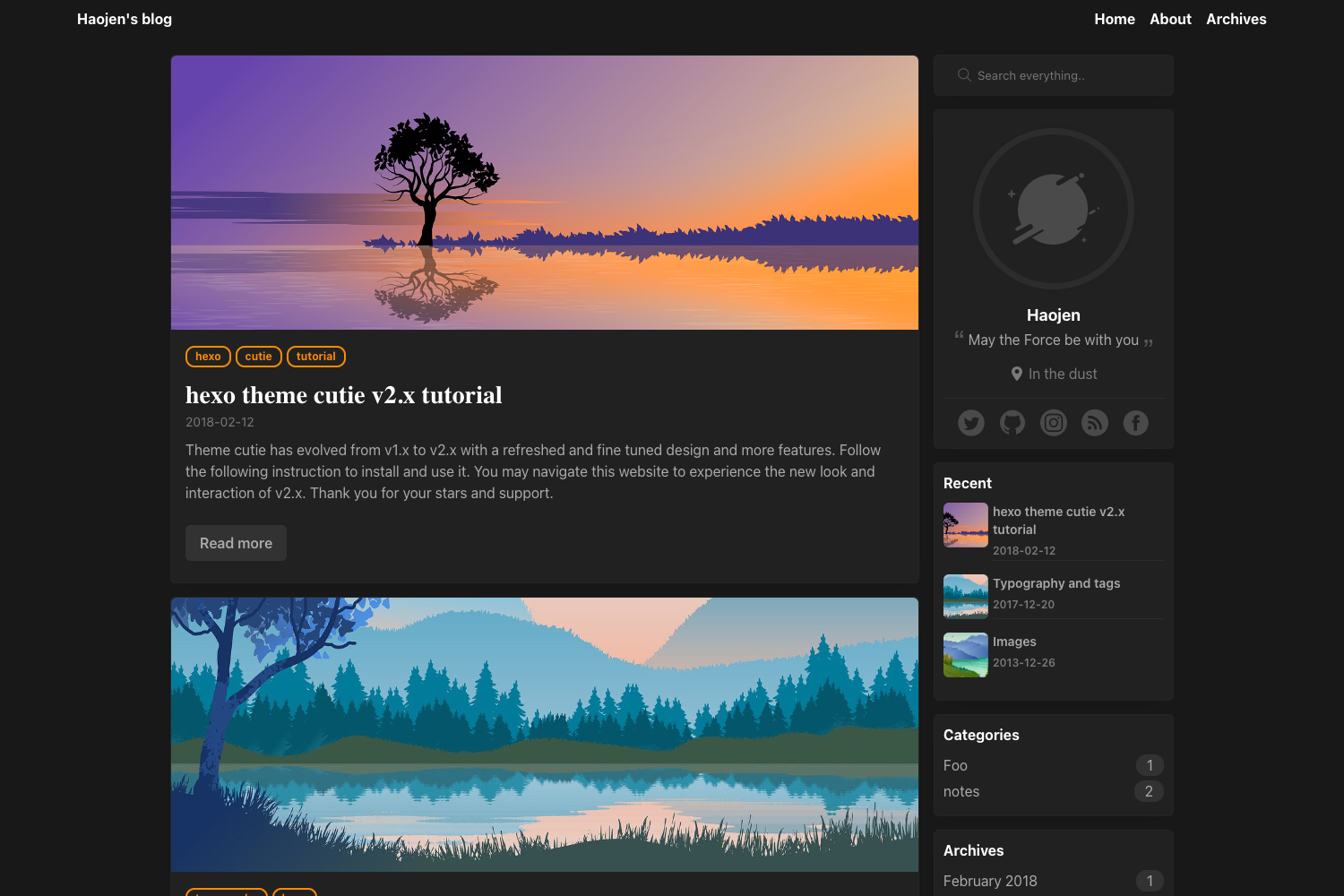
A Material Design style Hexo theme that is simple, lightweight, and fast-loading.
About this template
MDM is a Material Design-styled theme for the Hexo static site generator that turns Markdown posts into a lightweight, responsive, fast-loading blog. Created by developer TonyChenn and hosted on GitHub at TonyChenn/hexo-theme-mdm, the theme is written in EJS templates and powered by the mdui 1.0.1 UI library, matching Google's Material Design components for cards, buttons, and navigation.
What is MDM?
MDM is a Hexo theme that applies Material Design visual language to a static blog. It takes a standard Hexo site—Markdown posts, tags, archives, and pages—and renders it as a responsive, mobile-friendly blog with optional PWA support, comments, and social features. The README is written in Chinese, and the theme's demo runs at blog.tonychenn.cn.
Key Features
MDM bundles a wide set of blog features directly in the theme, so you do not need to assemble them separately:
- Responsive layout — The theme adapts to both PC and mobile screens, and a specific fix for iOS Safari layout issues was released in the 2020.11.12 update.
- Day/night mode — Visitors can toggle between light and dark themes, and the header bar includes a one-click scroll-to-top button.
- Two comment systems — Valine and Gitalk are both supported; Gitalk adds GitHub-issue-based comments, while Valine is a simpler leancloud-backed option.
- PWA support — The theme can be installed and work offline; the README documents a workaround for the PWA failure after upgrading to Hexo 4.2.0.
- Post pinning and sorting — Articles can be pinned to the top by editing the hexo-generator-index generator with the custom JavaScript snippet provided in the README.
- Emoji rendering — Emoji support is enabled by switching the Markdown renderer to hexo-renderer-markdown-it and adding markdown-it-emoji as a plugin.
- Sitemap generation — Google and Baidu sitemaps are built in via hexo-generator-sitemap and hexo-generator-baidu-sitemap with configuration in the theme's _config.yml.
- Image lazy loading — Images load on demand, reducing initial page weight; a dedicated image preview feature is also included.
Who is it for?
- Hexo bloggers who want a polished Material Design look without building a theme from scratch can install MDM in the themes/mdm folder with a single git clone.
- Content-heavy sites that need comment, share, reward, and Google AdSense features are covered, since these are toggles in the theme config.
- Chinese-speaking developers will find the entire README and configuration commentary in Chinese, with the demo blog at tonychenn.cn.
What can you do with MDM?
- Personal bloggers: Publish Markdown posts and get a Material Design index, tags, archives, and about page with day/night switching and image lazy loading.
- Technical tutorial writers: Use the built-in code folding and code-language labels to present multi-file examples cleanly.
- Site owners wanting engagement: Enable Valine or Gitalk comments, share buttons, reward/donation links, and a global grey (mourning) mode for special occasions.
How does MDM work?
Installation is a two-step process: clone the repository into your Hexo project's themes/mdm directory, then optionally run git pull to update. Extra capabilities like sitemap, Emoji, and post pinning require installing the corresponding npm packages and adding configuration blocks shown in the README. The theme reads your Hexo site's configuration and the theme-level _config.yml for options such as sitemap paths.
Pricing
MDM is open source and freely available on GitHub under the TonyChenn account. You can clone, modify, and deploy it without paying a license fee.
Alternatives
Other Hexo themes such as NexT provide a different default visual style with their own feature sets; MDM distinguishes itself with a direct Material Design implementation based on mdui.
FAQ
Is MDM free?
Yes, MDM is an open-source Hexo theme hosted on GitHub. You can clone it, modify it, and use it on personal or commercial blogs at no cost.
Which comment systems does MDM support?
MDM supports both Valine and Gitalk. Valine is the simpler option, while Gitalk uses GitHub issues for comment storage and requires a GitHub application setup.
How do I enable sitemap for Google and Baidu?
Install hexo-generator-sitemap and hexo-generator-baidu-sitemap with npm, then uncomment the sitemap and baidusitemap blocks in the theme's _config.yml to generate sitemap.xml and baidusitemap.xml.
How do I enable Emoji support?
First uninstall hexo-renderer-marked, then install hexo-renderer-markdown-it and markdown-it-emoji. Add the markdown configuration with the emoji plugin to your Hexo config file, then regenerate the site.
Why is PWA not working after Hexo 4.2.0?
The README provides a manual fix: open node_modules/hexo-pwa/lib/serviceWorker.js and change the line that reads let posts = this.locals.cache.posts.data to let posts = locals.posts.sort('-date').toArray(). This restores service worker caching after the Hexo upgrade.