Template details
Mediator
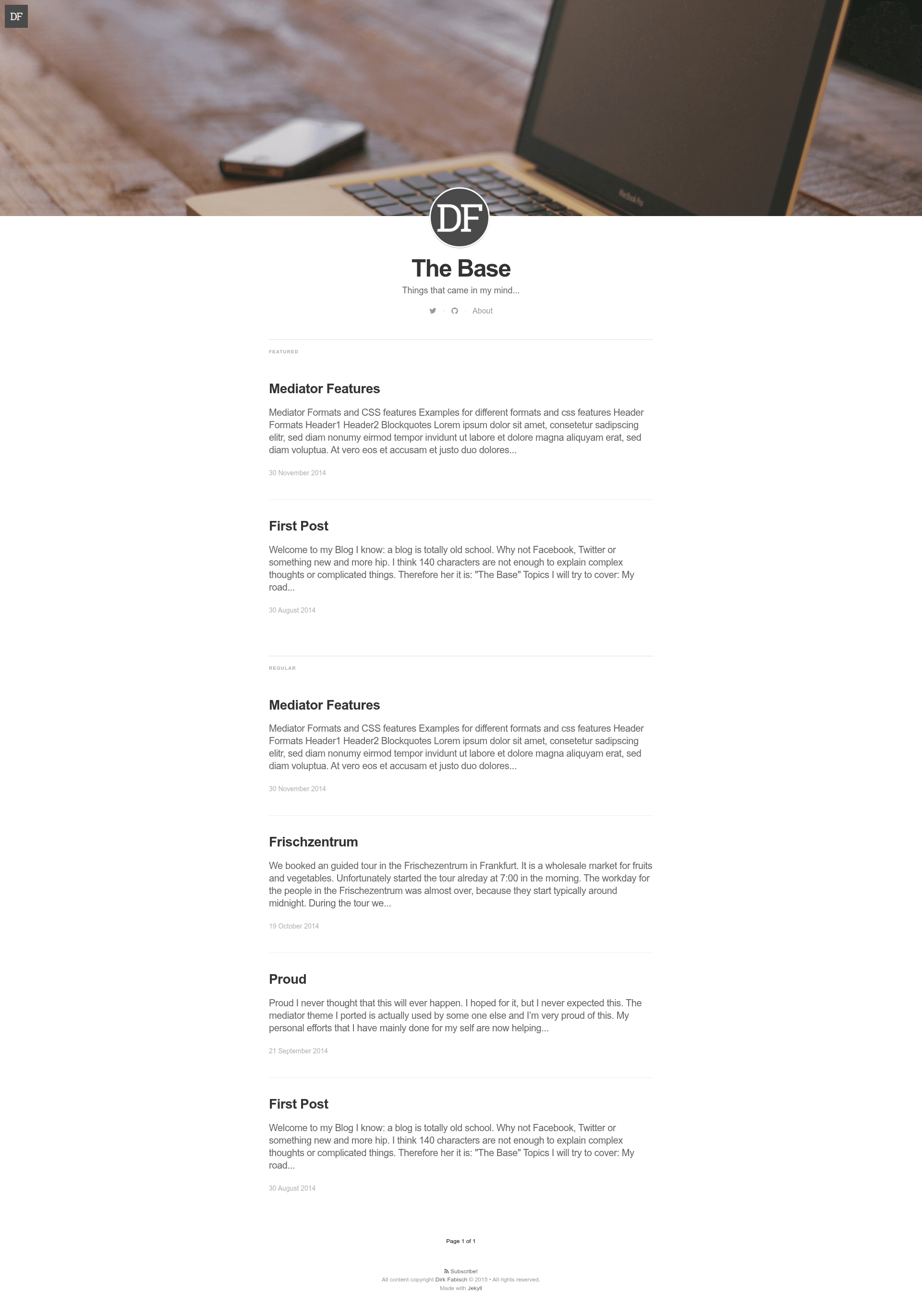
A Medium-inspired Jekyll blog theme with responsive layout, featured articles, and social sharing.
About this template
Mediator is a Medium-inspired Jekyll blog theme that gives personal blogs a clean, responsive, typographic layout with featured articles and social sharing.
What is Mediator?
Mediator is an open-source Jekyll blog theme created by Dirk Fabisch, modeled after the look of Medium. It takes a standard Jekyll site with Markdown posts and produces a fully responsive static blog with featured article support, per-post header images, and configurable social sharing buttons. The theme runs on Jekyll and requires the GitHub Pages gem, Bourbon, Jemoji, and Jekyll itself. It is distributed under the MIT license with no attribution requirement.
Key Features
- Fully responsive layout — The theme adapts to mobile, tablet, and desktop viewports without any additional configuration.
- Header images — Adding an
imagetag with a URL in a post's front matter displays a cover image on that article's page. - Featured article support — Mark any post as featured to give it a more prominent position in the layout.
- Minimal design — A clean, typographic design inspired by Medium keeps the focus on your writing.
- FontAwesome icons — Use FontAwesome's icon font to add social or UI icons throughout the theme.
- Free and open-source fonts — The theme uses freely licensed fonts, avoiding proprietary font licensing issues.
- Social sharing integration — Configure
share_url,share_title, andshare_linkfor platforms like Twitter; sharing buttons appear below posts unless you leave the share fields empty. - Disqus comments — Set the
disqusfield in_config.ymlto enable Disqus comment forums on your posts.
Who is it for?
- Personal bloggers — Publish a Medium-style blog on their own domain using Jekyll and GitHub Pages.
- Developers — Fork the theme to create a custom tech blog or portfolio with the ability to modify every detail via
_config.ymland front matter. - Writers who prefer minimal design — Use a clean layout that prioritizes reading and typography over visual clutter.
What can you do with Mediator?
- Publish a blog on GitHub Pages — Fork the repository, configure
_config.yml, and deploy a static blog with no server-side dependencies. - Highlight key content — Use featured article support to draw attention to your most important posts.
- Add social sharing — Configure share URLs for Twitter and other platforms to let readers easily share your articles.
How does Mediator work?
Fork the repository on GitHub, clone it locally, then run bundle install to install the required gems. Start the development server with bundle exec jekyll serve and view the site at localhost:4000. Customize the site title, description, logo, cover image, author details, and social links in _config.yml, then write posts in Markdown with the appropriate front matter.
Pricing
Mediator is free to use, modify, and distribute under the MIT license. There are no paid tiers or premium features.
FAQ
Is Mediator free?
Yes, Mediator is released under the MIT license, which means you can use it for personal or commercial projects free of charge and without needing to link back to the author.
How do I add a header image to a post?
In the front matter of your post, add a line like image: /path/to/image.jpg with the URL or relative path of the image. The theme will use it as the cover image for that article.
Does Mediator support comments?
Yes, you can enable comments by setting the disqus field in _config.yml to your Disqus forum name. The theme then embeds Disqus on your posts.
What gems does Mediator require?
The theme requires the GitHub Pages gem, Bourbon, Jemoji, and Jekyll itself. Running bundle install after cloning the repository installs all dependencies.
How do I run Mediator locally?
Fork and clone the repository, install dependencies with bundle install, then run bundle exec jekyll serve. Your site will be available at localhost:4000.