Template details
jekyll-theme-mdui
A Material Design Jekyll theme powered by MDUI, with PWA support and GitHub Pages compatibility.
About this template
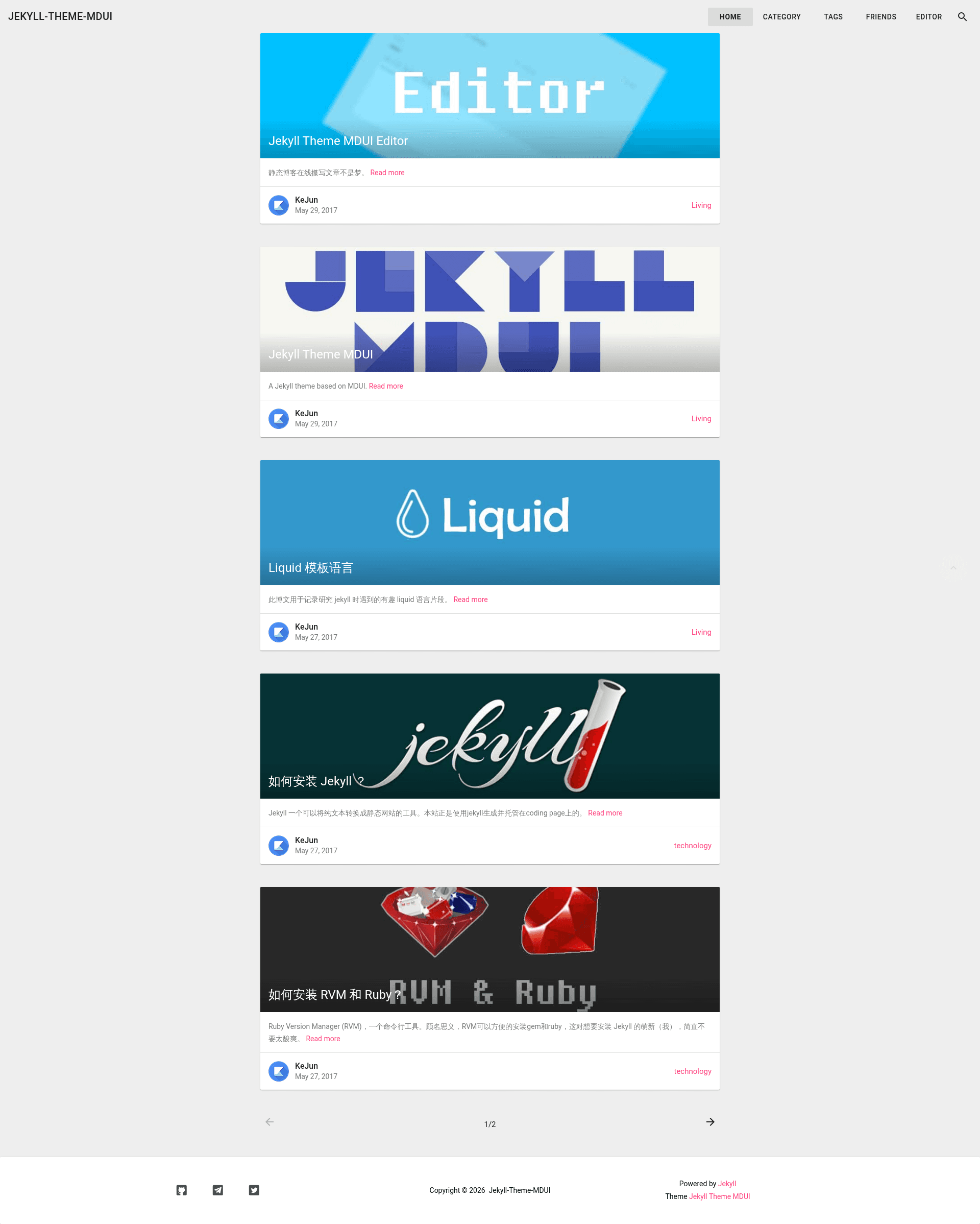
Jekyll Theme MDUI is a Material Design Jekyll theme powered by MDUI, built for Jekyll 3.5+ to create static blogs and personal sites with PWA capabilities.
What is Jekyll Theme MDUI?
Jekyll Theme MDUI is an open-source Jekyll theme that applies the MDUI (Material Design UI) framework to Jekyll's static site generator. It takes standard Jekyll content — posts, pages, and data files — and outputs a Material Design-styled website, including a blog, tag and search pages, and PWA support via a service worker. The theme is authored by KeJunMao, released under the MIT License, and is available as a Ruby gem or directly from GitHub.
Key Features
- Material Design styling — Uses MDUI, a lightweight Material Design CSS/JS framework, so every component (buttons, cards, navigation) follows Material Design guidelines without a heavy build step.
- PWA support — Includes optional
manifest.jsonandsw.jsfiles so the generated site can be installed as a Progressive Web App and work offline. - Configurable data files — Required
_data/site.yml,_data/lang.yml, and_data/menus.ymllet you set site-wide config, localization strings, and navigation without editing layouts. - Search and tags pages — Optional
search.jsonandtags.jsonenable a working search page and a tags archive for content discovery. - Friend links and social icons — Optional
_data/friends.ymlfor a friends page and_data/sns.ymlfor footer social icons, both driven by simple YAML. - GitHub Pages ready — Designed to run on GitHub Pages (topic listed), so you can host the generated site for free using a standard Jekyll build.
- Internationalization — The
_data/lang.ymlfile controls language strings, with docs provided in both English and Chinese at mdui.kejun.me.
Who is it for?
Jekyll Theme MDUI is for developers and writers who already use or want to adopt Jekyll as a static site generator. It suits bloggers who want a Material Design look without hand-writing CSS, developers who need a PWA on a Jekyll site, and GitHub Pages users who want a ready-made theme that works with the platform's default build. The theme's YAML-driven configuration also makes it approachable for non-programmers who are comfortable editing simple data files.
What can you do with it?
- Bloggers: Set up a personal blog with a Material Design interface, then add a tags page and search box so readers can find older posts.
- Developers: Turn the theme into a PWA by enabling the manifest and service worker files, giving your static site offline access and install prompts.
- Non-English sites: Use the
_data/lang.ymlfile to localize the interface; the official docs are in both English and Chinese, so bilingual setups are straightforward. - GitHub Pages users: Host the theme on GitHub Pages without any additional build configuration, since it uses the standard Jekyll pipeline.
How does the theme work?
The theme operates like any standard Jekyll site. After cloning or installing the gem, run bundle install to set up dependencies, then bundle exec jekyll serve to start a local server at http://localhost:4000. Content is added by dropping Markdown posts into the _posts folder and editing the required _data YAML files; the site regenerates automatically when files change. The theme's GitHub repository provides the expected _layouts, _includes, and assets directories that Jekyll loads during the build.
FAQ
Is Jekyll Theme MDUI free?
Yes. The theme is open source and released under the MIT License, so you can use it for personal or commercial projects without payment. The source is available on GitHub at https://github.com/KeJunMao/jekyll-theme-mdui.
How do I install Jekyll Theme MDUI?
The README points to quick-start docs at mdui.kejun.me, which cover both English and Chinese instructions. The standard path is to add the gem jekyll-theme-mdui to your Gemfile and configure the theme in _config.yml, or download the repository directly and run bundle install.
Is the theme still actively developed?
The README states the theme is in maintenance mode only: it says '主题停更,只做兼容性维护' (development stopped, only compatibility maintenance) and that a V2 is expected. This means you may not get new features on the current 0.5.4 version, but the existing code is maintained for compatibility.
Does it work with GitHub Pages?
Yes. The repository lists github-pages as a topic, and the theme is built to work with Jekyll's default configuration on GitHub Pages. You can publish your site by pushing the Jekyll source to a GitHub Pages-enabled repository.
What Jekyll version is required?
The theme badge indicates Jekyll 3.5 or later is needed, so it works with current Jekyll releases and with the version bundled into GitHub Pages.