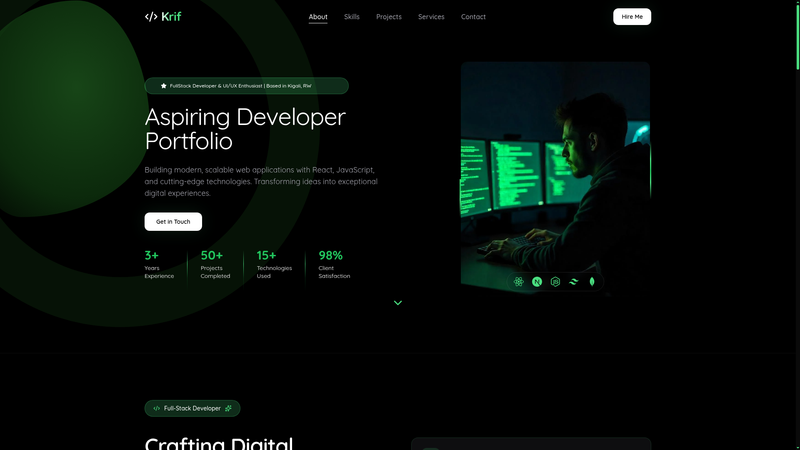
Modern Developer Portfolio Template is an open-source React 18 and Vite portfolio template that gives developers a pre-built, customizable personal website with eight ready-made sections.
What is the Modern Developer Portfolio Template?
It is a static-site template built with React 18, Vite 5, and Tailwind CSS 3, created by Krif and released under the MIT License. You clone the repository, replace the content in the section components and data arrays with your own information, and run a build to produce a dist folder you can deploy to Vercel, Netlify, or GitHub Pages. The template includes a live demo at https://devportifolio-eta.vercel.app/ and requires Node.js version 18 or higher and npm or yarn.
Key Features
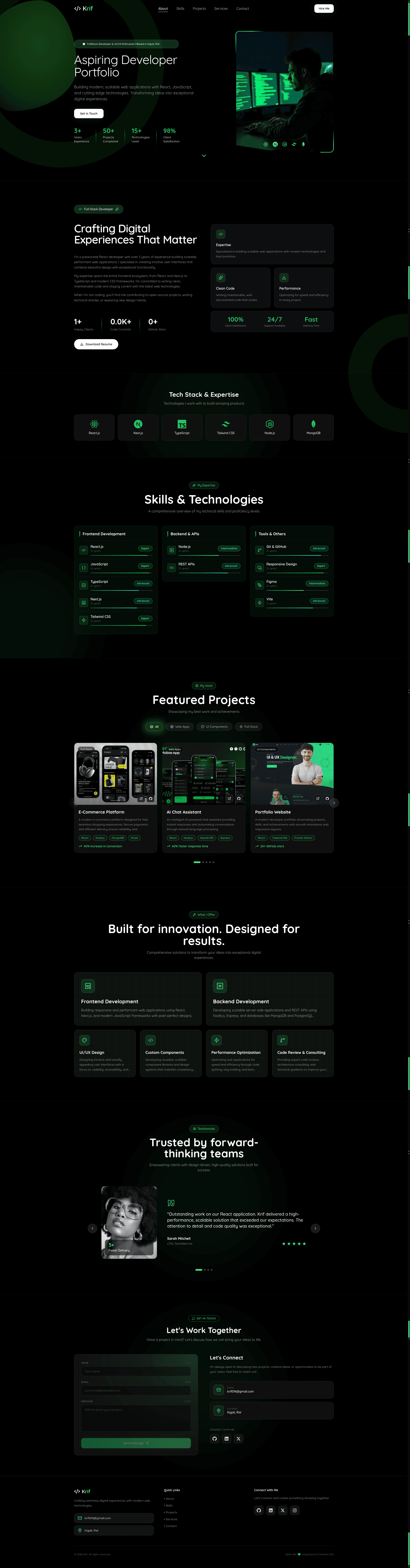
- Smooth scroll reveal animations — sections and elements fade and slide into view as the user scrolls, implemented with a dedicated animations component folder.
- Animated statistics counters — numbers in the hero and about sections count up when they enter the viewport.
- Interactive project carousel — projects are shown in a carousel and can be filtered by category; each project entry supports title, subtitle, category, technology list, demo URL, and GitHub URL.
- Categorized skills with progress indicators — skills are grouped by category and displayed with progress bars.
- Bento-grid services section — services are laid out in a responsive bento grid.
- Auto-rotating testimonials slider — client and collaborator quotes rotate automatically.
- Validated contact form — the contact section includes validation and social links; no backend is included, so submissions are not sent to a server unless you add one.
- Mobile-first responsive design — the layout reflows for small screens and features a dark UI with a green accent color set to #4ade80 in tailwind.config.js.
- Optimized production build — Vite outputs static files to the dist/ directory, and the README includes deployment commands for Vercel, Netlify, and GitHub Pages.
Who is it for?
- Developers — launch a professional portfolio by cloning the repo and swapping the placeholder content for your own projects and bio.
- Students — create a personal site to showcase class projects and skills when applying for internships or jobs.
- Freelancers — use the services bento grid, testimonials slider, and contact form to present offerings and collect inquiries.
- Creatives — use the modern dark design and animation-ready sections to present a varied body of work.
What can you do with the Modern Developer Portfolio Template?
- Job-seeking developers: publish a portfolio with hero, about, skills, projects, and contact sections in one afternoon using the provided starter data.
- Freelancers: customize the services and testimonials sections to build a client-ready site, then deploy the static output to Netlify or Vercel.
- Open-source contributors: use the GitHub Pages deployment instructions in the README to host a project showcase with filtered project cards.
How does the template work?
The README gives a four-step workflow: clone the repository, run npm install, then npm run dev to preview at localhost:5173, and npm run build to generate production files in the dist/ directory. Customization happens in component files such as Hero.jsx, AboutSection.jsx, ContactSection.jsx, and ProjectsSection.jsx, plus the tailwind.config.js file for the accent color. Deployment is handled by pushing the dist folder to Vercel, uploading it to Netlify, or using the included gh-pages command.
Pros and cons
- Pros: free MIT license, no backend or database required, fast Vite builds, separate component files for each section, and three deployment targets documented.
- Cons: all content is hardcoded in JSX, so adding a blog or CMS would require extra work; the contact form does not send messages out of the box; and there is no image optimization or asset pipeline beyond what Vite provides.
FAQ
Is the Modern Developer Portfolio Template free?
Yes, the template is released under the MIT License, so you can use, modify, and deploy it for free, including for commercial projects.
Do I need a backend to use this template?
No. The portfolio is a static site with a front-end-only contact form that includes validation but no server or database. To actually receive submissions you would need to add a form service or backend yourself.
How do I change the accent color?
Edit the accent color value in the tailwind.config.js file; the default is the green color #4ade80. The change applies to buttons, highlights, and other accent-colored elements across all sections.
What are the requirements to run it?
You need Node.js version 18 or higher and either npm or yarn installed. The development server runs on port 5173 by default.
How do I deploy the portfolio?
Run npm run build to create a dist/ folder, then deploy that folder to Vercel, Netlify, or GitHub Pages. The README includes specific commands for each platform, including a gh-pages deployment script.