Template details
NeoWX Material
A modern Material Design skin for WeeWX with interactive charts, dark mode, translations, and an HTML/NOAA archive.
About this template
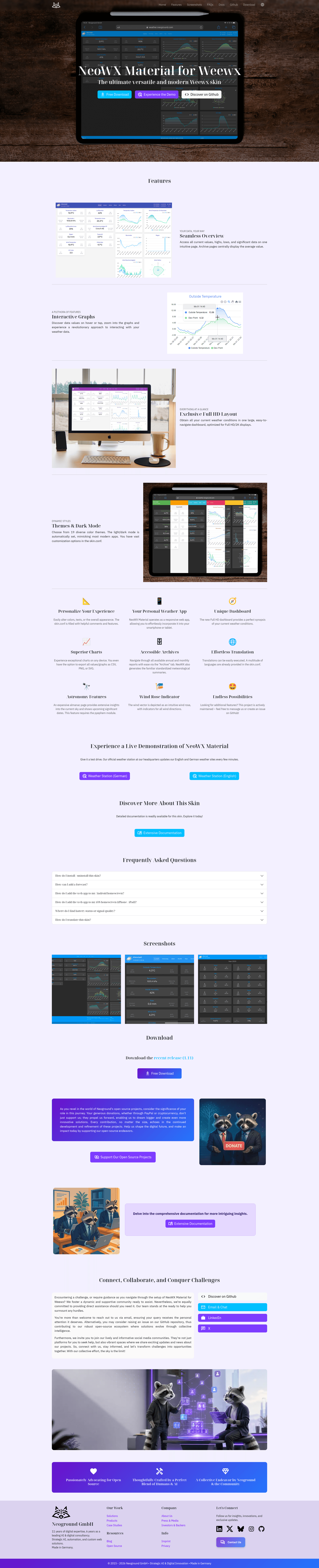
NeoWX Material is an open-source WeeWX skin that replaces the default weather-station web interface with a Material Design dashboard, featuring interactive charts, a wind rose, multi-language support, and an HTML plus NOAA TXT archive.
What is NeoWX Material?
NeoWX Material is a modern, responsive skin for WeeWX, the open-source weather-software platform, that turns a station's raw data into a polished web report. It plugs into WeeWX's report engine, taking the data collected by your weather station and generating HTML pages, JavaScript chart files, and NOAA TXT reports for every year and month. The skin is developed by Neoground as the successor to their earlier NeoWX skin, and it runs on the same Linux systems where WeeWX is installed. It is based on Material Design for Bootstrap (MDB) Free and uses ApexCharts for graphs, MomentJS for date handling, and Weather Icons for iconography.
Key Features
- Material Design UI — A clean, flat interface built on Material Design for Bootstrap (MDB) Free, with several built-in color schemes to choose from.
- Interactive charts — Zoomable, interactive graphs powered by ApexCharts let visitors explore temperature, humidity, pressure, rainfall, and other readings.
- Wind rose — A dedicated visualization shows wind direction and speed in a circular compass-style chart.
- HTML + NOAA TXT archive — Historical data is available for all years and months, generated as both accessible web pages and standard NOAA TXT files.
- Multi-language support — The skin is easy to translate and ships with many languages out of the box; you can also add your own translations.
- Auto dark mode — Automatically switches between light and dark themes based on the viewer's system preference, working on both mobile and desktop.
- Responsive layout — Optimized for modern tablets and smartphones, with a fluid design that adapts to small screens.
- Full sensor support — Works with all sensors supported by WeeWX, from basic temperature and humidity to UV and solar radiation, and is customizable via
skin.confoptions.
Who is it for?
- Home weather-station owners running WeeWX on a Raspberry Pi or another Linux machine who want a modern, mobile-friendly web interface for their station.
- Weather bloggers and public-station operators who publish live weather data and want a professional-looking site with charts, history, and dark mode for their visitors.
- Makers and self-hosters who prefer an open-source solution with easy installation via
wee_extensionand full control over the report configuration. - Translators and contributors who can help extend the skin's language packs or improve the code; contributions are welcomed via pull requests.
What can you do with NeoWX Material?
- Install it in minutes: Download the latest zip from the Neoground project page, run
wee_extension --install=path/to/neowx-material.zip, and restart WeeWX to instantly get a new weather dashboard. - Visualize current conditions: The dashboard displays live readings from all available sensors with interactive charts and a wind rose, so visitors can quickly see what's happening outside.
- Browse historical data: Use the year- and month-based archive pages to look up past weather in either a readable HTML layout or a standard NOAA TXT format.
- Customize the look: Edit
skin.confto choose a color scheme, enable or disable reports, or add your own translation file; developers can also rebuild the CSS from SCSS using the included npm scripts.
How does NeoWX Material work?
After installation, WeeWX runs the skin's templates on each reporting cycle to generate the static website files in your public_html directory. The skin reads the database of your station, generates the current-conditions page, creates the interactive charts, and outputs the archive pages. For the almanac to display correctly, the Python ephem module (pyephem) must be installed — the docs recommend installing python3-ephem on Debian-based systems. The development workflow uses npm scripts: run yarn run build to create a dist package, then create-zip produces the installable archive.
Pros and cons
- Pros: Modern look compared to the default WeeWX skin; responsive on mobile; built-in dark mode; many languages; interactive charts and wind rose; works with all WeeWX sensors.
- Cons: Building the distribution zip is currently supported only on Linux systems due to shell commands in the npm scripts; if you add or rename files, you may also need to update the
dist/install.pyfile list.
Alternatives
- WeeWX Standard skin — the default skin that ships with WeeWX; it offers a simpler, classic layout with fewer visual customizations.
- Sofaskin — an earlier WeeWX skin on which NeoWX (the predecessor) was based; NeoWX Material is a more modern rewrite of that look.
FAQ
Is NeoWX Material free?
The project is open source and free to download from the Neoground project page. No pricing tiers or commercial licensing are mentioned on the site, and the maintainers welcome contributions.
How do I install NeoWX Material?
Download the latest version from the Neoground project page, install it with wee_extension --install=path/to/neowx-material.zip, then restart WeeWX with sudo service weewx restart. If your site does not change, set skin = neowx-material in the [StdReport] section of weewx.conf and reload with sudo service weewx reload.
Does NeoWX Material support dark mode?
Yes. The skin includes an auto dark mode that switches themes based on the viewer's system preference, and it works on both mobile and desktop browsers. You can customize this behavior through the skin's configuration.
What sensors and data does it display?
The skin supports all sensors available through WeeWX, including temperature, humidity, barometric pressure, wind, rain, UV, and solar radiation. Data is shown in interactive charts, a wind rose, and a year/month archive in both HTML and NOAA TXT formats.
Can I add my own language?
Yes. The translation system is designed to be easy to extend, and the content says it provides many languages out of the box. You can add your own translation by creating a new language file, and the project encourages contributors to submit translations as pull requests.