Template details
Next UIBlogTemplate
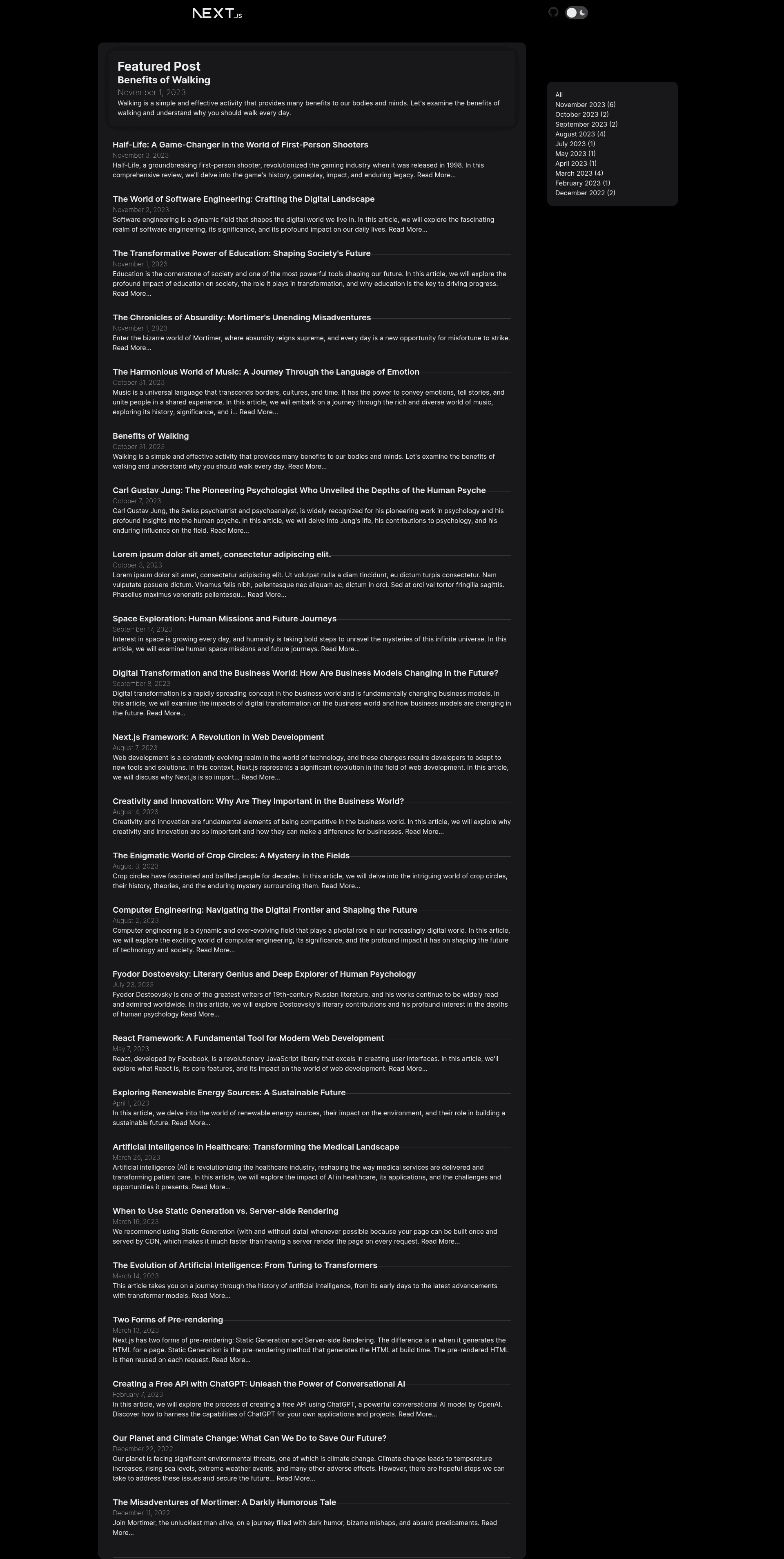
Next.js blog template using Next UI components, markdown-based posts, and Tailwind styling.
About this template
Next UIBlogTemplate is a free, MIT-licensed blog starter that combines Next.js 14 with the Next UI component library and renders each markdown file in its sampleposts folder as a blog post, with the file name determining the post URL.
What is Next UIBlogTemplate?
Next UIBlogTemplate is a blog website template built on Next.js version 14.0.0 and the Next UI React component library (version 2.1.13). It uses the classic Pages Router (the project contains a pages directory with the home page and dynamic post pages). The template takes markdown files placed in the sampleposts directory and produces a styled blog where each file's name becomes the URL suffix — for example, my-first-blog-post.md renders at /blog/my-first-blog-post. It also includes sample posts in sampleposts, and running the provided development script serves the site locally.
Key Features
- Markdown-driven content — Write blog posts as markdown files in the
samplepostsdirectory; the file name determines the URL path, so no database or CMS is required. - Next.js 14 and React 18 — Built on Next.js 14.0.0 with the React 18 core library, giving server-side rendering and static generation capabilities.
- Next UI components — Uses @nextui-org/react v2.1.13 as the design system for the navbar, footer, and post components.
- Tailwind CSS styling — Tailwind CSS v3.3.5 handles utility-first styling, with PostCSS 8 and Autoprefixer 10 processing the styles.
- TypeScript and ESLint — The project is written in TypeScript 5 and ships with ESLint 8 configuration to catch linting problems during development.
- Redux Toolkit state management — Redux Toolkit v1.9.7 is included for managing shared state.
- Dark theme switching — Next Themes v0.2.1 enables dynamic theme switching in the Next.js application.
- Vercel Analytics — The template includes Vercel Analytics v1.1.1 to track visitor data when deployed on Vercel.
Who is it for?
Next UIBlogTemplate is aimed at developers who want a ready-made Next.js blog without building everything from scratch. A front-end developer can clone the repository, install dependencies with npm install, and run npm run dev to start a local blog in minutes. A technical writer can create markdown posts in the sampleposts directory and push to a Git repository connected to Vercel for automated deploys. A designer can customize the Next UI components, Tailwind theme, and page layout to match a personal brand.
What can you do with Next UIBlogTemplate?
- Personal blogs: Publish written articles as markdown files and get a responsive blog with navigation, post pages, and a consistent design system.
- Portfolio sites with a blog section: Add a blog to a portfolio by reusing the post rendering logic and styling for other page types.
- Self-hosted documentation: Use the same markdown-to-page pattern to serve technical documentation pages, since each markdown file becomes a separate URL.
How does Next UIBlogTemplate work?
- Clone the repository, install dependencies with
npm install, and start the development server withnpm run dev. - Add a new post by creating a markdown file in the
samplepostsdirectory; the file name defines the post's URL suffix. - Run
npm run buildto produce a production build, thennpm run startto serve it. - The front-matter and content of each markdown file are parsed with Gray Matter and processed by Remark (v15.0.1) and Remark HTML (v16.0.1) to render HTML on the page.
Pricing
Free — the project is open source under the MIT License, so it can be used and modified without a license fee.
FAQ
Is Next UIBlogTemplate free to use?
Yes. The project is licensed under the MIT License, which allows free use, modification, and distribution. You can view the license file in the repository.
How do I add a new blog post?
Create a markdown file in the sampleposts directory. The file name becomes the post's URL, for example placing my-first-blog-post.md makes the post available at /blog/my-first-blog-post. The included Markdown File Renamer web app can help rename files to this format.
What tech stack does it use?
Next UIBlogTemplate uses Next.js 14, React 18, Next UI 2.1.13, Tailwind CSS 3.3.5, Redux Toolkit 1.9.7, Framer Motion 10.16.4, TypeScript 5, and several markdown-processing libraries including Gray Matter, Remark, and Remark HTML.
Does the template include a content management system?
No. Content is managed entirely through markdown files in the sampleposts directory, so there is no admin panel or database. This keeps the template lightweight and file-based.
Can I deploy it to Vercel?
Yes. The template includes Vercel Analytics v1.1.1, and the typical workflow is to connect a Git repository to Vercel for automatic builds and deploys.