Template details
Nextjs Contentlayer Blog
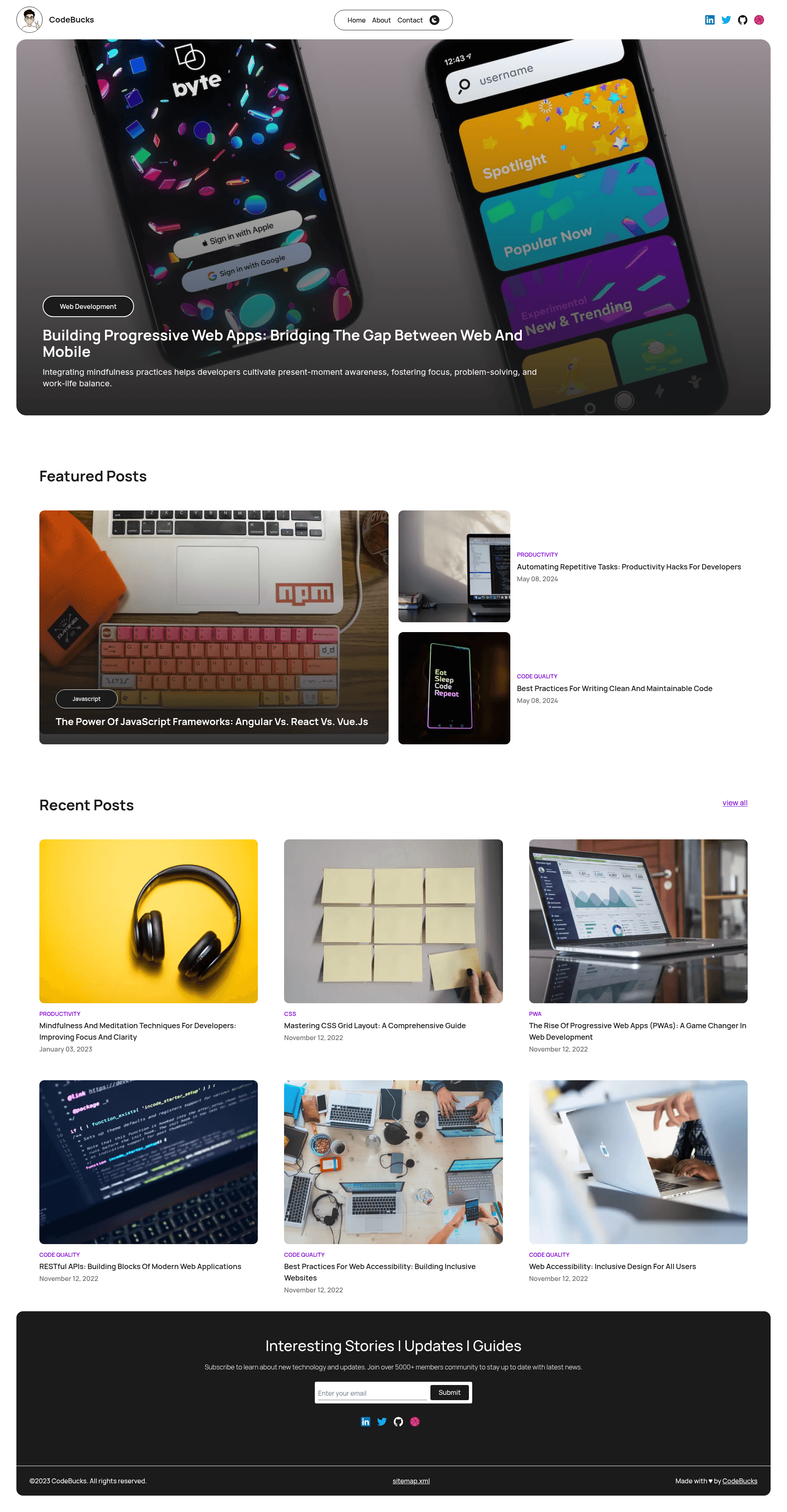
Build SEO optimized personal blog website with Next.js, Tailwind CSS and Contentlayer.
About this template
Nextjs Contentlayer Blog is an open-source starter template for building a search-engine-optimized personal blog with Next.js, Tailwind CSS, and the Contentlayer content layer, maintained by GitHub user codebucks27.
What is Nextjs Contentlayer Blog?
Nextjs Contentlayer Blog is a starter-code repository for a personal blog website built with Next.js, styled with Tailwind CSS, and powered by Contentlayer for markdown-based content. It takes Markdown files as input and renders them as an SEO-optimized blog, with Home, About, and Contact pages, and it runs on the Next.js App Router (the project is bootstrapped with create-next-app). The template is created and published by the GitHub user codebucks27, who also provides a YouTube tutorial walking through its construction.
Key Features
- Next.js App Router — Built on the Next.js 13-era App Router structure using the pages in
app/page.js, with automatic font optimization vianext/fontloading the Inter Google Font. - Tailwind CSS styling — The entire UI is styled with Tailwind CSS utility classes, giving a modern, responsive layout without a separate CSS framework.
- Contentlayer integration — Blog content is written in Markdown and processed by Contentlayer, which generates typed content so posts can be queried with type safety.
- Velite.js updated version — Because Contentlayer is no longer actively maintained, the final-code branch has been updated to use Velite.js instead, while the starter in this repo keeps Contentlayer.
- Home, About, and Contact pages — The template includes three visible pages: a blog Home with post listings, an About page with a character image, and a Contact page with a Lottie animation of a meditating sloth.
- Iconify icons and Google Fonts — Icons are loaded from Iconify, fonts come from Google Fonts, and the About character image was created using Bing Image Creator.
- Vercel-ready deployment — The project is configured to deploy easily on Vercel using the platform's standard Next.js deployment flow.
Who is it for?
- Web developers learning Next.js — They can follow the companion YouTube tutorial (video ID 1QGLHOaRLwM) to build the blog step by step and then use the starter to experiment.
- Personal bloggers who write in Markdown — They can drop Markdown files into the content directory and get a styled, SEO-friendly blog without building a custom CMS.
- Tutorial viewers and open-source learners — The repo acts as a reference implementation for the tutorial, with the final code available in a separate branch that uses Velite.js.
What can you do with Nextjs Contentlayer Blog?
- Start a personal blog quickly — Clone the starter, run
npm run dev, and begin writing Markdown posts that are automatically converted to HTML by Contentlayer. - Customize the About and Contact pages — The About page includes a character image and biography area, while the Contact page embeds a Lottie animation, both of which you can replace with your own assets.
- Deploy to Vercel in a few clicks — Because it is a standard Next.js app, you can push the repository to GitHub and import it into Vercel for continuous deployment.
How does Nextjs Contentlayer Blog work?
Install dependencies with npm install (or yarn/pnpm), run npm run dev, and open http://localhost:3000 to preview the site. Content is written in Markdown and handled by Contentlayer, and the page files live under the app/ directory with the entry file app/page.js auto-updating as you edit it.
FAQ
Is Nextjs Contentlayer Blog free?
Yes, the repository is open source on GitHub under the codebucks27 account, with no licensing or payment requirement, and the companion tutorial is free to watch on YouTube.
Does this template use Contentlayer or Velite.js?
The starter code in this repository uses Contentlayer. However, because Contentlayer is not actively maintained, the author provides a final-code branch that uses Velite.js instead, located in the repository Nextjs-tailwindcss-blog-template.
What content format does the blog support?
Blog posts are written in Markdown. Contentlayer parses the Markdown files into typed data, which lets the Next.js components render posts with type safety and SEO-friendly markup.
Can I deploy Nextjs Contentlayer Blog to Vercel?
Yes. Since it is a standard Next.js project bootstrapped with create-next-app, you can connect the repository to Vercel and deploy through the Vercel Platform, as outlined in the Next.js deployment documentation.