Template details
Nigiri
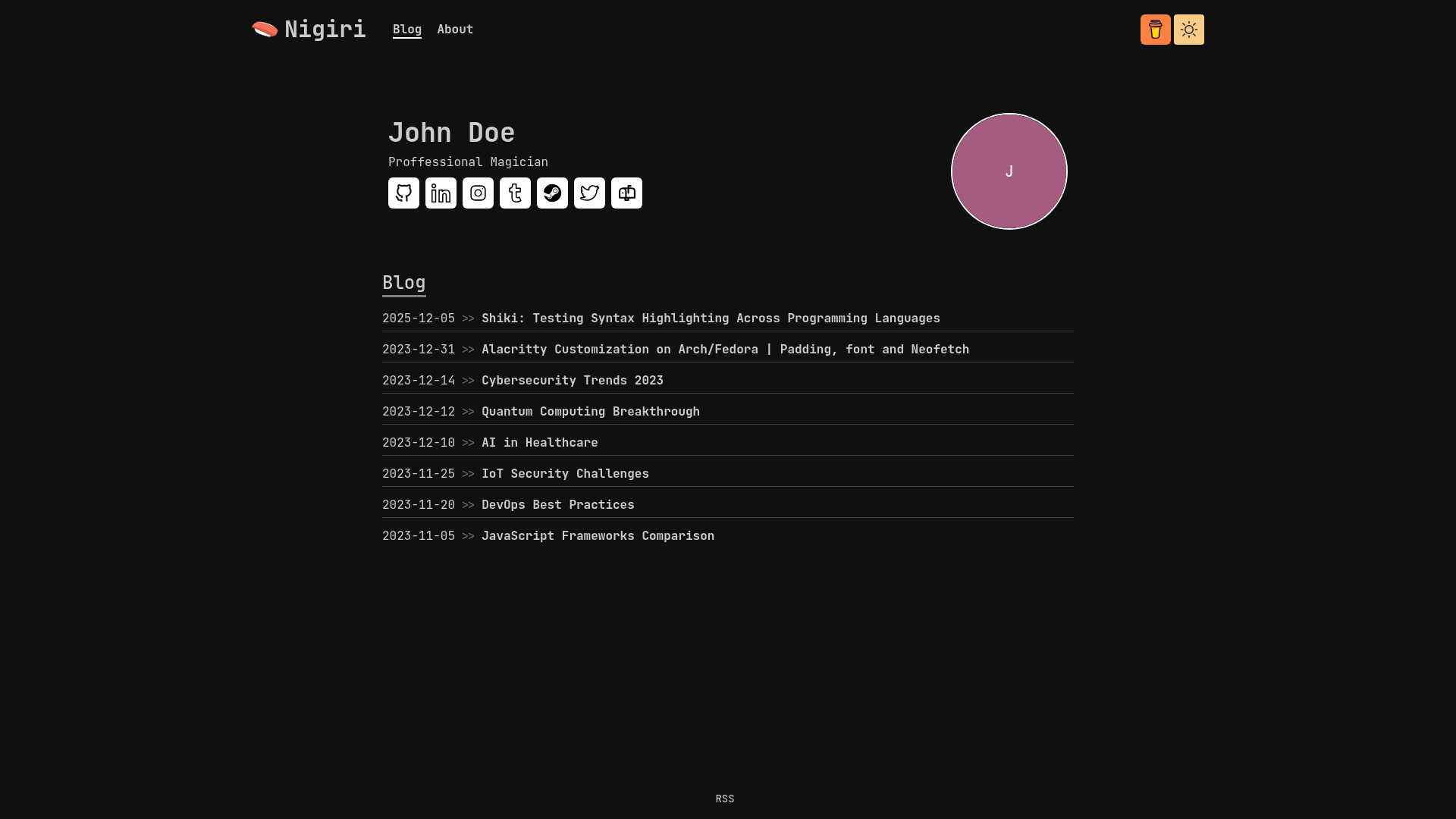
The Nigiri Next.js Blog template allows you to create a personalized blog with ease.
About this template
Nigiri is a Next.js 14 blog template that builds a complete personal blog from a single configuration.yaml file, covering profile, about sections, social links, and sitemap generation.
What is Nigiri?
Nigiri is a Next.js 14 blog template that turns a single YAML file into a personalized blog with a professional profile page. It takes structured configuration data — site title, description, name, surname, professional identity, profile picture, about paragraphs, social media usernames, email, and Buy Me a Coffee username — and outputs a static blog site complete with a blog listing, an about page, and header navigation. The template is built on Next.js 14 and integrates sindresorhus's github-markdown-css for GitHub-flavored markdown styling of blog content.
Key Features
- YAML-driven configuration — All site content lives in configuration.yaml in the main directory, so you can set site title, meta description, personal name, surname, professional identity, profile picture path, and site description without writing JSX.
- Flexible about sections — Each paragraph key in the YAML becomes a heading, so about_me_paragraph renders as "About Me" and work_paragraph as "Work", allowing unlimited custom sections.
- Pre-downloaded social icons — GitHub, LinkedIn, Instagram, Tumblr, Steam, and Twitter icons ship with the template; you can add more platforms by placing an icon in public/platforms and adding a platformName_username and platformName_icon entry to the configuration.
- Email and Buy Me a Coffee — An email_address value displays as an icon immediately after your socials, and a buyMeACoffee_username renders a Buy Me a Coffee button in the header next to the theme toggler.
- Automatic sitemap generation — Set a SITE_URL environment variable and run npm build to generate sitemap.xml automatically via the next-sitemap library.
- UI behavior toggles — Control profile picture border (default true), max posts per page (default 8), disable the about page entirely, disable the animated underline hover effect, and choose between ISO_8601 (2023-12-15) and full_date (December 15, 2023) formats for blog preview dates.
Who is it for?
- Developers who want a minimal codebase: edit one YAML file, run npm i and npm run dev, and have a fully working blog locally.
- Freelancers and professionals who need an online presence with a profile picture, professional identity, social links, and a Buy Me a Coffee button without building a site from scratch.
- Bloggers using Next.js who want static export with automatic sitemap generation for better SEO, plus a clean markdown-based writing workflow.
What can you do with Nigiri?
- Personal storytellers: add unlimited about-style sections with custom headings to describe your background, projects, or work experience.
- Social media enthusiasts: link six platforms out of the box and extend to custom platforms by adding SVG icons to public/platforms and username entries in configuration.yaml.
- SEO-conscious site owners: generate a sitemap automatically by defining the SITE_URL environment variable before running npm build.
How does Nigiri work?
To start, clone the repository, then run npm i and npm run dev to preview locally. Edit configuration.yaml with your personal data — the template reads it at build time to render the profile, blog page, about page, and header. When you're ready, run npm build with SITE_URL set to generate the static site and sitemap.xml.