Template details
Nord Web
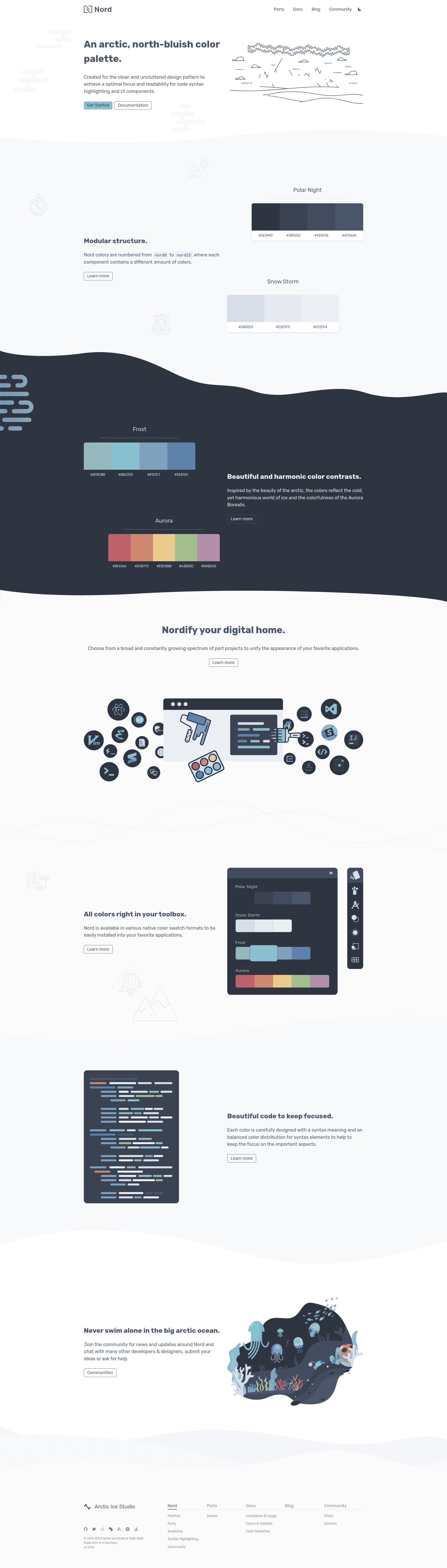
The official Nord website and documentation, built with Gatsby and React.
About this template
Nord Web is the official website and documentation hub for the Nord Arctic color palette, built as an open-source Gatsby site and deployed to production on Netlify.
What is Nord Web?
Nord Web is the official website and documentation hub for the Nord Arctic color palette, created by Sven Greb and maintained in the nordtheme/web GitHub repository. It takes the project's documentation content and renders it into the public site at nordtheme.com, which is deployed to production on Netlify. The project is open source under the MIT license, and its development is guided by Sven Greb's JavaScript, Markdown, and Git style guides.
Key Features
Nord Web is built on Gatsby with React, follows a set of public style guides, and ships as a statically-deployed documentation site.
- Gatsby and React stack — The repository topics list gatsby and react, so the site uses the Gatsby static-site generator with React components for the documentation pages.
- Netlify production deployment — The README shows a production deployment badge pointing to nordtheme.com with the Netlify logo, meaning the site is hosted as a static build on Netlify.
- Nord palette documentation — The site documents the Nord color palette and includes a version badge showing Nord v0.2.0, covering the palette's color schemes and themes.
- Style guide integration — The README links release badges for the JavaScript, Markdown, and Git style guides from Sven Greb, which define how the project's code and docs are written.
- Changelog on the develop branch — A changelog.md file is linked from the README, giving a history of releases for the web project.
- MIT license — The repository is released under the MIT license, so the site's source code can be reused with attribution.
- Official branding — Every release badge uses the Nord color scheme colors (4c566a and 88c0d0), keeping the repository itself aligned with the palette it documents.
Who is it for?
Nord Web is for anyone who uses or contributes to the Nord color palette and theme ecosystem.
- Nord theme users — Developers using the Nord palette across editors, terminals, and design tools can use the site to look up palette values and documentation before applying Nord to their own projects.
- Open-source contributors — Developers who want to improve or extend the Nord documentation can fork the nordtheme/web repository, edit the Gatsby source and Markdown content, and submit pull requests following the linked style guides.
- Documentation site maintainers — Anyone building a color-system or design-token documentation site can study Nord Web as a working reference implementation of a Gatsby-based docs site deployed to Netlify.
What can you do with Nord Web?
Nord Web supports reading palette documentation, tracking project releases, and contributing documentation back to the project.
- Look up Nord palette details: Find the color values and usage guidance for the Arctic-themed Nord palette in the official documentation.
- Track releases and changes: Read the changelog.md file on the develop branch to see what changed between releases of the web project.
- Contribute to the docs: Fork the repository, edit the Markdown-based documentation, and open a pull request that follows the JavaScript, Markdown, and Git style guides.
FAQ
Is Nord Web free?
Yes. The Nord Web repository is released under the MIT license, so the source code can be used, modified, and distributed freely as long as the copyright notice is preserved.
What tech stack does Nord Web use?
Nord Web is built with Gatsby and React according to the repository topics, and the production site is deployed to Netlify. Documentation content is written following the project's Markdown style guide.
What is the Nord palette?
Nord is an Arctic color palette theme created by Sven Greb. The README shows a Nord version badge for v0.2.0, and Nord Web is the official website and documentation for that palette.
Where is the Nord Web source code hosted?
The source code is hosted on GitHub in the nordtheme/web repository, with releases tracked in a changelog.md file on the develop branch.