Template details
Nuxt AI Chatbot Template
A full-featured AI chatbot app template built with Nuxt UI and Vercel AI SDK, featuring streaming chat, GitHub auth, and persistent history.
About this template
The Nuxt AI Chatbot Template is a production-ready AI chatbot boilerplate for Nuxt that combines streaming chat powered by the Vercel AI SDK with GitHub authentication and persistent chat history.
What is the Nuxt AI Chatbot Template?
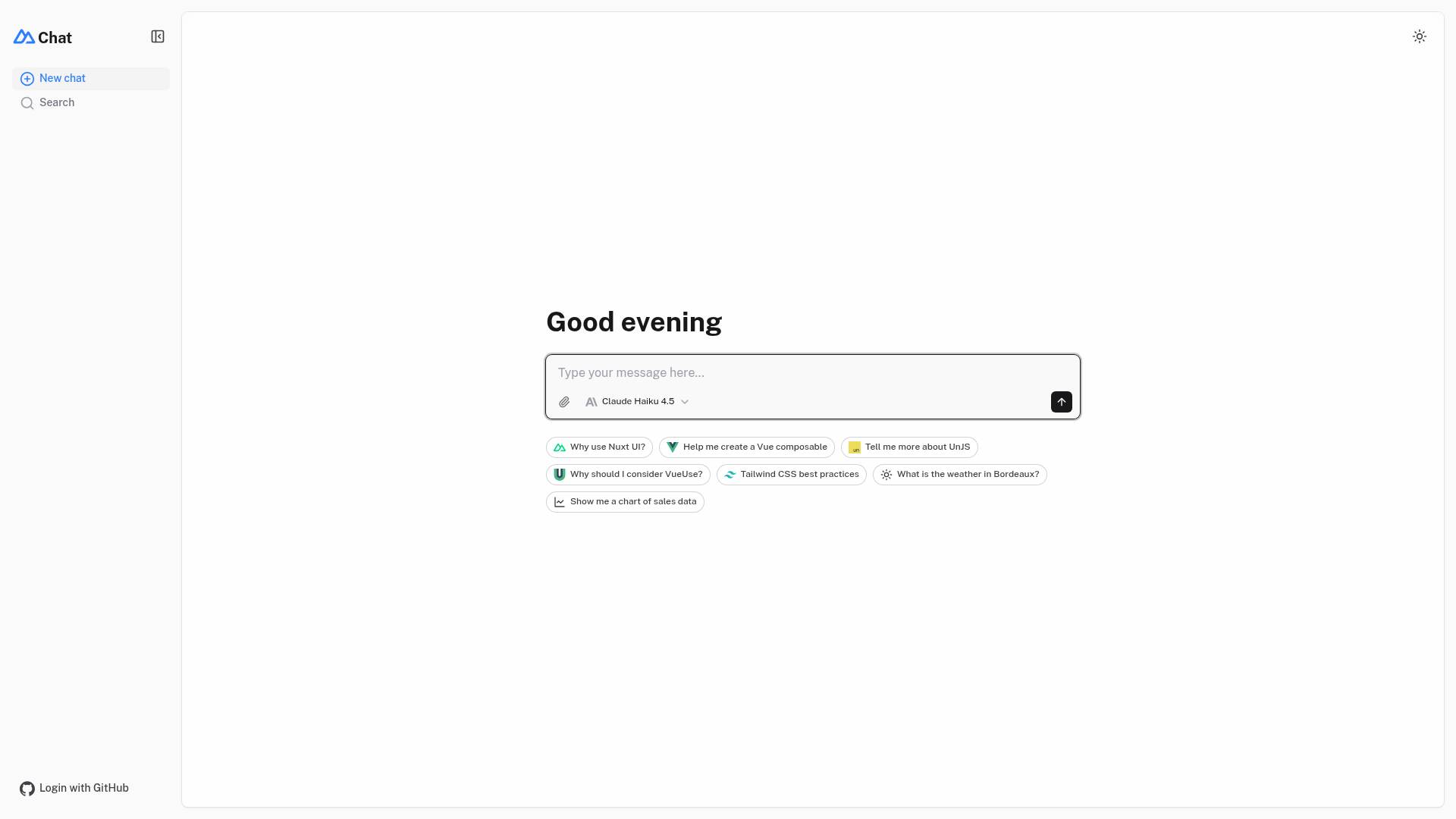
The Nuxt AI Chatbot Template is a complete chat application boilerplate for the Nuxt framework. It takes your AI provider credentials as configuration and produces a production-ready web app where users can log in with GitHub, send messages, receive streaming AI responses, upload files, and revisit past conversations. It is maintained as part of the nuxt-ui-templates organization and is available on GitHub.
Key Features
- Streaming AI messages — powered by the AI SDK with support for thinking and reasoning outputs streamed to the client.
- Multiple model support — works with Claude Haiku 4.5, Gemini 3 Flash, and GPT-5 Nano through the Vercel AI Gateway, which unifies API access to hundreds of models.
- Web search tool — built-in provider tools from Anthropic and OpenAI let the chatbot fetch current information during a conversation.
- Charts and weather tool calling — the template renders tool results as rich UI, including charts and weather widgets.
- Authentication — GitHub OAuth via nuxt-auth-utils, protecting chat history and file uploads.
- Chat history persistence — conversations are stored in a SQLite database using Drizzle ORM, with Turso as the production database option.
- File uploads — drag-and-drop uploads through NuxtHub Blob, which supports local filesystem, Vercel Blob, Cloudflare R2, and Amazon S3 storage drivers.
- Markdown rendering — chat responses are rendered as Markdown with streaming code highlighting via Comark.
Who is the Nuxt AI Chatbot Template for?
The template is aimed at developers who want to ship a custom AI chatbot without building the chat UI, auth, and data layer from scratch. It is also useful for product teams evaluating AI SDK integrations and for Nuxt developers looking for a reference implementation of authentication, file uploads, and real-time streaming. Additionally, anyone deploying to Vercel can take advantage of the automatic AI Gateway and Turso database configuration.
What can you do with the Nuxt AI Chatbot Template?
- Build a customer support chatbot: Add your own AI model configuration and deploy a branded chat widget with authenticated user history.
- Prototype an AI assistant: Use the streaming responses, markdown rendering, and code highlighting to quickly demo an assistant for documentation or coding help.
- Create a tool-calling demo: Call weather and charting tools to show how the AI SDK turns model output into interactive UI.
How does the Nuxt AI Chatbot Template work?
To get started, create a new project with the command npm create nuxt@latest -- -t ui/chat, then install dependencies with pnpm install, run database migrations with pnpm db:migrate, and start the development server with pnpm dev. To enable authentication, you add GitHub OAuth credentials and a session password to your environment. For AI responses in production, the Vercel AI Gateway is configured automatically when deployed to Vercel; for local development you set an AI_GATEWAY_API_KEY in a .env file.
FAQ
Does the Nuxt AI Chatbot Template require authentication?
Authentication is required for file uploads, but the chat interface itself works without logging in. GitHub OAuth is enabled by setting NUXT_OAUTH_GITHUB_CLIENT_ID, NUXT_OAUTH_GITHUB_CLIENT_SECRET, and a session password of at least 32 characters.
Can I use my own OpenAI or Anthropic API key?
With the Vercel AI Gateway you do not need individual API keys for each provider when deploying to Vercel. The gateway uses a single AI_GATEWAY_API_KEY to access models from OpenAI, Anthropic, and others through one endpoint.
What database does the template use?
During local development it uses SQLite. In production, the recommended setup is Turso, which can be provisioned automatically through the Vercel integration and exposed via TURSO_DATABASE_URL and TURSO_AUTH_TOKEN.
Is there a live demo?
Yes, a live demo is hosted at chat-template.nuxt.dev, and the template comes with a one-click deploy button for Vercel.