Template details
Nuxt Supabase Starter
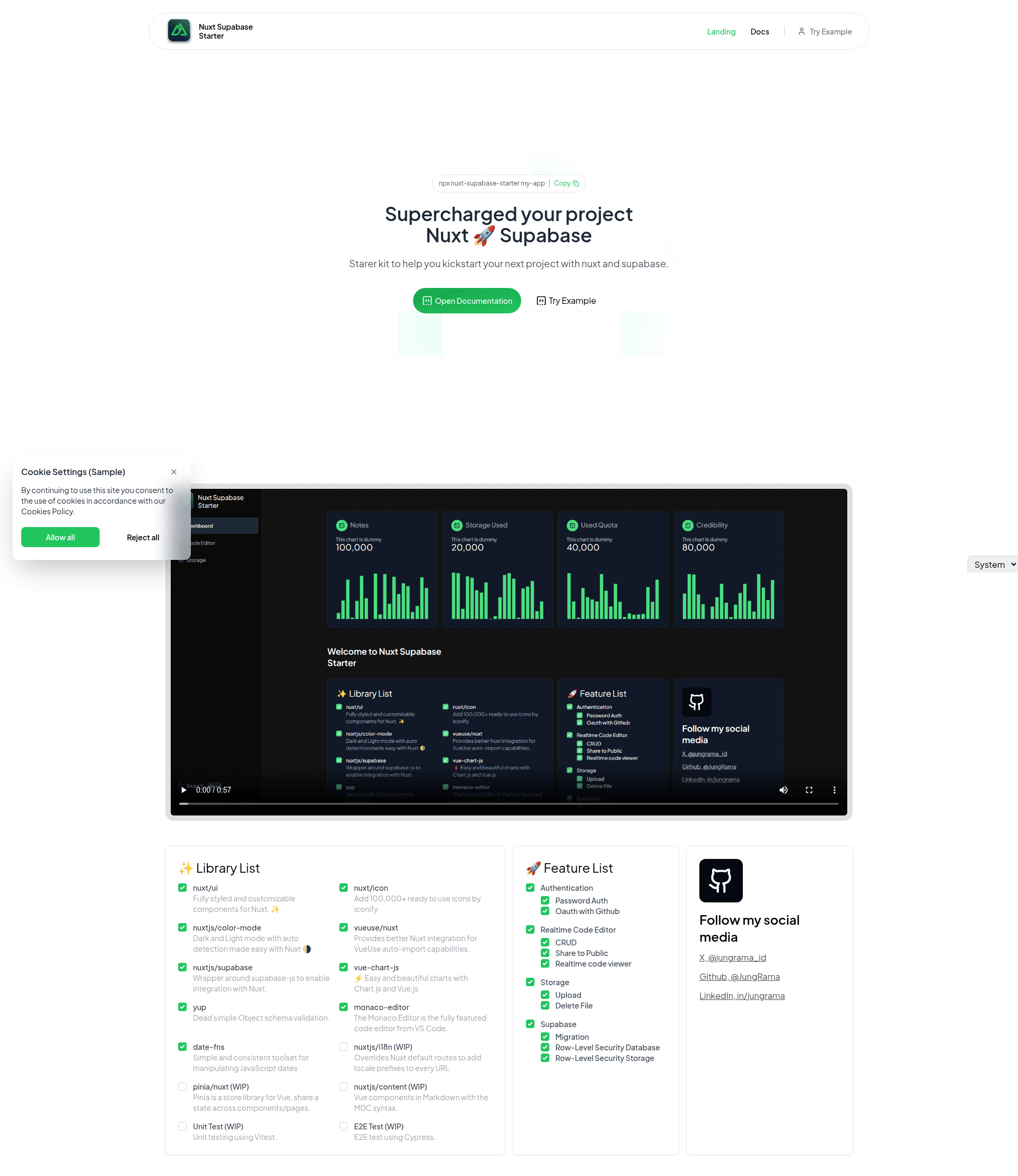
Nuxt + Supabase boilerplate with auth, realtime code editor, file storage, and preinstalled Nuxt libraries.
About this template
Nuxt Supabase Starter is a GitHub boilerplate that scaffolds a Nuxt application with Supabase authentication, a realtime code editor, and file storage already configured. Created by developer JungRama, it is distributed as an open-source repository at https://github.com/JungRama/nuxt-supabase-starter and designed to cut down the time spent installing libraries and wiring up utility functions.
What is Nuxt Supabase Starter?
Nuxt Supabase Starter is a starter template for the Nuxt framework that comes with Supabase preintegrated for authentication, realtime data, and storage. It takes only a project name as input — via the npx nuxt-supabase-starter my-app command — and produces a runnable Nuxt application with a .env.example file ready to be filled with your Supabase project credentials. The template is built for Nuxt 3 and uses the official nuxtjs/supabase module as a wrapper around supabase-js.
Key Features
- Nuxt UI preinstalled — A fully styled, customizable component library for Nuxt speeds up interface development.
- Nuxt Icon access — Over 100,000 icons are available through Iconify, integrated via the
nuxt/iconmodule. - Color-mode support — The
nuxtjs/color-modemodule adds dark and light themes with automatic detection. - Supabase authentication — Password auth and OAuth with GitHub are both included, handled by
nuxtjs/supabase. - Realtime code editor — A Monaco Editor component supports CRUD operations, public sharing, and realtime viewing through Supabase Realtime.
- File storage — Supabase Storage integration allows uploading and deleting files from the browser.
- Utility libraries — VueUse auto-imports, Yup schema validation, vue-chart-js charts, and date-fns date handling are preconfigured.
- Planned additions — i18n, Pinia, Nuxt Content, Vitest unit tests, and Cypress E2E tests are listed as WIP.
Who is Nuxt Supabase Starter for?
Nuxt developers who want to skip repetitive boilerplate setup can use this to jump straight into building. Indie hackers prototyping apps with authentication and a code editor will find the realtime editor and file storage features useful. Anyone new to Supabase can use this starter as a reference implementation of auth, storage, and realtime subscriptions inside a Nuxt app.
What can you do with Nuxt Supabase Starter?
- App builders: Scaffold a project and immediately add password or GitHub OAuth sign-in without extra packages.
- Collaborative coding tools: Customize the Monaco editor to make a realtime document editor or code sharing site.
- File-driven apps: Use the built-in upload/delete storage actions to let users manage files in your application.
How does Nuxt Supabase Starter work?
Install it with npx nuxt-supabase-starter my-app. Then copy .env.example to .env and set NUXT_PUBLIC_APP_URL, NUXT_PUBLIC_SUPABASE_URL, and NUXT_PUBLIC_SUPABASE_KEY to match your Supabase project. After that, start the Nuxt dev server — the modules and component wrappers are already wired together.
Pros and cons
- Pros: Curated set of libraries saves hours of configuration; authentication and storage are functional from the start; the realtime editor demonstrates Supabase Realtime integration.
- Cons: Some advertised features are still WIP — internationalization, Pinia store, Nuxt Content, and unit/E2E testing are not yet implemented in the current version.
FAQ
How do I install Nuxt Supabase Starter?
Run npx nuxt-supabase-starter my-app in your terminal, replacing "my-app" with your project name. The starter files will be downloaded to that directory.
What environment variables are needed?
Copy .env.example to .env and fill in NUXT_PUBLIC_APP_URL, NUXT_PUBLIC_SUPABASE_URL, and NUXT_PUBLIC_SUPABASE_KEY with your Supabase project details.
Does the starter include authentication?
Yes, it supports both password authentication and OAuth login with GitHub. The nuxtjs/supabase module handles the integration.
What is the realtime code editor?
It is a Monaco Editor component that can create, read, update, and delete documents. Documents can be shared publicly, and edits appear in real time using Supabase Realtime.
Is everything listed in the README done?
No. Features marked WIP — including i18n, Pinia, Nuxt Content, Vitest, and Cypress — are planned but not finished. The core auth, storage, and realtime editor features work in the current release.