Template details
Nuxt Toolbox Template
Netlify ❤️ Nuxt.js: a simple template to give you the code you need to use Netlify features with Nuxt.
About this template
Nuxt Toolbox is a NuxtJS v2 reference template from netlify-templates that shows how to combine Netlify Forms, Netlify Functions, Redirects, and the Netlify CLI with a Nuxt.js site. It produces a static Nuxt project configured for one-click deployment to Netlify, with working code examples for each feature rather than documentation links alone.
What is Nuxt Toolbox Template?
Nuxt Toolbox is a NuxtJS v2 (Vue 2) starter project that functions as a working reference for integrating Netlify's platform features into a Nuxt.js application. It takes as input the typical configuration needs of a Netlify-hosted site — forms, serverless functions, redirects, and deployment settings — and packages them into a runnable static site. The project includes a netlify.toml file that sets the build command to npm run generate and points the publish directory to dist. It was created by the Netlify templates team and is available as a GitHub template that can be deployed via the Netlify UI or CLI.
Key Features
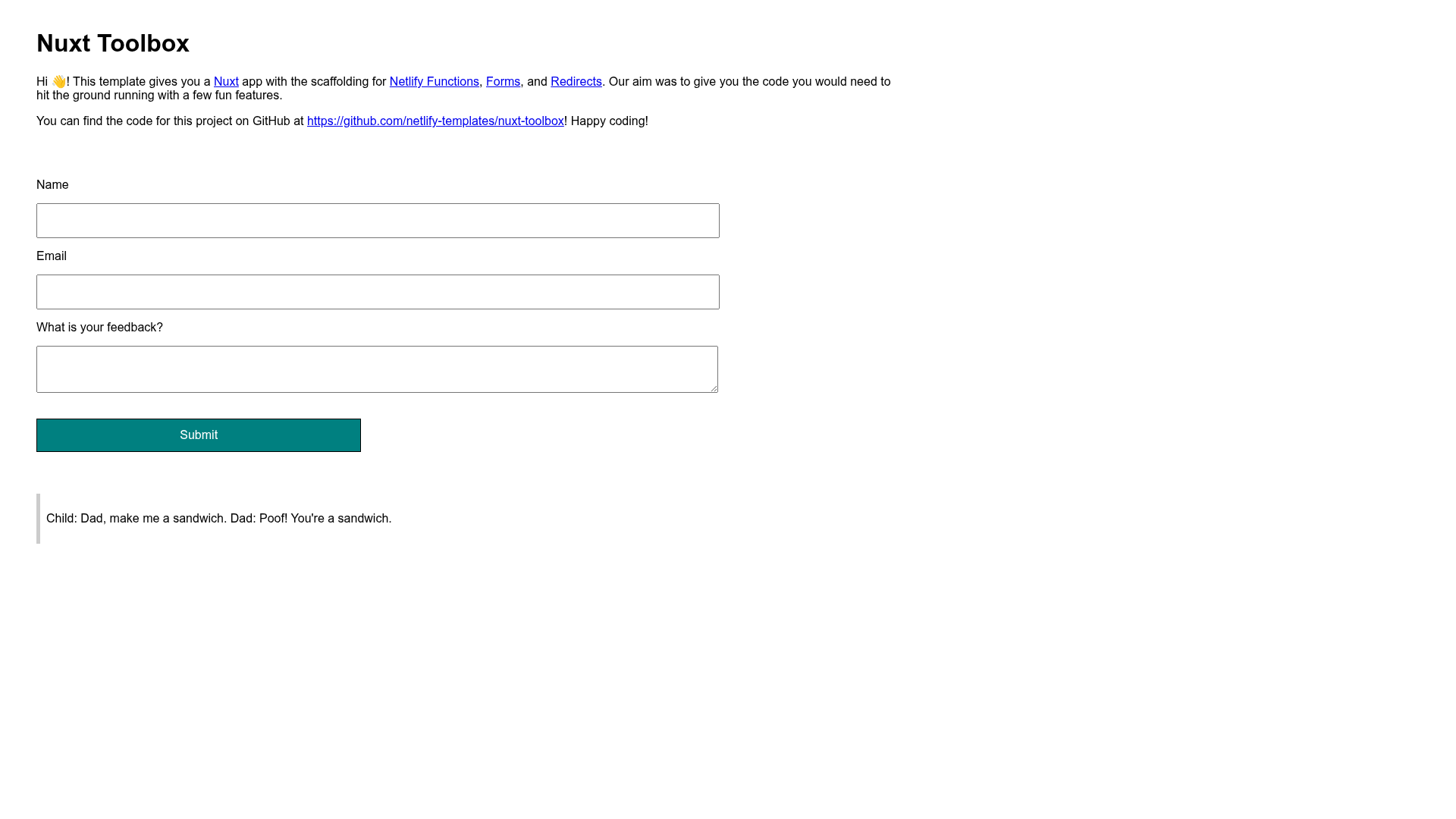
- Netlify Forms integration — a feedback form component in
components/feedbackForm.vueuses thenetlifyattribute and a hiddenform-nameinput namedfeedbackso submissions land in the Netlify admin Forms dashboard. - Custom submission page — the form's
actionattribute is set to/success, directing users to a project route atpages/Success.vueinstead of the default Netlify success page. - Honeypot spam protection — a visually hidden
bot-fieldinput plus thenetlify-honeypotattribute on the form blocks bot submissions. - Serverless function example —
netlify/functions/joke.jsexports an asynchandlerand is reachable at/.netlify/functions/joke; esbuild bundling is configured innetlify.tomlunder[functions]. - Redirect rules — a
[[redirects]]block maps/api/*to/.netlify/functions/:splatwith status 200 andforce = true, giving functions a shorter, memorable endpoint. - Netlify CLI support — commands like
netlify init,netlify dev, andnetlify deploy --prodhandle initialization, local testing of functions and redirects, and manual deploys. - Testing tooling — Cypress end-to-end tests run via the
netlify-plugin-cypressbuild plugin, and Renovate automatically updates dependencies; both can be removed.
Who should use Nuxt Toolbox?
- Nuxt.js developers building a new site on Netlify can copy the working forms, functions, and redirects patterns instead of writing them from scratch.
- Jamstack learners who want to understand Netlify's file-based configuration will find a runnable example showing
netlify.tomlin action with the CLI. - Agency teams that maintain multiple Netlify-hosted marketing sites can use this as a starting point to standardize form handling and serverless endpoints.
What can you do with Nuxt Toolbox?
- JAMstack site builders: wire up a contact or feedback form in minutes by copying the
feedbackForm.vuecomponent and its hiddenform-nameinput. - API developers: create a serverless function by exporting an async
handlerinnetlify/functions, then call it via the/api/*redirect shorthand. - Front-end developers: run
netlify devto develop locally with functions and redirects working exactly as they will in production, ornetlify dev --liveto share a live URL.
How does Nuxt Toolbox Template work?
The repository is a complete Nuxt site with Netlify-specific configuration in netlify.toml. To start, click the Use the Template button on GitHub, then either press the Deploy to Netlify button in the README or run netlify init locally. The CLI reads netlify.toml, sets the build command to npm run generate, and configures continuous deployment so every push triggers a fresh build and deploy.
FAQ
Does Nuxt Toolbox work with Nuxt 3?
No. This is a NuxtJS v2 project built on Vue 2, so the component and configuration code follows Nuxt 2 conventions. Users who need Nuxt 3 patterns should look for a different template.
How do I remove Cypress and Renovate from the template?
To remove Renovate, delete the renovate.json file. To remove Cypress, delete the entire cypress folder and cypress.config.ts, remove the netlify-plugin-cypress plugin block from netlify.toml, then run npm uninstall cypress and npm uninstall -D netlify-plugin-cypress.
Where do form submissions get stored?
Submissions from the included feedback form are stored in your Netlify site's Forms tab under the active form named feedback. You can view and manage them from the Netlify admin dashboard without setting up a separate backend.
What is the example Netlify Function in this template?
The function at netlify/functions/joke.js returns a random joke. It demonstrates the required async handler export format, and after deployment you can visit https://yoursite.netlify.com/.netlify/functions/joke to see it execute.