Template details
Todo App With Server Action
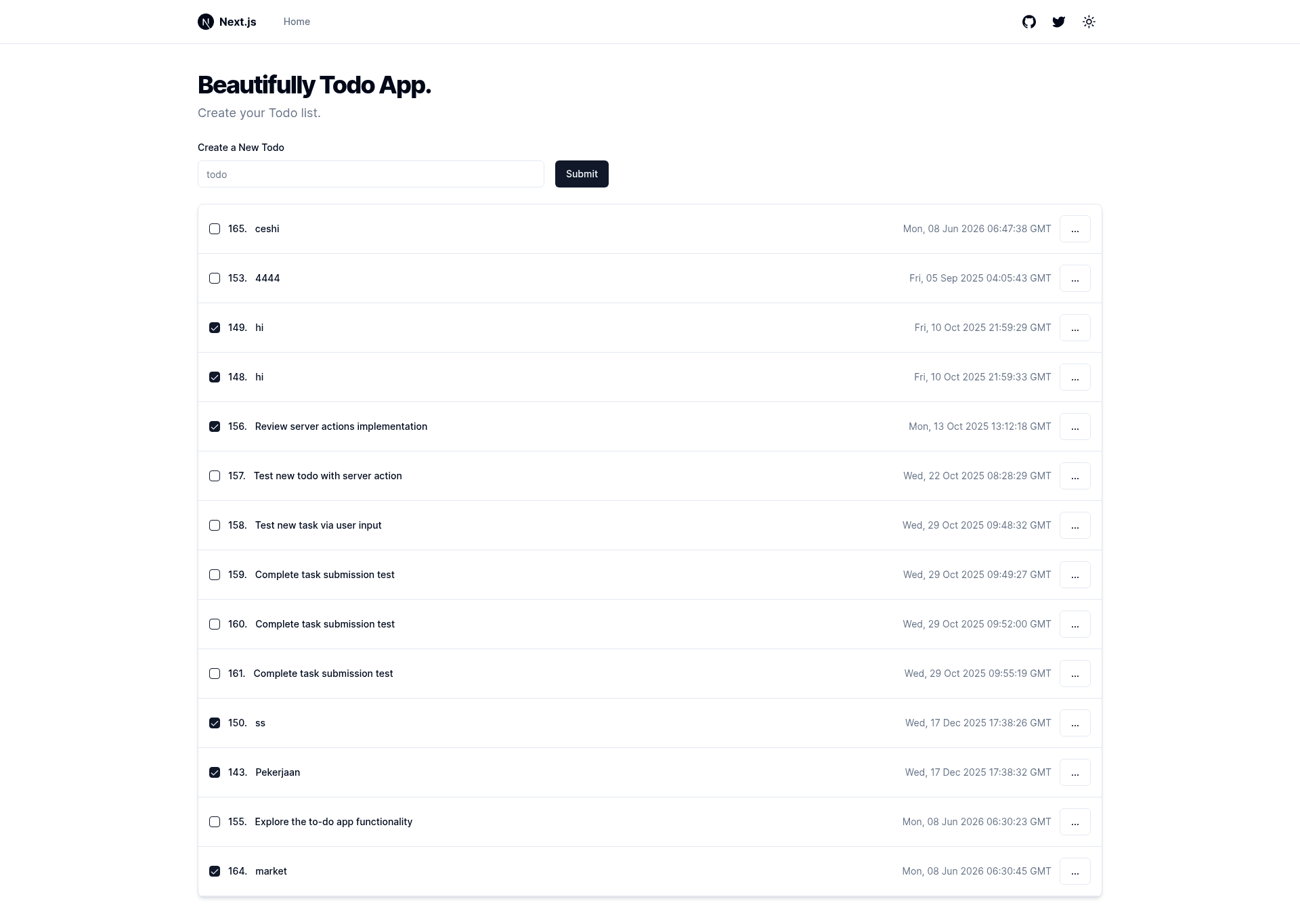
Todo App with Nextjs 13.4 Server Action, Prisma and PostgreSQL. In Components Library using ShadcnUI.
About this template
Todo App With Server Action is a boilerplate repository for a task-management web app built on Next.js 13.4, using Server Actions for data mutations, Prisma ORM with Vercel Postgres for storage, and shadcn/ui components styled with Tailwind CSS.
What is Todo App With Server Action?
Todo App With Server Action is a starter template that demonstrates how to build a full-stack CRUD todo application with the App Router and Server Actions introduced in Next.js 13. It takes todo item input from forms, persists records to a Vercel Postgres database through Prisma, and renders the task list server-side. The repository includes a dark mode toggle, a feature visible in its GitHub topics, and uses shadcn/ui for accessible component primitives like buttons and inputs. The template's author is not identified in the repository metadata.
Key Features
- Next.js 13.4 with Server Actions — Mutations like adding, updating, and deleting todos are handled directly in server components without a separate API route.
- Vercel Postgres integration — The database layer is configured for a serverless Postgres instance hosted on Vercel.
- Prisma ORM — Schema definition, migrations, and type-safe database queries are provided through Prisma, including the standard Prisma client setup.
- shadcn/ui components — The UI is assembled from the shadcn/ui library, which copies component source code into the project rather than installing a package.
- Tailwind CSS styling — All components and layouts are styled with Tailwind utility classes, and the project includes Tailwind configuration.
- Dark mode support — The repository lists "dark-mode" as a topic, indicating a theme toggle is implemented.
- Minimal starter structure — The app focuses on one feature (todos), making it easier to understand than a larger dashboard template.
Who is it for?
- Next.js developers learning Server Actions — You can read how mutations are triggered from form elements and revalidated with functions like revalidatePath, then apply the same pattern to your own projects.
- Developers starting a new todo or note-taking app — The repo gives you a working CRUD loop with database persistence, so you can fork it and extend with auth, categories, or due dates.
- Developers exploring the shadcn/ui + Prisma combo — It shows one concrete setup of these tools together, including how Prisma client is instantiated and how shadcn/ui components are wired into a Next.js app.
Use cases
- Learning project: Study a minimal but complete implementation of Server Actions with a Postgres database to understand the data flow in Next.js 13 App Router applications.
- Rapid prototyping: Build a task manager MVP quickly by cloning the repo, creating a Vercel Postgres instance, and running prisma migrate to set up the Todo model.
- Starter for a production app: Use the repository as a foundation for a real todo or productivity tool, adding user authentication and sharing features on top of the existing CRUD layer.
How does Todo App With Server Action work?
The template follows the standard Next.js 13 App Router structure. A Prisma schema defines the Todo model, and a server component fetches all todos from Vercel Postgres. Forms call Server Actions that create, update, or delete rows; after each mutation the server component re-fetches and the UI reflects the change. To run it locally you would install dependencies with a package manager, create a Vercel Postgres database, copy its connection string into a .env file, run prisma migrate, and start the development server.
FAQ
What is a Server Action in Next.js 13?
Server Actions are functions that run on the server and can be called directly from client components or forms. In this template they replace traditional API routes for todo mutations, letting you pass form data and return updated state without writing REST endpoints.
Does the template include an authentication system?
The repository metadata does not list any authentication provider. The scope is limited to a basic todo CRUD app with Vercel Postgres and Prisma, so user accounts and permissions are not part of this template.
Does it support dark mode?
Yes, the GitHub repository includes "dark-mode" in its topics, and the checklist in the README notes dark mode as part of the template. The implementation follows the shadcn/ui theming approach with a class-based dark theme.
What database does it use?
Vercel Postgres, which is a serverless PostgreSQL database offered by Vercel. The template uses Prisma as the ORM, so you can also point the schema at any PostgreSQL database by changing the connection string.