Template details
Nuxt Typography
Beautifully customizable Prose components for Nuxt Content.
About this template
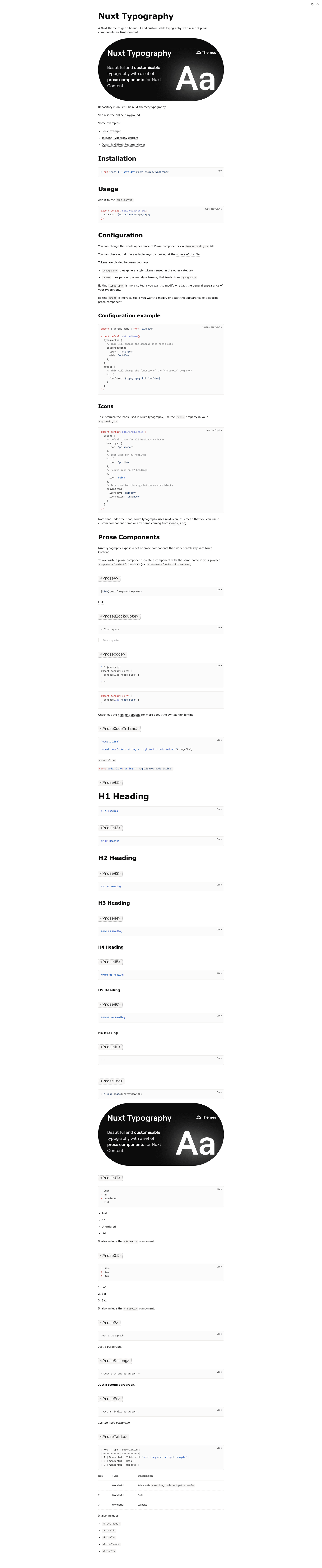
Nuxt Typography is a Nuxt theme from the nuxt-themes organization that gives Nuxt Content sites a set of customisable Prose components for beautiful typography out of the box. It is distributed as an npm package, @nuxt-themes/typography, and is free to use under the MIT License.
What is Nuxt Typography?
Nuxt Typography is a Nuxt theme that layers a set of Prose components onto Nuxt Content, so Markdown content is rendered with consistent, styleable typography. The theme takes a Nuxt Content project as input and outputs the same content with those components pre-styled. It is published by the nuxt-themes organization and is installed as a dev dependency, then applied via the extends option in nuxt.config.
Key Features
- Easy installation — Install with
npm install --save-dev @nuxt-themes/typographyand addextends: '@nuxt-themes/typography'to your Nuxt config to apply the theme. - Made for Nuxt Content — The theme provides a set of Prose components that map Markdown elements to styled Vue components inside Nuxt Content.
- Customisable typography — The theme's own tagline is "beautiful and customisable typography", so the base styles are designed to be adapted to a site's design.
- Documentation site — A full documentation site lives at typography.nuxt.space, covering setup, configuration, and component usage.
- Online playground — A StackBlitz playground (nuxt-theme-typography) lets you try the theme live without a local install.
- MIT License — The source is openly licensed, with no cost for personal or commercial use.
Who is it for?
- Nuxt developers — who want to add polished Prose components to a Nuxt Content site without building the Markdown-to-Vue component mapping themselves.
- Content and documentation teams — who publish Markdown files through Nuxt Content and need a consistent typography baseline that can be customised.
- Open-source maintainers — who prefer an MIT-licensed theme they can freely extend or embed in their own Nuxt projects.
What can you do with Nuxt Typography?
- Style Markdown content quickly — After installing and extending the theme, every Markdown file managed by Nuxt Content renders with the theme's Prose components.
- Customise the base look — The typography is configurable, letting you adjust the theme to match existing brand or design guidelines.
- Prototype in the browser — The StackBlitz playground gives you a working Nuxt Content example to test the theme's behaviour before installing it.
How does Nuxt Typography work?
Install the package as a dev dependency, then add extends: '@nuxt-themes/typography' to the nuxt.config file. After that, any Nuxt Content page you create uses the theme's Prose components to render its Markdown with the bundled typography styles.
FAQ
Is Nuxt Typography free?
Yes, Nuxt Typography is released under the MIT License, which means it is free to use, modify, and distribute in personal, open-source, and commercial projects.
What does Nuxt Typography do?
It provides a set of Prose components for Nuxt Content, so Markdown content is rendered with a consistent, customisable typography instead of browser defaults.
How do I install Nuxt Typography?
Run npm install --save-dev @nuxt-themes/typography and then add the theme to your Nuxt config via the extends option. Detailed setup instructions are on the documentation site at typography.nuxt.space.
Is Nuxt Typography compatible with Nuxt Content?
Yes, the theme is purpose-built for Nuxt Content. It extends the Prose component mapping that Nuxt Content uses to render Markdown, which is why it needs a Nuxt Content project to work.