Template details
Dinky
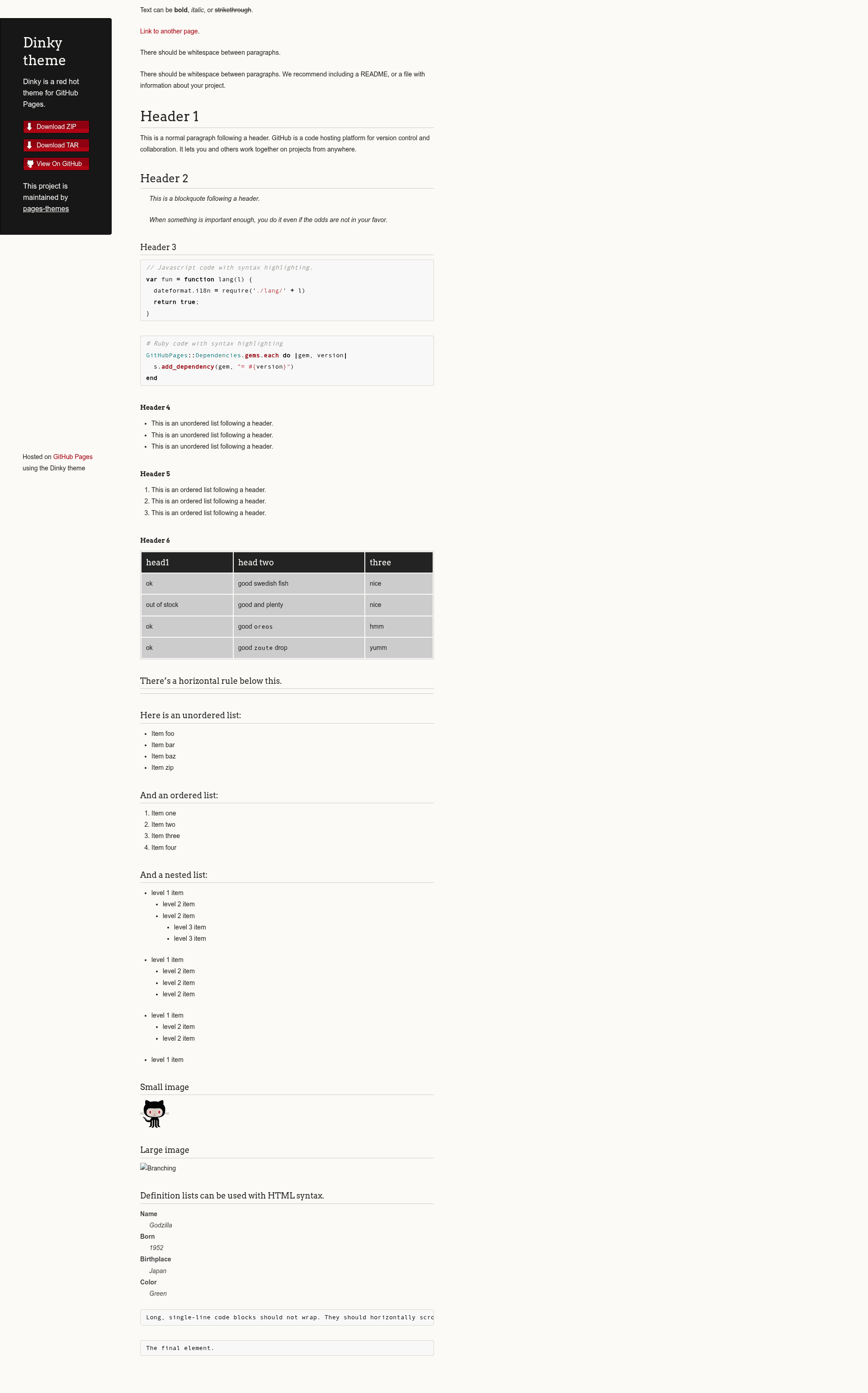
A minimal Jekyll theme for GitHub Pages with configurable title, downloads, and Google Analytics.
About this template
Dinky is a Jekyll theme for GitHub Pages that turns a Markdown-based site into a styled static website with minimal configuration.
What is Dinky?
Dinky is a Jekyll theme maintained by the pages-themes organization and distributed as a Ruby gem and GitHub repository (pages-themes/dinky). It runs on Jekyll, the static site generator built into GitHub Pages, and accepts site content written in Markdown or HTML plus a _config.yml file. The theme outputs a complete static website with a dark-on-light, project-oriented layout, ready to host on GitHub Pages. It is designed for simplicity, erring on the side of out-of-the-box usefulness rather than flexibility.
Key Features
- Remote theme installation — Add
remote_theme: pages-themes/dinky@v0.2.0to _config.yml with the jekyll-remote-theme plugin; no local Jekyll installation required for GitHub Pages. - Title and description variables — Set title and description in _config.yml to populate the site header and meta tags.
- Optional download links — Set show_downloads to true to display GitHub-generated download URLs for your repository.
- Google Analytics integration — Configure google_analytics with a tracking ID, or override the snippet via _includes/head-custom-google-analytics.html for newer versions of the analytics code.
- Custom stylesheet support — Create /assets/css/style.scss, add
@import "{{ site.theme }}", then append custom CSS or Sass, including overriding theme Sass variables before the import line. - Layout overrides — Copy _layouts/default.html from the theme repository into your site and edit it for full control over HTML structure; smaller changes can go into _includes files.
- GitHub URL overrides — Replace default repository or download URLs by defining github: keys in _config.yml, with the site. prefix removed and each variable indented under github:.
- Local preview and tests — Clone the repo, run script/bootstrap, then bundle exec jekyll serve for local preview at localhost:4000; a minimal build test suite runs via script/cibuild.
Who is it for?
- GitHub Pages beginners — Create a first website quickly by adding two lines to _config.yml and pushing to a GitHub repository.
- Developers who want a simple project page — Publish a documentation or project landing page with download links and custom styling without designing from scratch.
- Jekyll users who need a base to customize — Extend the theme with custom CSS, layouts, and includes when the default look is not enough.
What can you do with Dinky?
- Publish a personal site or project page — Set title and description, write content in Markdown, and get a styled static site on GitHub Pages.
- Customize appearance without touching HTML — Add custom SCSS in style.scss, including changing theme variables, to adjust colors and typography.
- Run the site locally — Use script/bootstrap and bundle exec jekyll serve to preview changes before deploying.
How does Dinky work?
Install via remote_theme, push to a GitHub Pages branch, and GitHub builds the Jekyll site automatically — the theme is applied during the build. For local development, add gem "github-pages" to your Gemfile and run the bootstrap script to fetch dependencies.
Pricing
Dinky is free to use. It is an open source project (contributions welcome) and requires no paid license; GitHub Pages hosting is the only external dependency.
Alternatives
- Minimal — Another official GitHub Pages theme with a similarly bare layout, focused on maximum simplicity.
- Cayman — A bolder official GitHub Pages theme with a blue gradient header, also supporting remote_theme usage.
FAQ
Is Dinky free?
Yes. Dinky is an open source Jekyll theme published on GitHub under the pages-themes organization. There is no paid tier or license fee, and GitHub Pages hosts public repositories for free, so running a Dinky site costs nothing beyond a GitHub account.
How do I install Dinky on GitHub Pages?
Add remote_theme: pages-themes/dinky@v0.2.0 to your site's _config.yml and include jekyll-remote-theme in your plugins list. Commit the file to the publishing branch, and GitHub Pages builds the site with the theme automatically on push. No local Ruby or Jekyll installation is needed for this step.
Can I customize Dinky's colors and styles?
Yes. Create /assets/css/style.scss with an @import "{{ site.theme }}" line, then add your own CSS or Sass. To change Sass variables, set new values before the @import line in that file, allowing full control over colors, fonts, and spacing.
Does Dinky support Google Analytics?
Yes. Set google_analytics in _config.yml with your tracking ID. For newer versions of Google Analytics, place the updated tracking snippet in _includes/head-custom-google-analytics.html, which is loaded with the default layout. Custom snippets can also be added in the same include file.
Can I run Dinky locally?
Clone the repository, run script/bootstrap to install dependencies, then bundle exec jekyll serve. The site appears at localhost:4000, letting you preview changes before pushing to GitHub Pages. You must run script/bootstrap once before the test script script/cibuild will work.