Template details
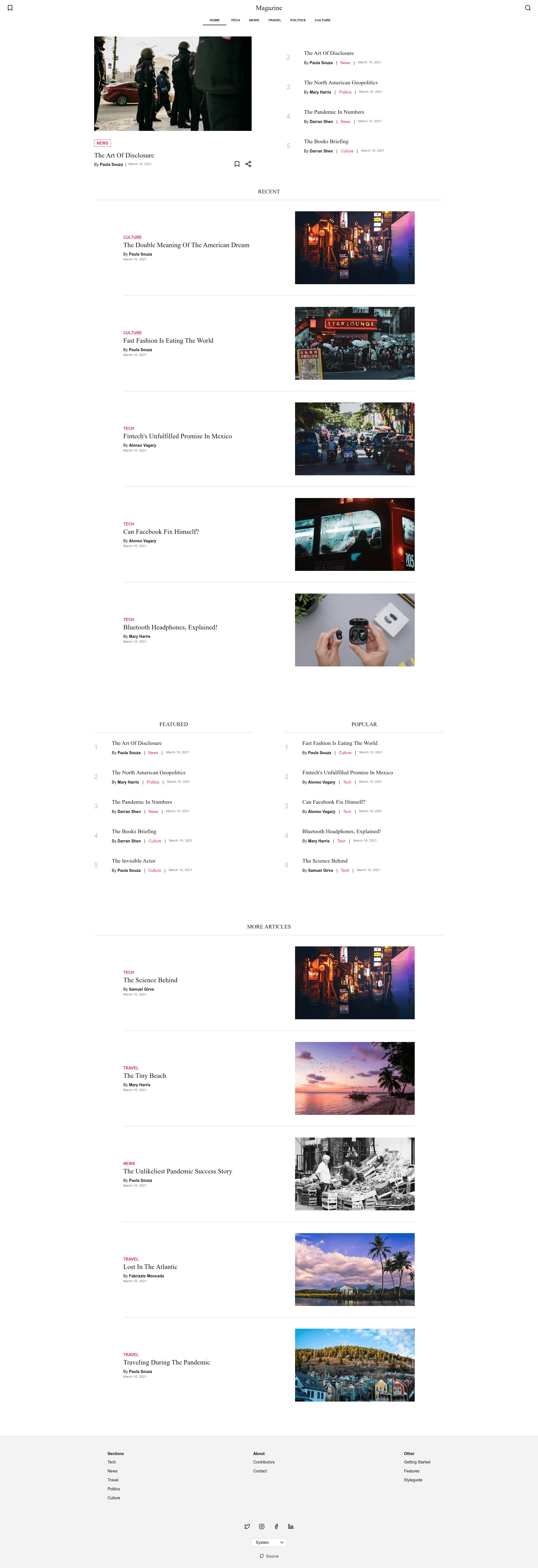
Strapi Starter Next Magazine
Strapi Next.js digital magazine starter kit with PWA, offline reading, and preview mode.
About this template
The Digital Magazine Starter Kit is a Strapi-powered Next.js starter that produces a fully static, PWA-optimized magazine site with offline reading and editorial preview mode.
What is the Digital Magazine Starter Kit?
This starter is a full-stack boilerplate that pairs a Next.js frontend with a Strapi CMS backend to create a digital magazine. It takes content managed in Strapi (articles, categories, contributors, pages) and generates a static, SEO-friendly website via Next.js static site generation. The project is maintained by edgarlr on GitHub and is published under the MIT License.
Key Features
This starter ships with a range of features covering performance, offline use, SEO, and editorial workflow.
- PWA optimized — The site is installable and includes offline support through a service worker.
- Offline article saving — Readers can save articles to read later using IndexedDB.
- SEO and social media ready — Open Graph and JSON-LD structured data are built in, and a sitemap is generated dynamically.
- Preview mode for unpublished content — Editors can preview drafts from Strapi using a secret URL before publishing.
- Search module — A search hook and static local search are included, with a caveat about slow performance if the CMS sleeps on Heroku.
- Dark and light themes — A UI provider lets readers switch between theme preferences.
- Google Analytics integration — Page views are tracked via the measurement ID environment variable, and the tracker can be removed if not needed.
- Responsive UI components — Tailwind CSS and CSS Modules style a set of reusable components across the magazine.
Who should use this starter?
Magazine editors and small publishing teams can stand up an online publication quickly without writing frontend code for every article. Developers who want a pre-configured Next.js + Strapi monorepo will save setup time, especially if they plan to deploy to Vercel and Heroku. Content creators can manage the magazine through Strapi's admin panel without touching the codebase.
What can you do with it?
Here are the main ways you can put this starter to use.
- Launch a digital magazine — Deploy a full publication with articles, categories, and contributors organized in a static site.
- Build a blog with offline reading — Give readers a PWA that lets them save articles and read them without a connection.
- Preview content before publishing — Use Strapi's preview feature to review drafts on the live site URL before they go live.
- Customize themes and branding — Change constants in the
lib/constants.tsfile and replace favicons to match a brand.
How does the starter work?
The easiest way to start is the create-strapi-starter CLI command, which creates a monorepo containing the Next.js frontend and Strapi backend. The frontend runs on http://localhost:3000 and the backend on http://localhost:1337, with sample data required in Strapi for Categories, Contributors, articles, and pages. For preview mode, set the PREVIEW_SECRET and API_URL environment variables and configure the Preview Content settings in Strapi.
FAQ
Is this starter free?
Yes, the project is released under the MIT License, so it can be used freely for personal and commercial projects.
Does it require a Strapi CMS?
Yes, the frontend is designed to pull content from a Strapi backend, and the starter includes the backend portion in the monorepo. It also integrates with the Strapi Magazine Template and Heroku Magazine Strapi CMS.
Can I remove Google Analytics?
The analytics scripts live in _document.tsx and the router change handler in _app.tsx. Remove those two script blocks and the handler, and fill the GA_MEASUREMENT_ID environment variable with dummy text if deploying to Vercel.
How do I deploy it?
The README includes a Vercel deployment button that clones the project and sets the required environment variables: API_URL, PREVIEW_SECRET, and GA_MEASUREMENT_ID. The Strapi CMS must be deployed separately first.