Template details
Nuxt3 Admin Dashboard
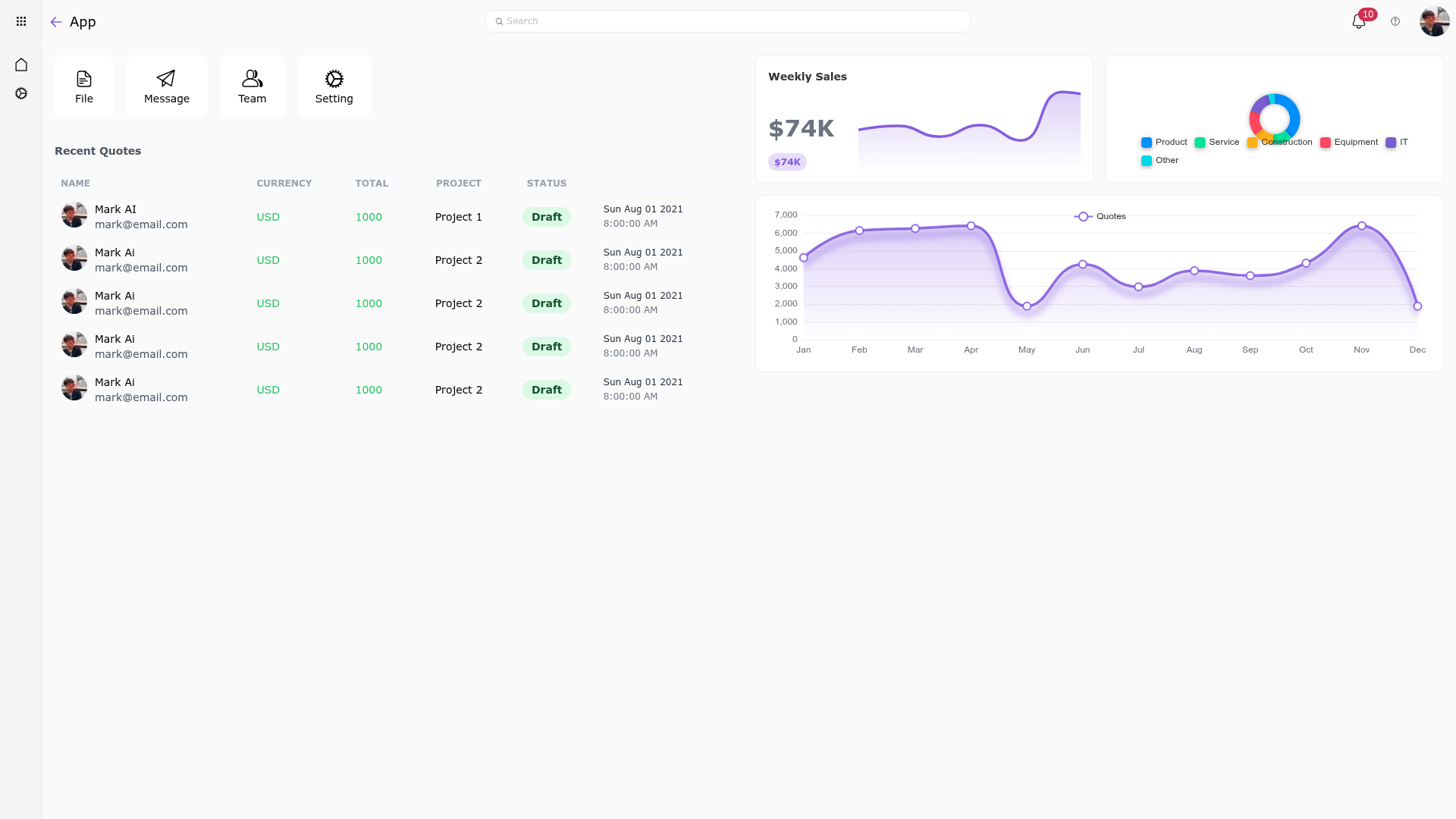
A Nuxt 3 admin dashboard template with Tailwind CSS, Naive UI, ECharts, TypeScript, ESLint, and Prettier.
About this template
Nuxt3 Admin Dashboard is a simple admin dashboard template built on Nuxt 3 and Tailwind CSS, giving developers a ready-to-run starting point for building admin interfaces with Naive UI components and ECharts visualizations.
What is Nuxt3 Admin Dashboard?
Nuxt3 Admin Dashboard is a simple admin dashboard scaffold that combines Nuxt 3, the Vue-based framework with server-side rendering and file-based routing, with Tailwind CSS for utility-first styling. The template takes a fresh Nuxt project and preconfigures it with Naive UI via the nuxt-naiveui module, ECharts for charting, TypeScript for static typing, and ESLint plus Prettier for code quality. A live demo is deployed at https://nuxt3-admin.netlify.app/, and the source lives in the story2Dev repository on GitHub.
Key Features
- Nuxt 3 framework — Built on Nuxt 3, offering server-side rendering, static site generation, and auto-imports for Vue components and composables.
- Tailwind CSS — Preconfigured utility-first CSS for rapidly customizing the dashboard's look without writing custom styles.
- Naive UI integration — The UI component library is wired through nuxt-naiveui, giving access to Vue 3 components with theming support directly in Nuxt.
- ECharts integration — Charting library included, enabling data visualization widgets like line, bar, and pie charts inside dashboard pages.
- TypeScript — The codebase is written in TypeScript, providing type checking across components and composables.
- ESLint and Prettier — Linting and formatting are preconfigured to maintain consistent code style and catch errors early.
- Multiple package managers — Setup and run commands are documented for npm, pnpm, yarn, and bun, so you can use your preferred tool.
Who is it for?
- Vue developers — Build a custom admin frontend quickly by extending the provided Nuxt 3 structure with your own pages, components, and API routes.
- Developers needing UI components — Use the Naive UI integration to compose forms, tables, modals, and other admin elements without installing and configuring the library yourself.
- Teams standardizing on TypeScript — Get a project with TypeScript, ESLint, and Prettier already set up, making it easy to enforce code quality from the first commit.
- Prototypers and startups — Spin up an admin MVP for internal tools or customer dashboards using the included charting and styling stack.
What can you do with Nuxt3 Admin Dashboard?
- Create analytics dashboards: Embed ECharts to display real-time or historical data in interactive charts within the Nuxt pages.
- Build internal admin panels: Use Naive UI components such as data tables, forms, and notifications to manage users, orders, or content.
- Learn Nuxt 3 patterns: Explore a small, readable codebase that shows how Nuxt 3, Tailwind, Naive UI, and ECharts work together in practice.
How does it work?
The template gives you a standard Nuxt 3 project layout. After cloning the repository, install dependencies with npm install, pnpm install, yarn install, or bun install. Start the development server with npm run dev (or the equivalent) to preview on http://localhost:3000, and build for production using npm run build, then preview the build with npm run preview.
FAQ
Does Nuxt3 Admin Dashboard use TypeScript?
Yes, the template is written in TypeScript. It also includes ESLint and Prettier configuration, so you get type checking and consistent formatting out of the box.
What UI library does Nuxt3 Admin Dashboard use?
It uses Naive UI, a Vue 3 component library, integrated through the nuxt-naiveui module. This gives you access to themed components for building admin interfaces.
Does it include charting capabilities?
ECharts is included as a feature of the template, so you can add interactive data visualizations to your dashboard without installing additional chart libraries.
How do I run the development server?
After installing dependencies, run npm run dev (or the equivalent for pnpm, yarn, or bun). The server starts at http://localhost:3000.
Which package managers are supported?
The README documents commands for npm, pnpm, yarn, and bun, covering install, dev, build, and preview workflows.