Template details
PiDash
A Lightweight & Minimalistic Monitoring Dashboard for Raspberry Pi
About this template
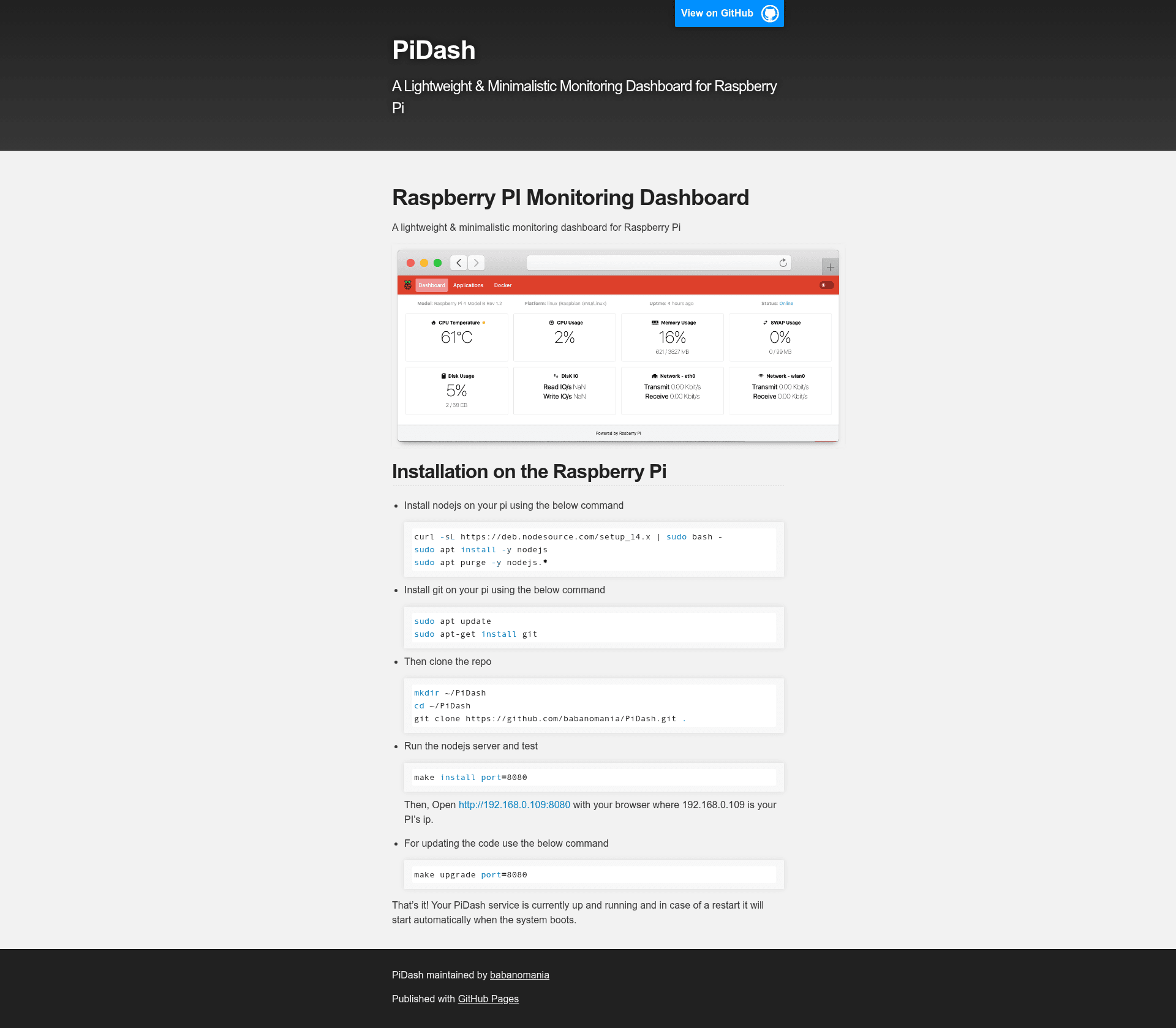
PiDash is a lightweight, minimalistic monitoring dashboard for Raspberry Pi, built with Next.js and Tailwind CSS, that runs as a Node.js server on your Pi and displays system status in a browser.
What is PiDash?
PiDash is an open-source, self-hosted monitoring dashboard designed for the Raspberry Pi. It takes a Raspberry Pi running Node.js and provides a web-based dashboard accessible via the Pi's IP address on a configurable port (default 8080). The project is built with Next.js and Tailwind CSS, and its repository is hosted on GitHub under the name PiDash.
Key Features
- Lightweight and minimalistic — The dashboard is designed to be lightweight, making it suitable for the limited resources of a Raspberry Pi while presenting data without visual clutter.
- Next.js framework — Built on Next.js, the React framework, providing a modern, component-based front end.
- Tailwind CSS styling — Uses Tailwind CSS for utility-first styling, keeping the interface clean and customizable through CSS classes.
- Easy installation — Installation is done via a few command-line steps: installing Node.js, cloning the repository, and running
make install port=8080to start the server. - Configurable port — The server port can be set during installation or upgrade using the
port=argument (e.g.,make install port=8080). - Auto-start on boot — Once installed, the PiDash service automatically starts when the system boots, requiring no manual intervention after reboot.
- Simple updates — The
make upgrade port=8080command pulls the latest code and restarts the server, keeping the dashboard up to date.
Who is it for?
- Raspberry Pi hobbyists — People who run a Pi at home and want a simple, self-hosted dashboard to monitor system status without overhead.
- Self-hosters — Users who prefer lightweight open-source tools and want full control over their monitoring setup, with the ability to modify the Next.js and Tailwind code.
- Makers and tinkerers — Those who enjoy setting up small web services on embedded devices and want a minimal base to extend with their own metrics.
What can you do with PiDash?
- Monitor your Pi at a glance — Install PiDash on your Raspberry Pi and open its IP address with port 8080 in a browser to see the dashboard with system monitoring information.
- Run a lightweight web service — Use PiDash as a simple example of a Node.js/Next.js service on a Pi, learning how to deploy and manage such applications.
- Customize the dashboard — Since the source is on GitHub, you can fork or modify the code to display the data that matters to you.
How does PiDash work?
PiDash runs as a Node.js server on the Raspberry Pi. After installing Node.js and cloning the repository, you execute make install port=8080, which sets up the service. The server listens on the specified port (default 8080) and serves a web dashboard. To update, run make upgrade port=8080 to fetch the latest code and restart the service. A bootstrap mechanism ensures the service starts on boot.
FAQ
Is PiDash free?
Yes, PiDash is open-source and free to use. The code is publicly available on GitHub, and you can install it on your own Raspberry Pi without any cost.
How do I install PiDash?
First install Node.js and git on your Pi, then clone the repository from GitHub, and run make install port=8080. After that, open your Pi's IP address with the specified port in a web browser.
Does PiDash automatically start on reboot?
Yes, the installation sets up the service to start automatically when the system boots, so you don't need to manually launch it after a restart.
What port does PiDash use?
By default, PiDash uses port 8080, but you can specify a different port when running make install port=YOUR_PORT or make upgrade port=YOUR_PORT.