Template details
Photon by HTML5 UP
A free, responsive HTML5 single-page template by HTML5 UP with image-led sections and call-to-action buttons.
About this template
Photon is a free, responsive HTML5 site template from HTML5 UP, built to serve as a single-page layout with image-centric sections and straightforward calls to action.
What is Photon by HTML5 UP?
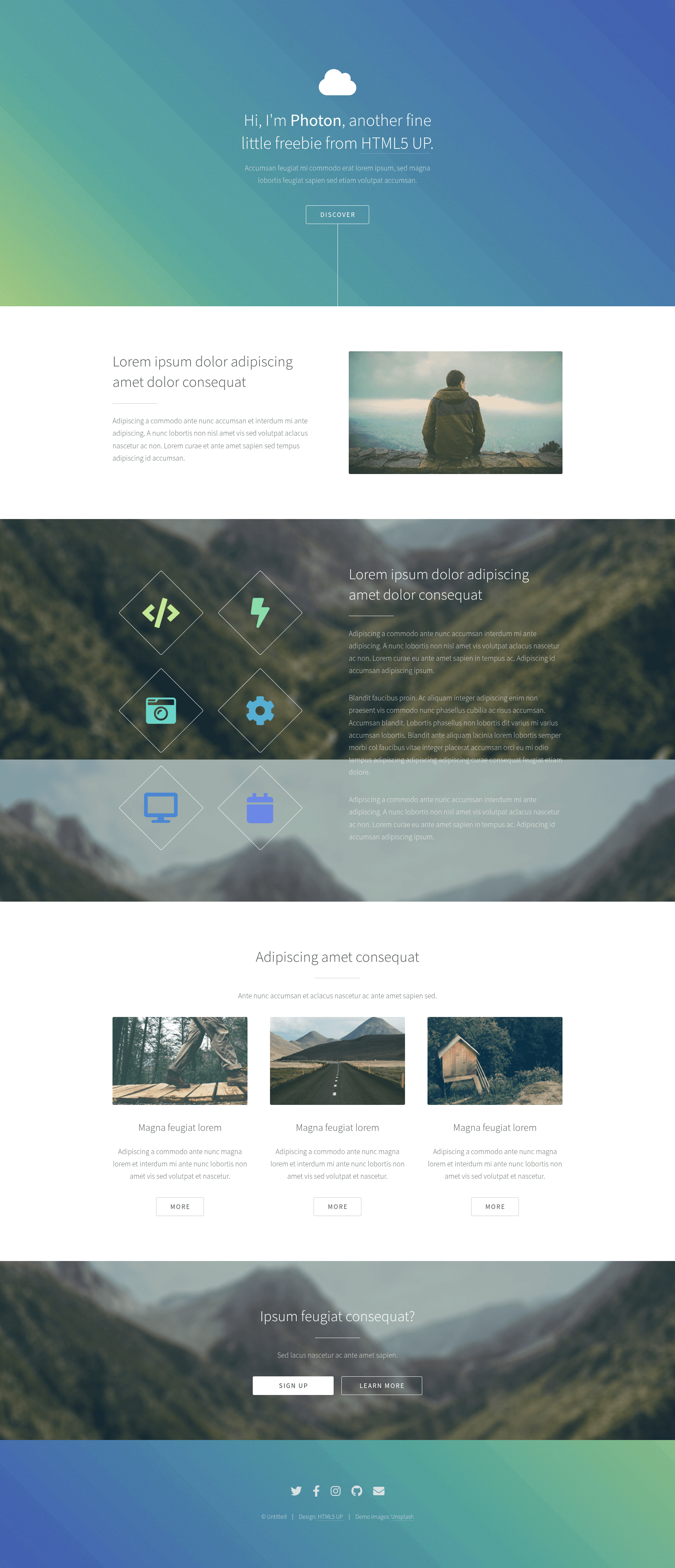
Photon is a single-page HTML/CSS template distributed through HTML5 UP, a catalog that offers free web templates. The demo page presents a hero-style introduction, three alternating image-and-text feature rows, a Twitter widget iframe, and a final section with "Sign Up" and "Learn More" buttons. It runs on plain HTML5 and CSS3 without a JavaScript framework, and the downloadable version is a static site with no server-side dependencies.
Key Features
- Responsive layout — the template uses a fluid grid that adapts to mobile, tablet, and desktop widths, which is standard in HTML5 UP designs.
- Image-led sections — three feature blocks each pair a photo (pic01–pic04) with a "Magna feugiat lorem" heading and a short descriptive paragraph.
- Call-to-action buttons — the closing section includes "Sign Up" and "Learn More" links, ready to point to signup or about pages.
- Social embed slot — the demo includes a Twitter widget iframe, showing where a social feed can be integrated.
- Placeholder content — lorem ipsum text and stock images allow direct replacement with your own copy and visuals.
- Clean typography — the layout uses simple headings and paragraphs that keep the focus on imagery.
Who should use Photon?
- Designers — use Photon as a starting point for a visual one-page landing site and swap in client photography and copy.
- Developers — edit the plain HTML and CSS directly without learning a framework, making it fast to deploy to any static host.
- Small businesses — create a simple promotional page with image galleries and signup links, requiring no backend setup.
What can you do with Photon?
- Landing pages: replace the placeholder feature rows with product highlights and link the "Sign Up" button to your signup form.
- Portfolio showcases: use the alternating image layout to display photography, projects, or case studies.
- Personal pages: set the intro as a short bio and the feature sections as skills or interests, with the Twitter widget feeding a live social stream.