Template details
simple-blog
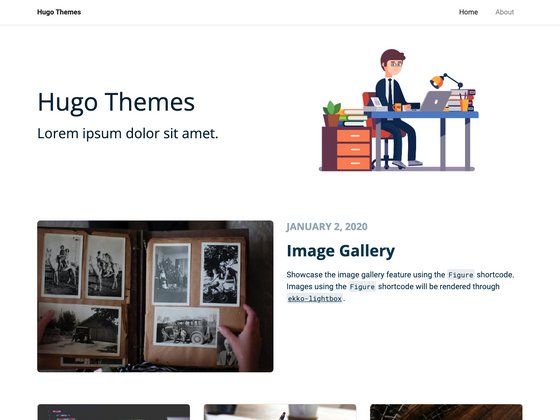
A minimal Hugo blog theme built on Bootstrap with tags, categories, and pagination.
About this template
simple-blog is a Hugo blog theme that converts Markdown content into a static website, using Bootstrap for styling and built-in Hugo taxonomies for tags and categories. It is maintained on GitHub by user 10mohi6 and is designed to be minimal, clean, and easy to customize.
What is simple-blog?
simple-blog is an open-source Hugo theme built for personal blogging. It takes content authored in Markdown with TOML front matter and renders it into a fully static site through Hugo's build process. The theme depends on Bootstrap for responsive layout, and provides pagination, tag and category archives, and a simple navigation menu. The repository includes a config.toml example showing how to set the theme, base URL, title, copyright, pagination count, and menu items.
Key Features
- Bootstrap foundation — The theme's layout and components are built on Bootstrap, giving a responsive grid and consistent styling out of the box.
- Pagination — Blog post listings are paginated; the paginate option in config.toml controls how many posts appear per page.
- Tags and categories — Hugo taxonomies are configured for category and tag, letting you organize posts and generate archive pages automatically.
- Menu configuration — A main menu is defined in config.toml, so you can add links like About to the site header.
- Simple installation — Clone the repository into your Hugo themes directory and set theme = "simple-blog" to activate it.
- Minimal design — The theme uses a light, clean aesthetic with minimal styling, making content the focus.
Who should use simple-blog?
- Personal bloggers — Create a straightforward blog with Hugo without overcomplicating the design; add posts via Markdown files.
- Hugo developers — Use the theme as a small, readable codebase to learn how Hugo themes handle taxonomies, pagination, and menus.
- Writers — Publish long-form writing with a clean, distraction-free reading experience and automatic category/tag archives.
What can you do with simple-blog?
- Publish a personal blog — Write Markdown posts, organize them into categories and tags, and configure pagination to control archive pages.
- Build a portfolio site — Although designed for blogs, the theme's minimal layout and menu system can be adapted for a simple portfolio or resume site.
- Create a documentation hub — Use the taxonomy and pagination features to structure technical notes or documentation into navigable sections.
How does simple-blog work?
- Clone the theme repository into your Hugo project's themes directory using git clone https://github.com/10mohi6/hugo-theme-simple-blog themes/simple-blog.
- Set theme = "simple-blog" in your config.toml, along with baseURL, title, pagination count, and taxonomies.
- Run hugo server -t simple-blog to preview the site locally, or hugo to build static files for deployment.
FAQ
Is simple-blog free?
Yes. The theme is open source and hosted on GitHub. You can view the source, fork it, and modify it for your own projects under the terms of its license (see the repository for details).
Does simple-blog support tags and categories?
Yes. The theme configures Hugo's taxonomy system for both tags and categories. Add taxonomies in config.toml, and the theme will generate archive pages for each term.
How do I install simple-blog?
Clone the repository into your Hugo project's themes folder, then activate the theme by setting theme = "simple-blog" in config.toml. You can preview it with hugo server -t simple-blog.
How do I add a navigation menu?
Define menu items in config.toml under the [menu] section. The example config includes a main menu with an About link, using name, url, and weight fields.
Can I customize the theme?
Yes, the theme is minimal and open source. You can edit the template files directly, override styles, or modify the Bootstrap-based layout to suit your preferences.