Template details
StockBot - Powered by Groq
Open-source AI chatbot template powered by Groq, Llama 3 70B, Vercel AI SDK, and TradingView that answers with live stock charts, news, and screeners.
About this template
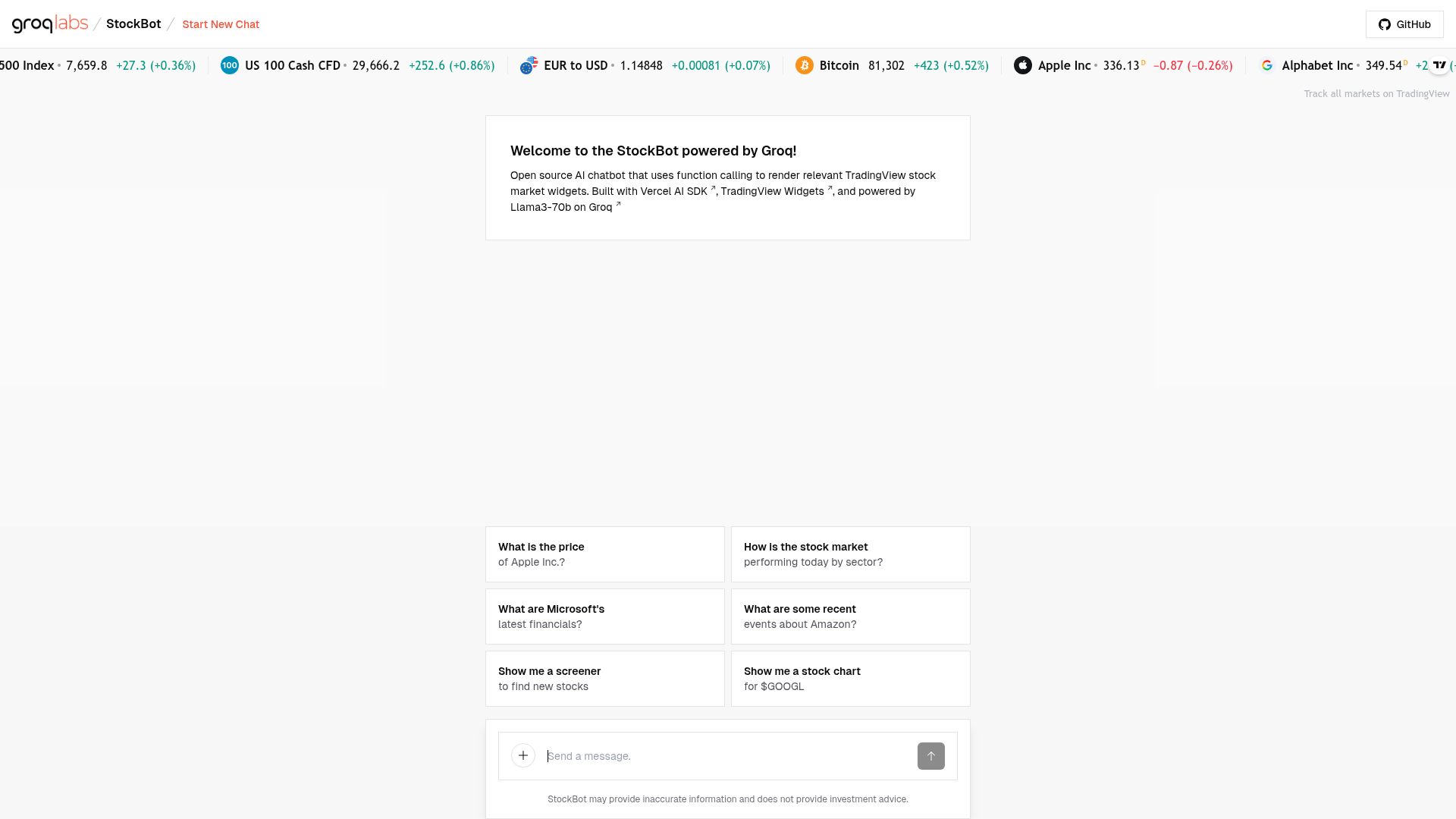
StockBot is an open-source AI chatbot template from Groq that converts natural-language market questions into live, interactive TradingView charts, financials, news, and screeners rendered directly inside the chat.
What is StockBot?
StockBot is an open-source AI chatbot that accepts natural-language prompts about markets and answers with live TradingView widgets — candlestick charts, financial breakdowns, news stories, screeners, and heatmaps — embedded in the conversation. It is developed by Benjamin Klieger at Groq and built on the AI Chatbot template created by Vercel, combining Llama 3 70B on Groq, the Vercel AI SDK, and TradingView's live widgets. The app deploys to Vercel through a one-click clone that prompts for a Groq API key, or runs locally on port 3000 using pnpm. The repository ships an important disclaimer: StockBot may return inaccurate information and does not provide investment advice — it is intended for entertainment and instructional use only.
What makes StockBot stand out?
- Groq-accelerated tool calling — Groq's inference speed makes a two-call sequence, one for tool selection and one for composing the reply with a separate specialized prompt, return near-instantaneously.
- Live TradingView widgets — Responses render real TradingView components with live market data rather than static text or images.
- Adaptive generative UI — The interface dynamically picks and mounts the TradingView component that matches the user's request instead of returning a fixed layout.
- Nine prebuilt interfaces — Daily market heatmap, stock financial breakdown, historical price chart with customizable date ranges, candlestick charts, per-stock news, market overview with Open/High/Low/Close values, stock and ETF screener, trending stocks (top five gainers, losers, most active), and an ETF heatmap.
- Multi-asset coverage — Data and analysis span stocks, forex, bonds, and cryptocurrencies.
- Vercel deploy button — A one-click clone flow requests the GROQ_API_KEY environment variable, sets the project name, and deploys the demo.
- Vercel AI Chatbot lineage — The codebase is built on Vercel's AI Chatbot template, so it inherits that project's chat architecture.
- Hosted demo — A running instance is available at groq-stockbot.vercel.app for testing before you self-host.
Who should use StockBot?
- AI developers prototyping tool-calling chat apps: start from a working example that wires Llama 3 70B tool use to React UI components and swap in their own domain.
- Retail investors and market watchers: ask plain-language questions about a ticker and get candlestick charts, financial metrics, and headlines without leaving the chat.
- Financial content creators and educators: capture live, interactive market visuals for demos, streams, or teaching material.
- Engineers evaluating Groq latency: benchmark how fast a two-call tool-use pipeline feels end to end.
What can you do with StockBot?
- Analyze a specific stock: request price history or a candlestick chart for a ticker and get a TradingView chart with the date range you asked for.
- Screen for new ideas: ask for a stock screener to surface companies and ETFs, or pull the top five gaining, losing, and most active stocks of the day.
- Scan the whole market: pull the daily performance heatmap, the ETF heatmap, or a market overview covering stocks, futures, bonds, and forex with change and OHLC values.
- Track news: ask for top stories on a specific company and receive the latest headlines inside the conversation.
How does StockBot work?
- You type a natural-language request about a stock, ETF, forex pair, bond, or cryptocurrency.
- The app issues two Groq API calls with separate specialized prompts — one selects the appropriate tool or widget, the other composes the conversational response.
- The matched TradingView widget renders live in the chat.
To run it locally, copy .env.example to .env.local, add a Groq API key from console.groq.com/keys, then run pnpm install and pnpm dev; the app starts on localhost:3000.
Pros and cons
- Open source, built on Vercel's AI Chatbot template, so the full chat and UI code is inspectable and modifiable.
- Tool calling feels near-instant because inference runs on Groq with Llama 3 70B.
- Nine TradingView interfaces ship ready to use, covering charts, news, screeners, and heatmaps.
- You must supply your own Groq API key to run or deploy it.
- The project states it may provide inaccurate information and is not investment advice.
Pricing
StockBot is free and open source. A hosted version runs at groq-stockbot.vercel.app, and a one-click Vercel clone is provided; both self-hosting and deployment require your own Groq API key.
FAQ
What does StockBot do?
StockBot is an AI chatbot that answers natural-language questions about stocks, ETFs, forex, bonds, and cryptocurrencies by rendering live TradingView charts, financial breakdowns, news, screeners, heatmaps, and market overviews inside the chat interface.
Is StockBot free?
Yes. StockBot is an open-source project, and a hosted demo is available at groq-stockbot.vercel.app. You can also clone the repository and deploy it yourself, though API usage on Groq requires your own key.
Do I need a Groq API key to run StockBot?
Yes. To run the app locally or deploy your own copy, you need a Groq API key from the Groq console. Place it in .env.local after copying .env.example, then install with pnpm and start the dev server.
Can StockBot be used for investment advice?
No. The project explicitly states that StockBot may provide inaccurate information and does not provide investment advice. It is intended for entertainment and instructional use only, so treat its outputs as demonstration data.
What can StockBot chart?
StockBot renders interactive TradingView charts covering stocks, ETFs, forex, bonds, and cryptocurrencies. Supported views include candlestick charts for specific assets, historical price charts with customizable date ranges, a daily market heatmap, and an ETF sector heatmap.