Template details
Headshot AI
Open-source Next.js starter kit from Astria for building an AI headshot generator SaaS, with Supabase auth, Stripe billing and Vercel deploy.
About this template
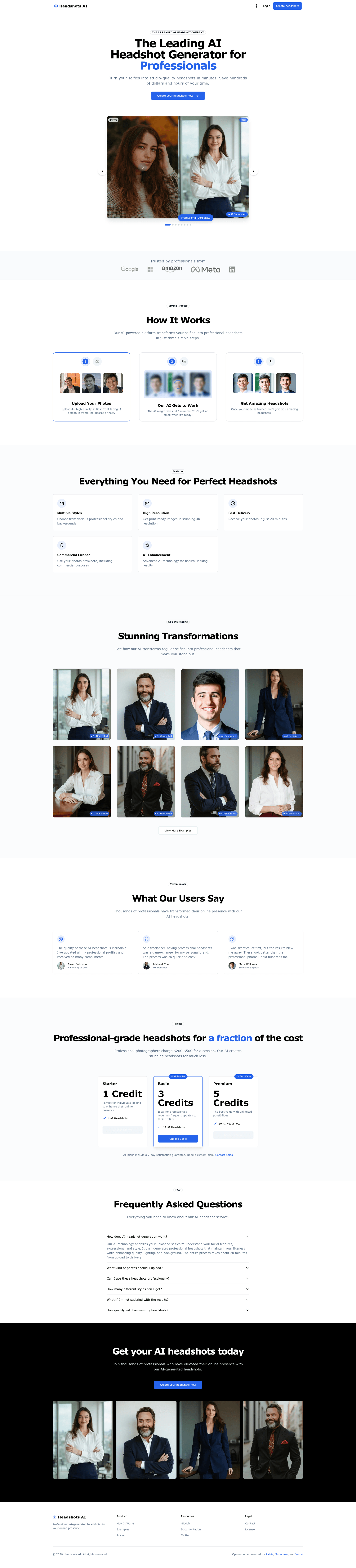
Headshot AI (headshots-starter) is an open-source Next.js starter kit from Astria that turns user-uploaded photos into professional AI headshots using Astria's model training and inference API.
What is Headshot AI?
Headshot AI is an open-source starter application published by Astria, the company behind the Astria image fine-tuning API, that generates professional AI headshots from a small set of photos supplied by a user. It is a full Next.js web app rather than a model or a CLI: the repository ships a landing page, authenticated dashboard, photo upload flow, and webhook handling ready to deploy. Input is a group of sample photos of one person plus a prompt pack; output is a fine-tuned Astria model and a batch of generated headshot images. The GitHub repository carries 4,462 stars and is released under the MIT license.
What makes Headshot AI stand out?
- Astria training and inference — model fine-tuning and headshot generation run through the Astria API, authenticated with an
ASTRIA_API_KEYand an arbitrary webhook secret string. - Next.js front end — the app and marketing landing page are one Next.js project, styled with Shadcn components on top of Tailwind CSS.
- Supabase for database and auth — the Vercel integration creates the
credits,images,models, andsamplestables with their columns and row-level security policies, and magic-link email auth is configured from the Supabase dashboard. - Vercel Blob uploads — user photos are stored through a Blob store and read/written with a
BLOB_READ_WRITE_TOKEN. - Optional Stripe billing — the preset model is credit based, where 1 credit equals 1 model train, with example one-time products for one, three, and five credits and a
checkout.session.completedwebhook pointing at/stripe/subscription-webhook. - Optional Resend email — sends a notification when a user's model finishes training.
- Astria Packs API support — a merged change adds prompt packs (set
NEXT_PUBLIC_TUNE_TYPE=packsandPACK_QUERY_TYPE=both), removing hardcoded prompts and easing a switch to Flux model fine-tuning. - One-click Vercel deploy — the deploy button clones the template to a new GitHub repo, provisions a Supabase project, and runs the SQL migrations.
Who should use Headshot AI?
- Developers and makers launching an AI SaaS who want a working billing, auth, and generation loop instead of starting from an empty repository.
- Full-stack Next.js developers who need a reference implementation for long-running AI jobs, webhooks, and credit accounting.
- Indie founders validating a headshot product before committing to custom infrastructure, using the Stripe credit flow as-is.
- AI engineers experimenting with Astria fine-tuning who want to swap the headshot prompt pack for another pack.
What can you do with Headshot AI?
- Headshot SaaS builders: deploy the template, connect an Astria key, and sell credit packs that each redeem for one model training run.
- Photographers and studios: offer AI-generated corporate portraits as an add-on without building an upload and delivery pipeline.
- Product and brand teams: repoint the same flow at Astria packs for AI avatars in anime, portrait, or story-illustration styles, pet portraits, product shots, food photography, icons, and style-consistent asset sets.
How does Headshot AI work?
- Click the Vercel deploy button, which creates a GitHub repository and a Supabase project and leaves the Create sample tables option checked so migrations run.
- Fill in environment variables copied from
.env.local.example: Astria API key, webhook secret, deployment URL, and Vercel Blob token, plus optional Resend and Stripe keys. - Run
npm installandnpm run dev, then openhttp://localhost:3000.
Users upload samples, Astria trains a model, and a webhook callback at the deployment URL marks the model ready; note the environment variable VERCEL_URL was renamed to DEPLOYMENT_URL.
Pricing
Headshot AI itself is free and open source under the MIT license; you pay only the third-party services you connect. Astria model training requires an active Astria API key, which is available on paid Astria plans. Stripe is pre-wired for a credit model where 1 credit equals 1 model train, with example one-time products for one, three, and five credits.
FAQ
Is Headshot AI free to use?
The template is free and MIT licensed, so you can fork and modify it. Running it in production costs money for the connected services: Astria training and inference, Supabase, Vercel, and optionally Stripe and Resend.
Do I need a paid Astria plan?
Yes for real training. The README states that training models is only available on paid plans and that you need an active Astria API key, obtained from the Astria account settings, to train models.
Can I run Headshot AI without Stripe or Resend?
Yes. Both integrations are marked optional, and Stripe stays disabled unless NEXT_PUBLIC_STRIPE_IS_ENABLED is set to true. Without Stripe you must still account for credits, since the schema tracks credits, images, models, and samples in Supabase.
What sample photos produce the best headshots?
Use close-up, clearly visible faces, one person per photo, no sunglasses or hats, and identical 1:1 aspect ratios such as 512x512 or 1024x1024. Match generation dimensions to the samples and add "double torso, totem pole" to the negative prompt to reduce repeated subjects and extra limbs.