Template details
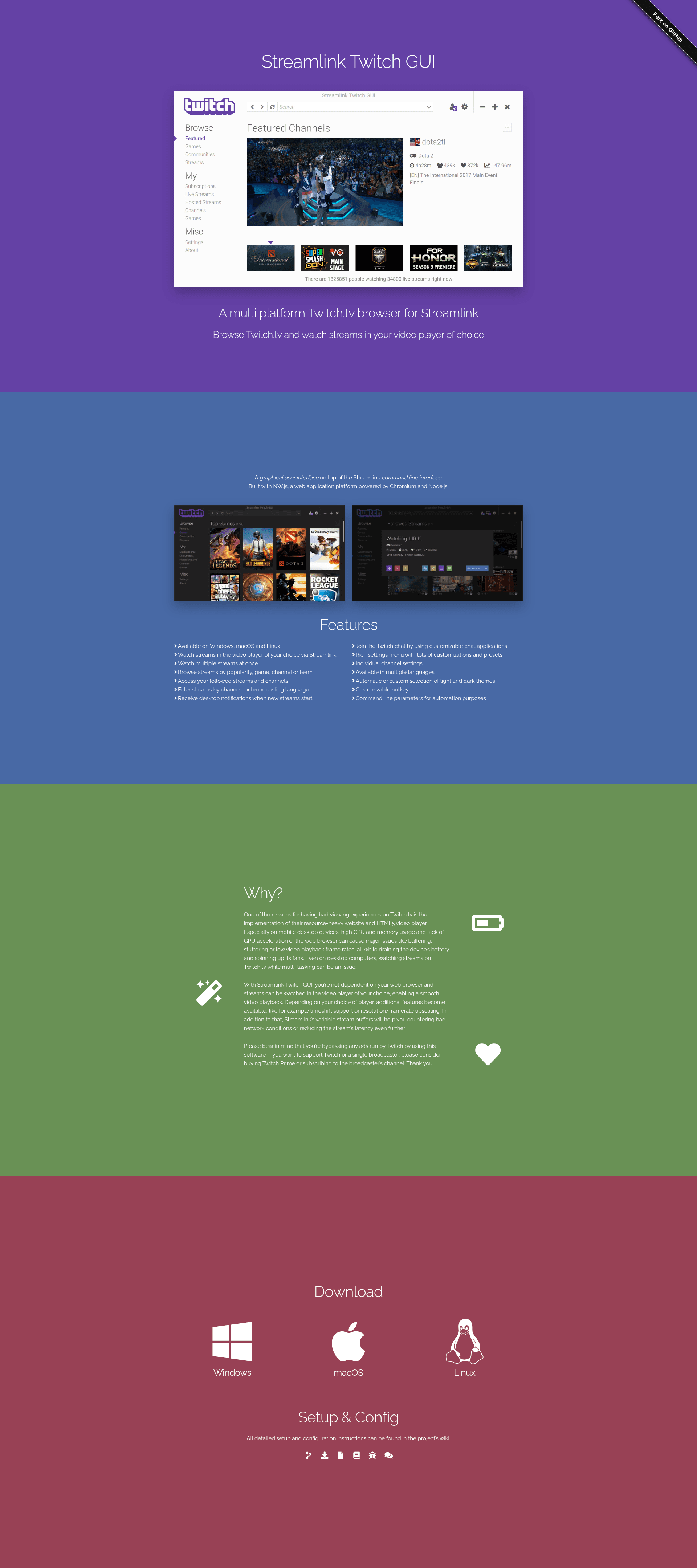
Streamlink Twitch GUI
A multi-platform Twitch.tv browser for Streamlink
About this template
Streamlink Twitch GUI is an open-source, multi-platform Twitch.tv browser that provides a graphical interface on top of the Streamlink command-line tool.
What is Streamlink Twitch GUI?
Streamlink Twitch GUI is an NW.js desktop application written in JavaScript using EmberJS, HTML via Handlebars templates, and CSS via LessCSS, running on a Node.js-powered version of Chromium. It takes Twitch channel and stream metadata as input and uses the Streamlink CLI to launch video streams in an external player of your choice. The application is maintained by the Streamlink project community; the GitHub repository lists bastimeyer as the sponsor recipient. It supports Windows, macOS, and Linux, and it requires a separate Streamlink installation to function.
Key Features
- Cross-platform desktop app — Runs on Windows, macOS, and Linux as a standalone desktop application distributed through GitHub releases.
- Stream browsing and discovery — Browse Twitch streams by popularity, game, channel, or team, and access your followed streams and channels.
- Multi-stream playback — Watch multiple streams at once, each launched via Streamlink into the video player of your choice.
- Language filtering — Filter streams by channel language or broadcasting language.
- Desktop notifications — Get notified when new streams start.
- Customizable chat integration — Open Twitch chat using customizable chat applications.
- Advanced settings — Rich settings menu with presets, individual channel settings, custom hotkeys, and automatic or custom light/dark theme selection.
- Localization — The interface is available in multiple languages, and translators are encouraged to contribute improvements.
Who is it for?
- Twitch viewers on resource-constrained devices — If Twitch's website causes high CPU/memory usage, buffering, or low frame rates, this app reduces the browser load by handing playback to an external player.
- Multitasking viewers — People who watch streams while working or gaming can avoid the overhead of a full web browser, easing multi-tasking on desktop.
- Power users and automation enthusiasts — Command-line parameters enable scripting and automation of stream launches.
- Open-source contributors — Developers and translators can build the app from source and contribute via the repository.
What can you do with Streamlink Twitch GUI?
- Launch streams in your preferred player: Use Streamlink's variable stream buffers to counter bad network conditions or reduce latency, and access player-specific features like timeshift or resolution/framerate upscaling.
- Watch multiple streams at once: Open several concurrent streams without juggling browser tabs.
- Avoid Twitch's web player entirely: The interface decouples viewing from the browser, and it bypasses ads; the project encourages supporting Twitch and broadcasters through Twitch Prime or subscriptions.
How does Streamlink Twitch GUI work?
Install Streamlink first, then download the release build for your platform from GitHub. Browse or search for a stream, select a stream quality, and the GUI invokes Streamlink to launch the stream in your chosen video player. If you want to contribute or test the latest code, clone the repository and run yarn install and yarn run grunt release to build the application into the build/releases folder.
FAQ
Does Streamlink Twitch GUI require Streamlink?
Yes. The name reflects its role: it is only a graphical user interface on top of the Streamlink CLI, so Streamlink must be installed on your system to actually launch streams.
Is Streamlink Twitch GUI free?
The project is free and open-source. Donations are accepted through GitHub Sponsors, PayPal, and Bitcoin to support its creator, but the software itself carries no license fee.
What platforms are supported?
Windows, macOS, and Linux are supported. The wiki lists supported packages and detailed installation guides for each platform.
How can I contribute translations?
Translation contributions are welcome. The wiki's Translating section describes the workflow and includes a beginner's guide to help new translators get started.
What is the development status of the project?
According to issue #1045 in the repository, there is a note asking users to check the development status, implying active maintenance may be uncertain. Check the linked issue for current details.