Template details
WebcoreUI
Free open-source UI component library for Astro with Svelte and React support, styled with Sass.
About this template
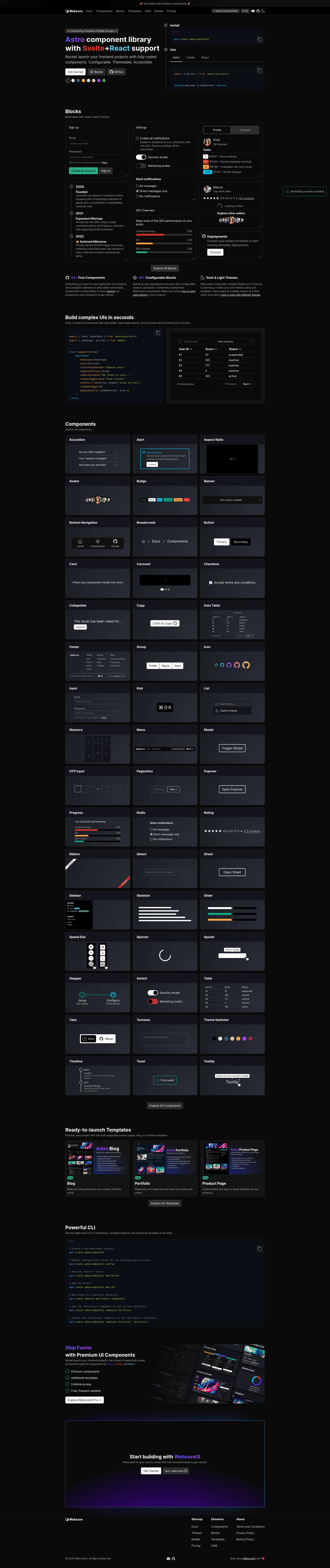
WebcoreUI is a free, open-source UI component library for Astro that also provides native Svelte and React versions, styled with Sass and written in TypeScript.
What is WebcoreUI?
WebcoreUI is a collection of 50+ UI components, 25+ blocks, and four full page templates published by Frontendland as the webcoreui npm package. It takes Sass configuration via a webcore.config.scss file and outputs themed, responsive UI elements for Astro, Svelte, or React projects. The library includes a CLI (npm create webcore@latest) that generates new projects and integrates into existing Astro setups.
Key Features
- Multi-framework imports — Components are imported from separate entry points
webcoreui/astro,webcoreui/svelte, andwebcoreui/react, so the same component API works across frameworks. - Sass styling system — Styling is based on Sass with a
setup()mixin that enables options for CSS resets, utility classes, tooltips, scrollbar styles, breakpoint variables, and theme switching. - CSS variable customization — Default styles for components such as Avatar, Progress, Slider, Spinner, and Tooltip are overridable through
--w-*CSS variables. Radius tokens like--w-sm-radius,--w-md-radius, and--w-lg-radiusare also defined. - CLI scaffolding —
npm create webcore@latestcreates a new project, runsconfigto update an existing Astro project, or usestemplate Portfolio ./portfolioto scaffold a specific template into a chosen directory. - Ready-made blocks — Includes Hero, FAQ, Team, SignUp, SocialProof, ErrorPage, Maintenance, and more than 20 other composable sections.
- Page templates — Ships with Authentication, Blog, Portfolio, and ProductPage templates that can be generated directly from the CLI.
- Theme management — The
setup()mixin accepts athemeoption (dark by default) and athemesmap to enable multiple themes activated by custom CSS selectors. - Prerequisites documented — The library works with Sass version 1.100 and TypeScript 5.9; for each framework it targets Astro 5.18, Svelte 5.55, or React 19.2 with React DOM 19.2.
Who should use WebcoreUI?
Astro developers who want a pre-built component set without pulling in a CSS framework will use WebcoreUI to assemble pages quickly and override styles via Sass. Svelte and React teams can adopt the same components with framework-specific imports, reducing the need to rebuild UI primitives. Product teams building marketing sites, blogs, dashboards, or authentication flows can start from the included blocks and templates instead of designing from scratch.
What can you do with WebcoreUI?
- Astro site builders: Generate a new Webcore project with
npm create webcore@latestand build a landing page using Hero, SocialProof, and Team blocks. - React or Svelte developers: Import components like DataTable, Tabs, and Modal from the React or Svelte entry points to add interactive UI to an app.
- Design-conscious teams: Customize the default dark theme, radial corners, and component colors by editing CSS variables and the
setup()mixin options inwebcore.config.scss. - Agency and portfolio sites: Scaffold the Portfolio template into a folder with
npm create webcore@latest template Portfolio ./portfolioto get a complete project structure.
How does WebcoreUI work?
After installing the package with npm i webcoreui, you add the webcore() integration to astro.config.mjs, create an empty webcore.config.scss at the project root, and import the library styles in a global SCSS file using @use 'webcoreui/styles' as *; @include setup(...). Then you import individual components from the appropriate subpath and use them as markup. The CLI can handle this setup automatically for new projects.
Pricing
WebcoreUI is free and open-source, released under the MIT license. The npm package has no paid tiers, and all components, blocks, and templates are available without charge.
FAQ
Is WebcoreUI free?
Yes. WebcoreUI is published under the MIT license, so it is free to use in personal and commercial projects without licensing fees.
What frameworks does WebcoreUI support?
WebcoreUI supports Astro, Svelte, and React. You import components from separate subpaths — webcoreui/astro, webcoreui/svelte, or webcoreui/react — depending on your project.
How do I install WebcoreUI?
Run npm i webcoreui for a manual install, or use npm create webcore@latest to scaffold a new project via the CLI. The CLI also offers a config command to update an existing Astro project.
Does WebcoreUI use Tailwind CSS?
No. WebcoreUI is styled with Sass and a compiled CSS setup. The setup() mixin can include its own reset and utility classes, so no separate CSS framework is required.
What templates come with WebcoreUI?
WebcoreUI includes four templates: Authentication, Blog, Portfolio, and ProductPage. You can generate any of them into a target directory using npm create webcore@latest template TemplateName destination.