Template details
Summer
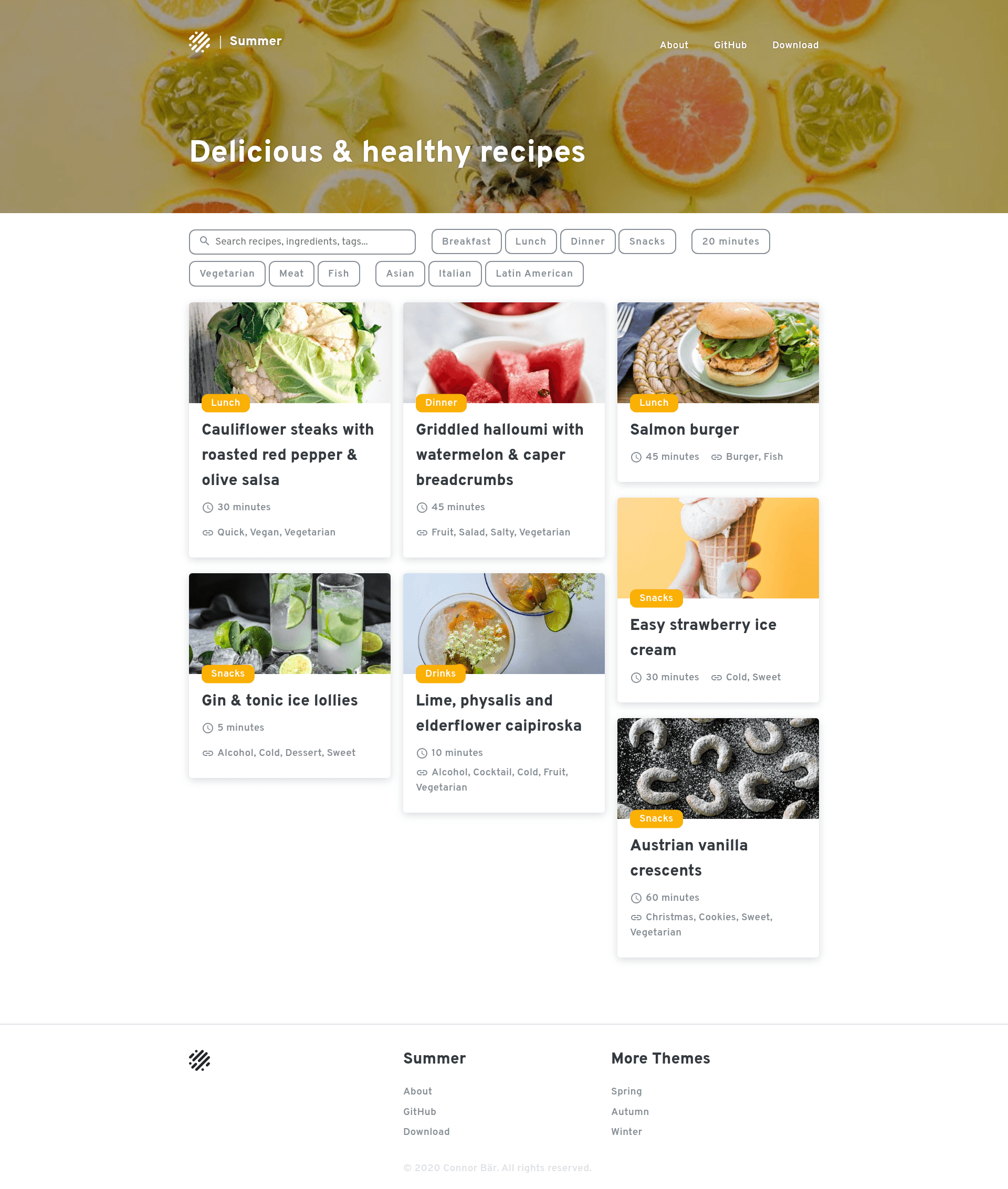
Summer is a simple Jekyll theme with a photo sidebar.
About this template
Summer is a simple, open-source Jekyll theme with a photo sidebar, created by Connor Baer and released under the MIT license. It provides a fully furnished Jekyll setup that runs locally with a few commands and is intended for lightweight static blogs, portfolios, and recipe sites.
What is Summer?
Summer is a Jekyll theme that centers on a photo sidebar, giving content pages an image-forward visual emphasis. The repository includes a complete Jekyll configuration: clone it, install the Ruby gems with bundle install and the Node modules with yarn, then run yarn start to serve the site at localhost:4000. The theme is published on GitHub and its README states it is no longer actively maintained, though contributions are welcome.
Key Features
- Photo sidebar layout — the theme's defining visual feature places a photo sidebar next to the main content area, suited for image-driven posts.
- Dark theme option — a notable customizable option is a built-in dark theme; users toggle it through
_config.yml. - Fully furnished Jekyll setup — the repo ships with a complete Jekyll site structure; only dependency installation is needed before running.
- Config-file customization — all theme options are defined in
_config.yml, so users can adjust settings without touching templates. - MIT license — the theme is free to use, modify, and distribute under the permissive MIT license.
- Recipe-oriented tagging — the repository's topics include "recipes", indicating the layout works for recipe content.
- CI and code-quality badges — the README shows Travis CI build status and a Codacy grade badge, so the project has automated checks.
Who is it for?
Summer is for Jekyll users who want a ready-made, minimal starting point rather than building a site from scratch. Photographers can use the photo sidebar to showcase images beside their writing. Recipe bloggers can leverage the recipe-related tagging and clean layout. Personal site owners can get a static blog or portfolio running quickly.
Use cases
- Photographers: Set up a portfolio blog where a photo sidebar highlights an image alongside each post, using the dark theme for dramatic display.
- Recipe bloggers: Publish recipes with a simple layout that supports photos; the repository's "recipes" topic suggests it fits food-blog content.
- Developers: Use Summer as a base to rapidly prototype a Jekyll site, customizing options in
_config.ymlinstead of editing layout files.
How does it work?
To get started, clone the GitHub repository, run bundle install and yarn to install Ruby gems and Node modules, then execute yarn start. Jekyll will build the site and serve it on port 4000, so you can preview and customize it locally.
Pros and cons
- Pros: free and open source; includes a dark theme; minimal configuration; fully furnished setup.
- Cons: no longer actively maintained, so it may not receive updates or security fixes.
FAQ
Is Summer free?
Yes, Summer is open source under the MIT license, so it is free to use, modify, and redistribute without cost.
Does Summer support a dark theme?
Yes, a dark theme is a built-in option. It is enabled by changing a setting in the _config.yml file.
What dependencies does Summer need?
Summer requires Jekyll, the Bundler gem, and Yarn (npm also works). Install dependencies with bundle install and yarn before running the site.
Is Summer still maintained?
The README states the theme is no longer actively maintained, but it should work as-is. Bug fixes and feature requests are welcome via pull requests and issues.