Template details
ts-mui-nextjs-starter
A minimal Next.js 16 starter with TypeScript and MUI v6, using markdown frontmatter for content and one-click Netlify deploy.
About this template
The ts-mui-nextjs-starter is a minimal boilerplate for Next.js 16 projects that combines TypeScript, Material-UI (MUI v6), and markdown files with YAML frontmatter for content, targeting static site generation and one-click deployment on Netlify.
What is the Next.js + TypeScript + MUI Starter?
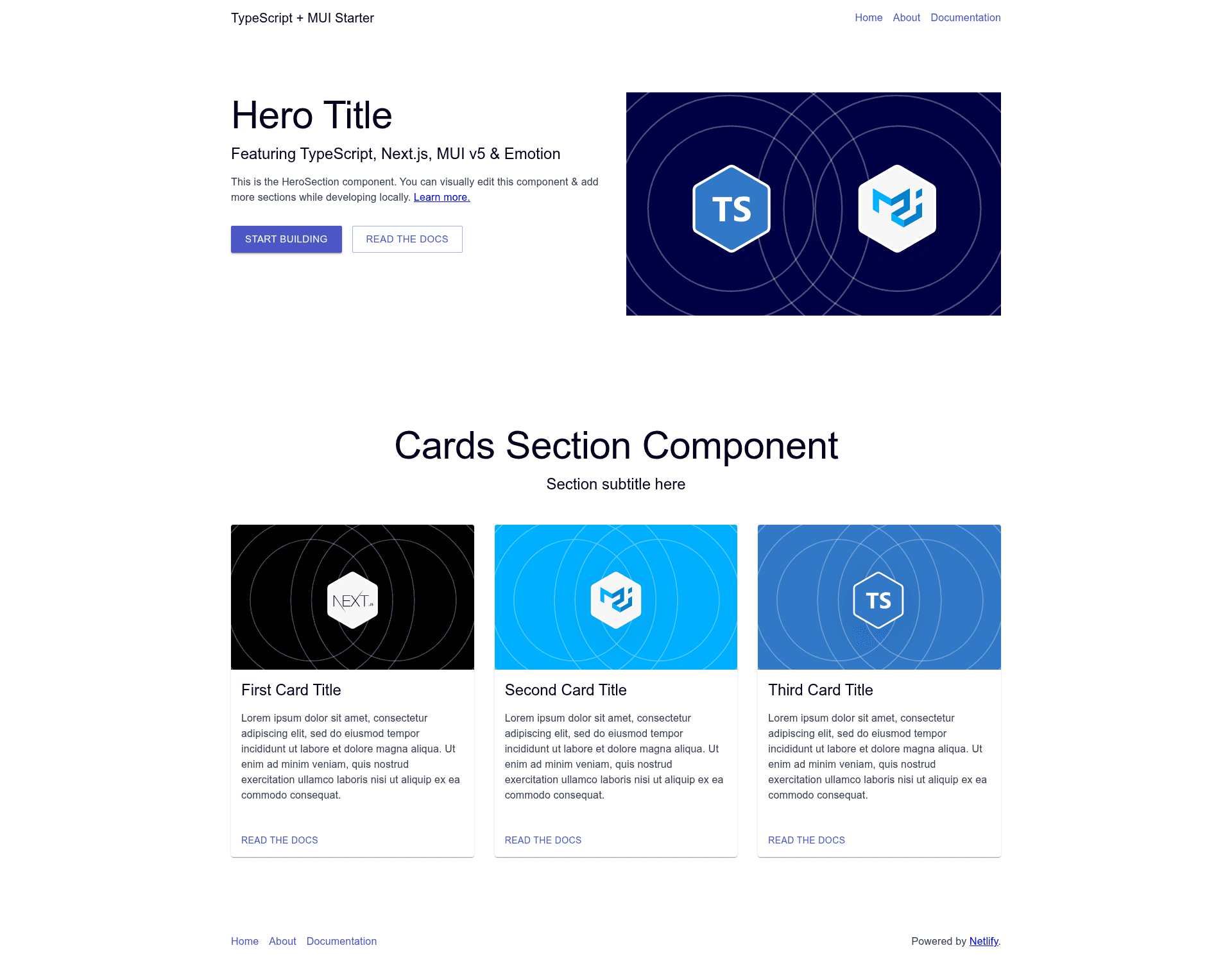
This starter is a Netlify Create project published by the netlify-templates GitHub organization. It takes markdown pages from the content/pages directory plus a JSON site configuration in content/data/config.json and renders them into static HTML through Next.js static site generation. The template includes a few basic sections — HeroSection and CardsSection — and automatically adds header and footer elements to every page. The source code is licensed under MIT and a live demo is hosted at ts-mui-starter.netlify.app.
Key Features
The starter keeps its scope intentionally small so you can see exactly how a component library, a content model, and TypeScript fit together:
- Flexible Pages — A simple page model: each markdown file in content/pages with YAML frontmatter becomes a page; frontmatter declares which sections, such as HeroSection or CardsSection, to render.
- Basic Components — Ships with a few section components (HeroSection, CardsSection) and atom-level UI components under src/components/atoms and src/components/sections.
- Layout Elements — Header and footer are automatically added to every page, configured globally via content/data/config.json.
- TypeScript Support — Components and content are type-safe; shared types live in the src/types directory, and the MUI theme lives in src/utils.
- MUI Integration — Material-UI v6 is wired in with Emotion for CSS-in-JS and custom theming.
- Static Site Generation — Next.js SSG produces static pages for fast production loads.
- Netlify Deployment — The Deploy to Netlify button creates a new repo that mirrors this one and sets up deployment immediately.
- Markdown Frontmatter — Content is managed through markdown files with a small frontmatter block, so adding a page is a matter of writing a few lines.
Who is it for?
This template suits developers and teams who want a minimal, transparent starting point rather than a fully featured theme.
- Next.js developers — want a reference implementation of MUI v6 with TypeScript, Emotion, and custom theming already configured.
- Developers evaluating Netlify Create — can use this starter to test how markdown frontmatter maps to page sections and how the Netlify visual editing workflow behaves.
- Content-driven site builders — prefer editing markdown files over a database and want a content model they can extend.
- Web designers prototyping — a small MUI-based site with header, footer, hero, and cards sections is a fast starting point for a landing page or documentation site.
Use cases
- Landing page prototypes: Drop a few markdown files with HeroSection and CardsSection frontmatter to generate a static landing page with MUI components.
- Personal or project documentation: Use the built-in markdown pages and config.json to spin up a small documentation site with a consistent header and footer.
- Netlify workflow experiments: Deploy to Netlify with the one-click button to see the entire CI/CD setup running in minutes.
- Component library learning: Study this small codebase to see how typed components, content types, and a theme are organized in a Next.js + TypeScript project.
How does the starter work?
Clone the repository, run npm install, then npm run dev to start the development server on http://localhost:3000. To add a page, create a markdown file under content/pages with YAML frontmatter declaring a title, a page type, and an array of sections; edit content/data/config.json to change header, footer, and site settings. Run npm run build for a production build and npm start to serve it.
FAQ
Is the Next.js + TypeScript + MUI Starter free?
Yes, the repository is published under the MIT license, so you can use it freely for personal or commercial projects.
What content formats does it support?
The starter uses markdown files with YAML frontmatter for pages and JSON for the site configuration in content/data/config.json. There is no database or external CMS; content is committed directly to the repository.
Does it work with the Netlify Visual Editor?
The repository carries the visual-editor topic and is described as a starting point for a Netlify Create project, so it is intended to integrate with Netlify's visual editing workflow for content managers.
What versions of Next.js and MUI does it use?
It uses Next.js 16, React 19, TypeScript, and MUI v6, with Emotion as the CSS-in-JS engine.
How do I deploy it?
Click the Deploy to Netlify button on the repository page, which creates a copy of the repo and deploys it to Netlify. A live demo of the deployed site is available at ts-mui-starter.netlify.app.