Template details
V&G Blue
A responsive Hugo blog theme with a perfect Lighthouse score, flexible home page, and 30+ social network icons.
About this template
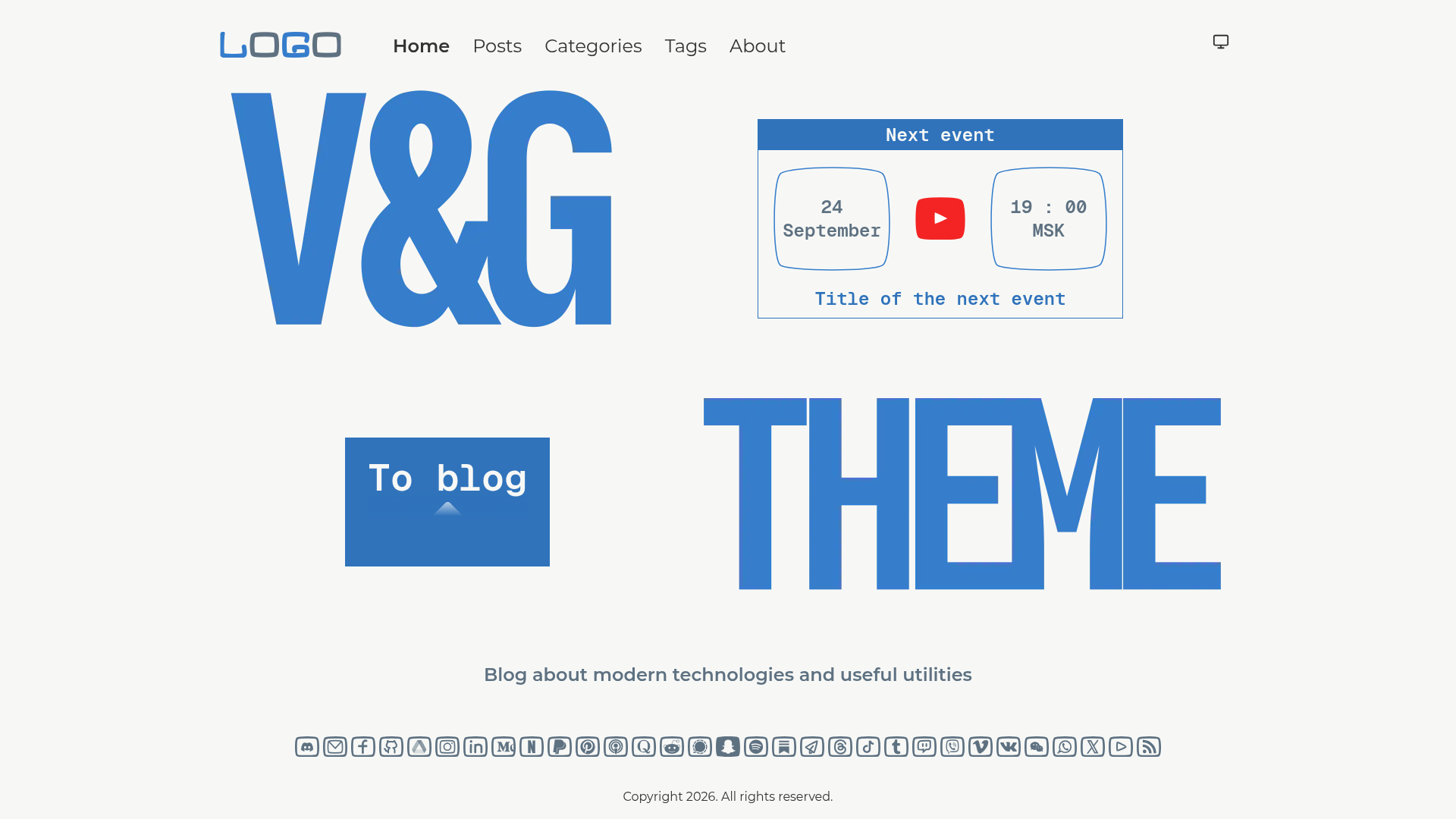
V&G Blue is a responsive Hugo blog theme that achieves a perfect 100/100/100/100 Lighthouse score on desktop and mobile, includes a configurable home page with an optional next-event block, and provides over 30 social network icons out of the box.
What is V&G Blue?
V&G Blue is a Hugo blog theme published by ismd on GitHub that turns standard Hugo content into a responsive, accessible blog with categories, tags, and a fixed sidebar. The theme takes Hugo posts and pages as input and renders a complete blog layout that includes a home page, tags page, categories sidebar, about page, and single post pages. It runs on the Hugo static site generator, so output is plain HTML/CSS/JS and can be hosted anywhere.
Key Features
- Perfect Lighthouse score — scores 100/100/100/100 across Performance, Accessibility, Best Practices, and SEO on both desktop and mobile.
- Next event block — a built-in home-page section for announcing upcoming events, with three position options:
top,bottom, ornone. - 30+ social icons — includes mainstream networks (X, Instagram, LinkedIn, YouTube, GitHub) and niche ones (Signal, Substack, Threads, WeChat, Viber, VK).
- Responsive layout — hamburger menu and HiDPI (2x) image support for high-resolution displays.
- Tag filtering — the tags page filters in place and keeps the URL state, so filtered views can be shared or bookmarked.
- Categories sidebar — a collapsible sidebar list organizes posts by category.
- About page tabs — sectioned profile content can be displayed with tabs.
- Giscus comments — optional comment system for single post pages, enabled via configuration.
Who is it for?
- Bloggers — publish posts with categories and tags, and get a fast, accessible site.
- Event organizers — use the home-page event block to announce meetups or conferences.
- Personal site owners — use the about page with tabs to present profile sections.
- Open-source project maintainers — use the sidebar and social icons to link to their projects and profiles.
What can you do with it?
- Announce an upcoming event — set
homeEventPositiontotoporbottomto feature an event at the top or bottom of the home page, ornoneto hide it. - Share filtered tag views — filter the tags page and share the resulting URL with its state intact.
- Add comments to posts — enable Giscus and paste the Giscus script with your repo, category, and IDs.
- Customize home logos — replace
assets/home-logo-top.pngandassets/home-logo-bottom.png; remove the bottom logo file to hide it.
How does it work?
Installation is done either through Hugo Modules (recommended) or as a git submodule. With Hugo Modules, you add the theme to your site config, then run hugo mod get github.com/ismd/hugo-theme-vng-blue. With git submodule, run git submodule add https://github.com/ismd/hugo-theme-vng-blue.git themes/vng-blue. After installation, configure the home page and social icons in your site config.
FAQ
Does V&G Blue support comments?
Yes, it supports Giscus comments. Enable it in the config by setting giscus.enable to true and adding the Giscus client script with your repository and category details.
What image sizes does the theme recommend?
The home page has two images: the top logo at 1600x530 and the bottom logo at 2080x470. The top-left logo can be any size, but 320x100 is recommended, and the sidebar logo must be at least 440x440 pixels.
Can I hide the event block on the home page?
Yes, set homeEventPosition to none to remove the next-event section entirely. You can also remove the assets/home-logo-bottom.png file to hide the bottom logo.
How do I update the theme when using Hugo Modules?
Run hugo mod get -u github.com/ismd/hugo-theme-vng-blue to update to the latest version. Hugo Modules require Go to be installed on your machine.