Template details
Mizuki
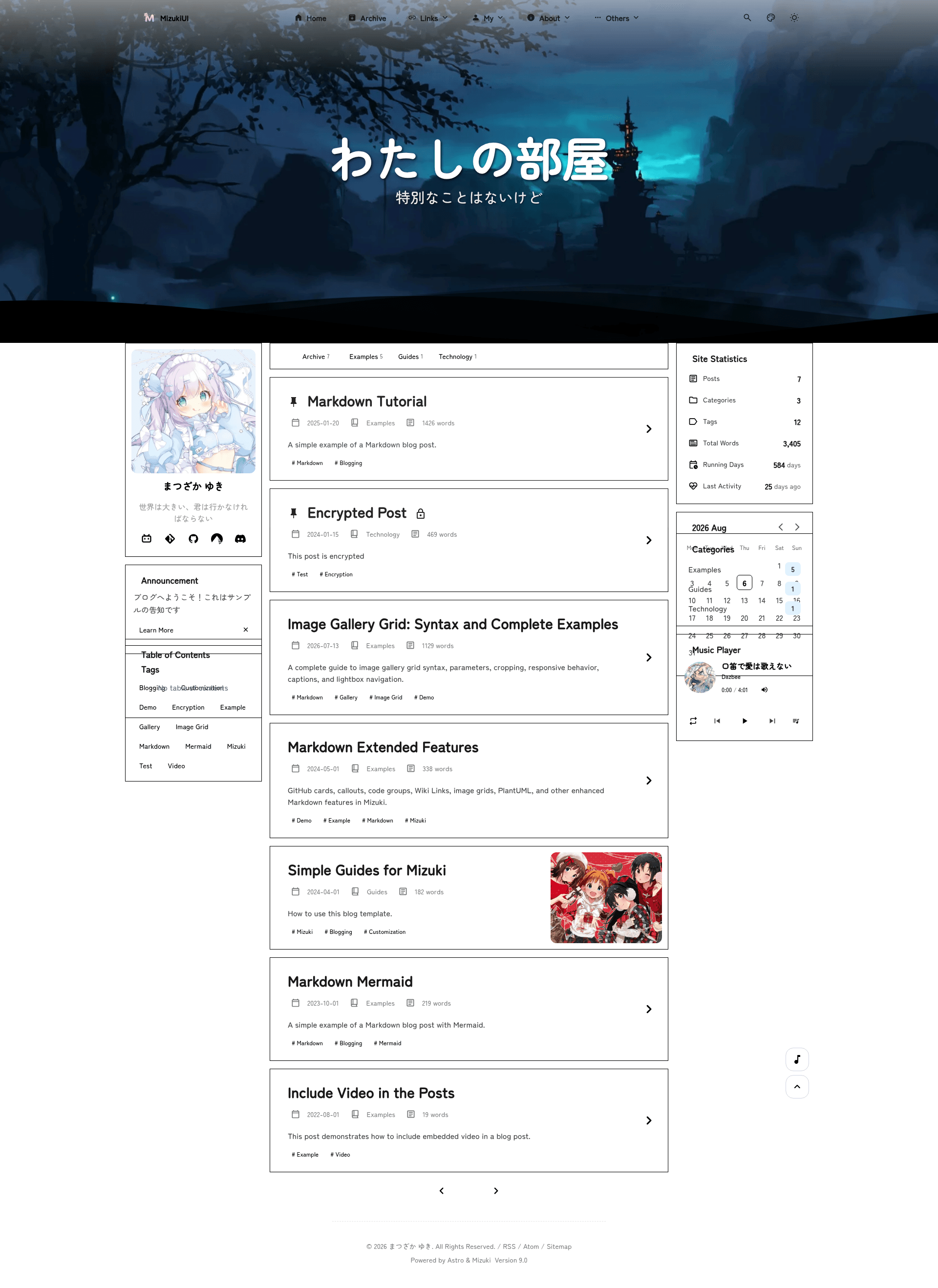
Modern Astro blog template with anime aesthetics, Pagefind search, theme customization, and special pages.
About this template
Mizuki is a modern, feature-rich static blog template built with Astro that gives developers a fully customizable personal blogging platform with anime-inspired aesthetics.
What is Mizuki?
Mizuki is an open-source static blog template powered by Astro 7.0.4 and TypeScript 6.0.3, created by LyraVoid. It takes Markdown content from src/content/posts/ and renders a complete blog site with special pages, search, and theming. The template outputs a static site via astro build and can be deployed to any static hosting platform.
Key Features
- Tech stack — Built with Astro, Tailwind CSS, and TypeScript; styled with JetBrains Mono font.
- Search — Full-text search powered by Pagefind.
- Content enhancements — Extended Markdown with callouts, KaTeX math formulas, GitHub cards, and code highlighting via Expressive Code.
- Theme system — Light/dark mode with system detection, customizable hue theme colors, and banner carousel with blur effects.
- Special pages — Includes Anime Tracking, Friends, Diary, Archive, and About pages.
- Performance & SEO — Lazy loading, caching, sitemap generation, and meta tags.
- Interactivity — Page transitions via Swup, PhotoSwipe image galleries, and Twikoo comment integration.
- Config-driven components — Sidebar components are managed through a unified
sidebarLayoutConfig.
Who is it for?
- Personal bloggers who want a feature-complete blog without building from scratch.
- Anime fans looking for a themed blog that includes an anime tracking page.
- Developers who want a TypeScript-safe, configurable Astro starter with content separation mode.
- Teams that need code-content separation with private content repositories.
What can you do with Mizuki?
- Bloggers: Write Markdown posts with frontmatter for draft, pinned, comment, and language settings.
- Anime enthusiasts: Track watching progress and ratings on the dedicated anime page.
- Content managers: Use the diary page to share life moments, and the friends page to showcase links.
- Developers: Use commands like
pnpm new-postto scaffold posts, and deploy to Vercel, Netlify, GitHub Pages, or Cloudflare Pages.
How does Mizuki work?
Mizuki uses a content-first workflow. You clone the repository, install dependencies with pnpm, edit src/config.ts for site settings, and write posts in Markdown with frontmatter. Run pnpm dev to preview locally or pnpm build to generate a static site in ./dist/. An optional content separation mode syncs content from a separate GitHub repository by setting ENABLE_CONTENT_SYNC=true in a .env file.
Pricing
Mizuki is free and open source under the Apache License 2.0. It also includes third-party MIT-licensed code from Fuwari and Firefly.
Alternatives
- Fuwari — the original template Mizuki is based on, with a similar Astro and Tailwind foundation.
- Yukina — an elegant blog template that inspired Mizuki's design.
- Firefly — a template with dual-sidebar and dual-column layouts that contributed design ideas.
- Twilight — a template with dynamic wallpaper modes and responsive transitions.
FAQ
Is Mizuki free?
Yes, Mizuki is open source and free to use under the Apache License 2.0. You can modify and deploy it for personal or commercial projects.
What are the Node.js and pnpm requirements?
Mizuki requires Node.js version 22 or higher and pnpm version 9 or higher. Dependencies are installed with pnpm, and the development server runs on localhost:4321.
Can I separate content from code?
Yes, Mizuki supports a content separation mode. Set ENABLE_CONTENT_SYNC=true in a .env file and provide a content repository URL to sync posts automatically before development.
How do I pin an article?
Set pinned: true in the article's frontmatter. Pinned articles appear at the top of the blog list, sorted by publication date, before regular articles.
Does Mizuki support comments?
Yes, through Twikoo. Enable the global comment system in src/config.ts, then control per-article comments with the comment frontmatter field.