Template details
Yummy Jekyll Theme
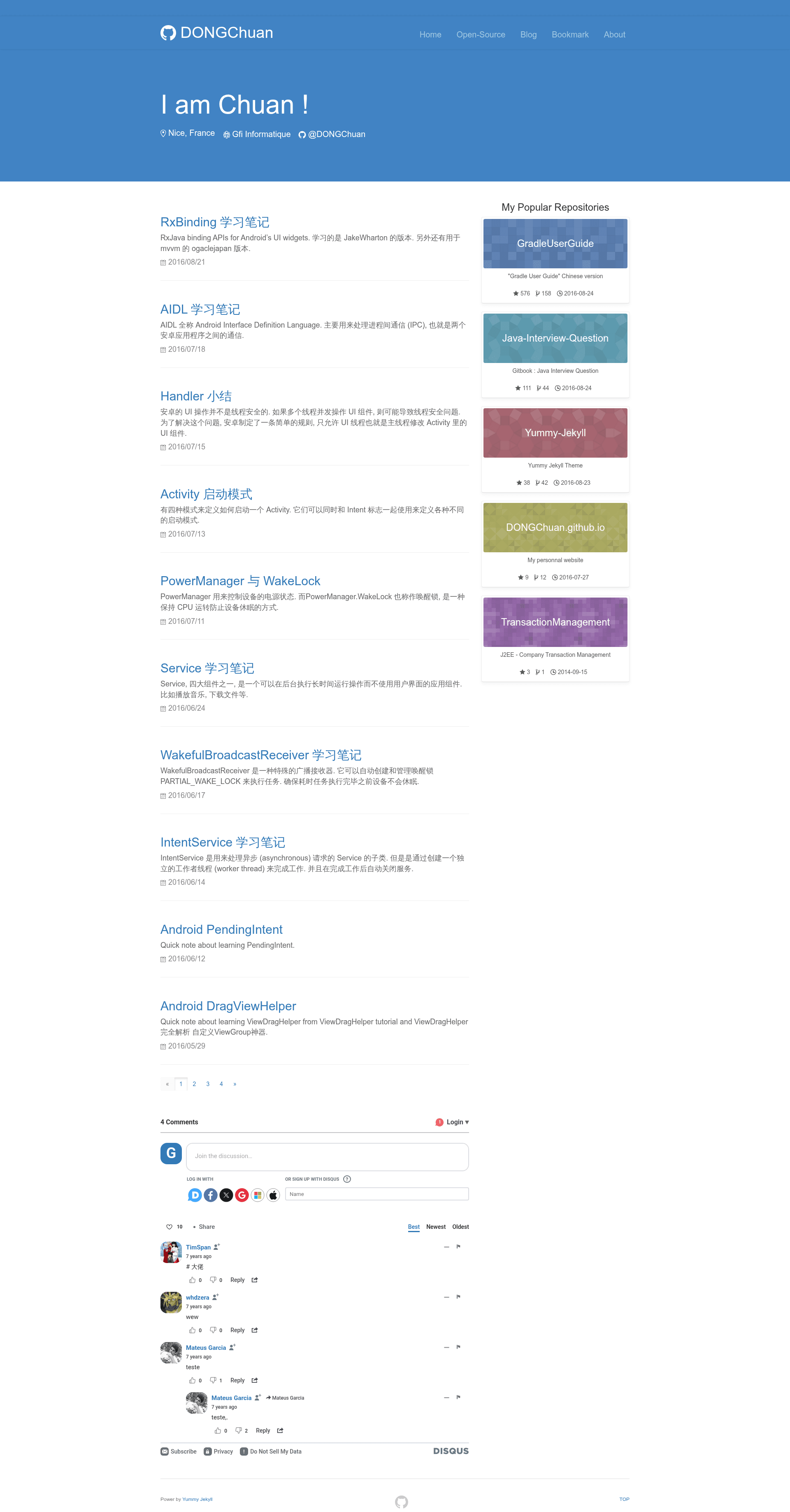
A Bootstrap-based Jekyll theme for developers to showcase GitHub projects, blog with timelines, and manage bookmarks.
About this template
Yummy is a free, open-source Bootstrap-based Jekyll theme built for developers who want a personal website that blends a blog, a GitHub project showcase, and a bookmark collection. The theme was created by DONGChuan and is compatible with Jekyll 3.x and GitHub Pages.
What is Yummy Jekyll Theme?
Yummy Jekyll Theme is a static-site theme that runs on Jekyll, the Ruby-based blog-aware static site generator, and is designed to deploy on GitHub Pages. It takes standard Jekyll Markdown posts, a GitHub username, and a bookmark list as inputs, and produces a personal website with a homepage, blog timeline, open-source project pages, and a bookmark page. The theme is built on the Bootstrap framework and styled with its default CSS grid and components.
Key Features
- GitHub Module — Automatically pulls and displays your public GitHub repositories on both the sidebar and a dedicated open-source page, using GitHub metadata instead of API calls so there is no request delay.
- Post Module — Renders all your blog posts as a visual timeline on the blog page, using Jekyll's standard
_postsfolder structure. - Bookmark Module — Lets you collect libraries, tools, and books by editing a single
bookmark.mdfile; the page is generated automatically from that file. - Post Navigation Module — Scans each post's headings (titles and subtitles) and generates a table-of-contents directory automatically; set
no-post-nav: truein a post's Front Matter to hide it. - Disqus Integration — Supports Disqus comments on posts so visitors can leave comments without you building a custom system.
- Google Analytics — Includes built-in support for Google Analytics tracking by adding your tracking ID to the configuration.
- Jekyll 3.x and GitHub Pages Ready — Designed for Jekyll 3.x and GitHub Pages, so you can publish the site by pushing to a
Username.github.iorepository.
Who is it for?
- Developers who want a personal landing page that also shows off their open-source repositories; the GitHub Module does this automatically from their profile.
- Technical bloggers who want a clean, Bootstrap-based blog with timeline post listings and automatic per-post navigation.
- Tool and resource collectors who want a simple bookmark page to keep track of libraries, tools, and books they like, maintained through one Markdown file.
What can you do with Yummy Jekyll Theme?
- Personal branding: Publish a personal site on GitHub Pages that shows your bio, about page, and GitHub projects in one place.
- Blogging: Write posts in Markdown with Jekyll's frontmatter for layout, title, category, and tags; the theme handles listing and navigation.
- Curating resources: Keep a public bookmark page of useful tools and books by editing
bookmark.md. - Showcasing open source: Display all your public repositories automatically on the open-source page and sidebar, so visitors can see your work without extra configuration.
How to install and set up
- Fork the repository and clone it locally.
- Run
bower installto install the Bootstrap and other front-end dependencies defined inbower.json. - Run
bundle installto install Jekyll and its Ruby dependencies defined in theGemfile. - Update
_config.ymlwith your own site settings. - Add your posts in
/_postsusing the standard Jekyll filename format (for example,2016-01-19-i-love-yummy.md). - Commit and push to your
Username.github.iorepository, then the theme will be live.
FAQ
Is Yummy Jekyll Theme free?
Yes, the theme is open source under the Apache License 2.0. You can use, modify, and distribute it freely, and the repository is available on GitHub.
Does Yummy Jekyll Theme work with GitHub Pages?
Yes, it is specifically designed to work with Jekyll 3.x and GitHub Pages. The recommended workflow is to fork the repository and rename it to Username.github.io.
Can I hide the post navigation?
Yes. For any post where you do not want the automatic heading-based directory, set no-post-nav: true in the post's Front Matter.
What do I need to install the theme locally?
To run the theme locally you need Bower and Bundler installed. Then run bower install and bundle install; the theme's README links to Stack Overflow fixes for common json, jekyll-paginate, and SSL_connect errors.
Note: The README mentions that local testing currently requires an internet connection; the developer says the bug will be fixed soon.