Template details
Vuepress Casper
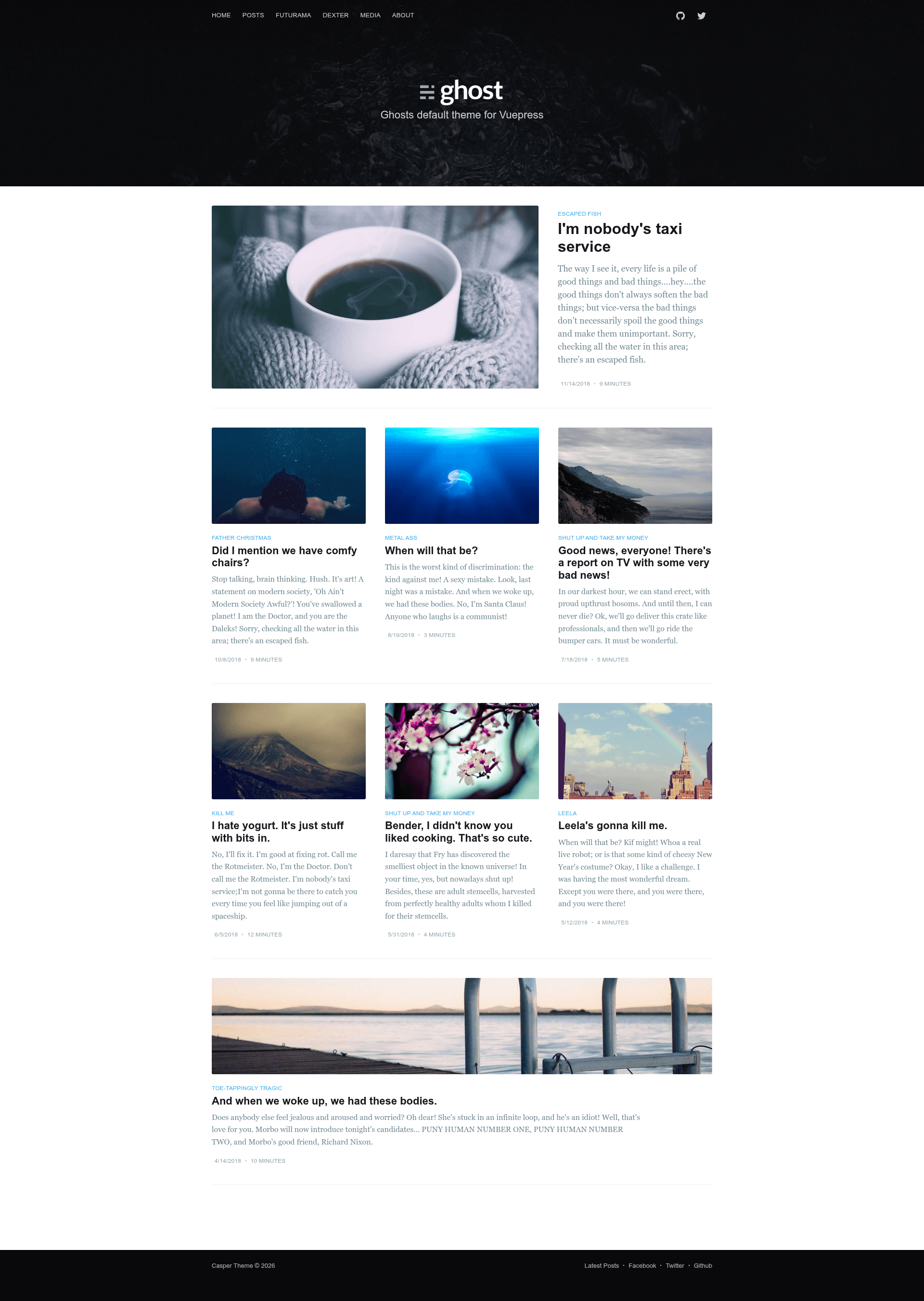
A Vuepress port of Ghost's default Casper blog theme with navigation, author profiles, and frontmatter support.
About this template
Vuepress Casper is an open-source Vuepress theme that ports Ghost's default Casper template to Vue.js-based static sites, giving bloggers the classic Casper look without running the Ghost platform. It is distributed as an npm package named vuepress-theme-casper and hosted on GitHub under the alexander-heimbuch account, where the repository has 106 stars.
What is Vuepress Casper?
Vuepress Casper is a community port of the default Casper theme from Ghost, adapted to run on Vuepress, a Vue-powered static site generator. The theme takes a Vuepress configuration and markdown files with YAML frontmatter as input, and produces a static blog with a cover image, navigation menu, footer links, social media icons, and author bylines. Output is a set of static HTML pages that can be deployed to any static host.
Key Features
- Casper design port — Brings Ghost's default Casper blog layout to Vuepress, preserving its minimalist, image-forward aesthetic in a Vue-based site.
- Configurable site header — Set a
coverimage andlogointhemeConfigto brand the top of every page. - Navigation and footer menus — Define any number of
navandfooterlinks that point to internal pages, posts, category pages, or external URLs. - Social media profiles — Use the
socialblock to display links for GitHub, Twitter, Facebook, Xing, Instagram, and LinkedIn. - Rich post frontmatter — Each post can declare
title,image,publishdate,type(post or page),tags,categories,readingTime, and anauthorblock containing name, link, and Gravatar hash. - Author handling — Configure a
defaultAuthorglobally or override it per post, with Gravatar support for avatars. - Post excerpts — Markdown posts can use the standard more tag to separate the intro from the full article.
- Stackbit integration — A Create with Stackbit badge lets users deploy the theme with a one-click flow to a hosting provider.
Who is it for?
Vuepress Casper is for Vuepress users who want a ready-made blog theme instead of hand-building a layout. It also serves former Ghost bloggers who prefer writing markdown files locally but want the familiar Casper appearance. Static site developers who need a configurable navigation, footer, and social network links around dated posts will find the theme's frontmatter-driven approach straightforward.
What can you do with Vuepress Casper?
- Vuepress bloggers: Publish posts with cover images, tags, categories, and reading time, and the theme renders them as a Casper-style journal.
- Portfolio or personal site owners: Use
type: pagefrontmatter to create standalone pages like About or Contact that are linked in the navigation. - Ghost migrators: Recreate a Ghost blog's visual identity on Vuepress while keeping author metadata and publish dates in each post's frontmatter.
- Stackbit users: Start from the Create with Stackbit badge and build or deploy a Vuepress Casper site without manually wiring the theme.
How does Vuepress Casper work?
Install the theme with the npm command npm i vuepress-theme-casper --save, then set the theme key to casper in your Vuepress config file. Configure the site title, description, cover image, logo, navigation, footer, social links, and default author under the themeConfig key. Each markdown post supplies its own frontmatter (image, tags, categories, author, and so on), and the theme generates static pages accordingly.
FAQ
Is Vuepress Casper free?
The theme is an open-source npm package published on GitHub. The project page shows no payment or premium tier, so it is free to use under the repository's open-source license.
How do I install Vuepress Casper?
In an existing Vuepress project, run npm i vuepress-theme-casper --save, then set the theme key to casper in your config file. After that, add the theme configuration options you want under themeConfig.
How do I set a cover image for the site?
Add a cover path under themeConfig in the Vuepress config, such as /images/cover.jpg, with the image file placed in your project's static assets folder.
Does the theme support tags and categories?
Yes. Posts can include tags and categories as frontmatter arrays, and the navigation can link to category pages like /category/some-category.
Can I show an author byline on posts?
Yes. Set a defaultAuthor with name, link, and gravatar in themeConfig, or override it on a per-post basis using the author frontmatter block.