Template details
Webjeda Hagura
A lightweight, minimal Jekyll theme for text-focused blogs, featuring a switchable dark mode and fast loading on slow connections.
About this template
Webjeda Hagura is a lightweight, minimal Jekyll theme designed for blogs with long text paragraphs, offering a switchable dark theme and instant loading even on slow data connections.
What is Webjeda Hagura?
Webjeda Hagura is a free and open-source Jekyll theme built for publishing long-form text on the web. It takes content written in Markdown and generates a static blog site, ready to host on GitHub Pages. The theme emphasizes readability with carefully chosen fonts and a clean layout, and it is developed by Webjeda under the MIT License.
Key Features
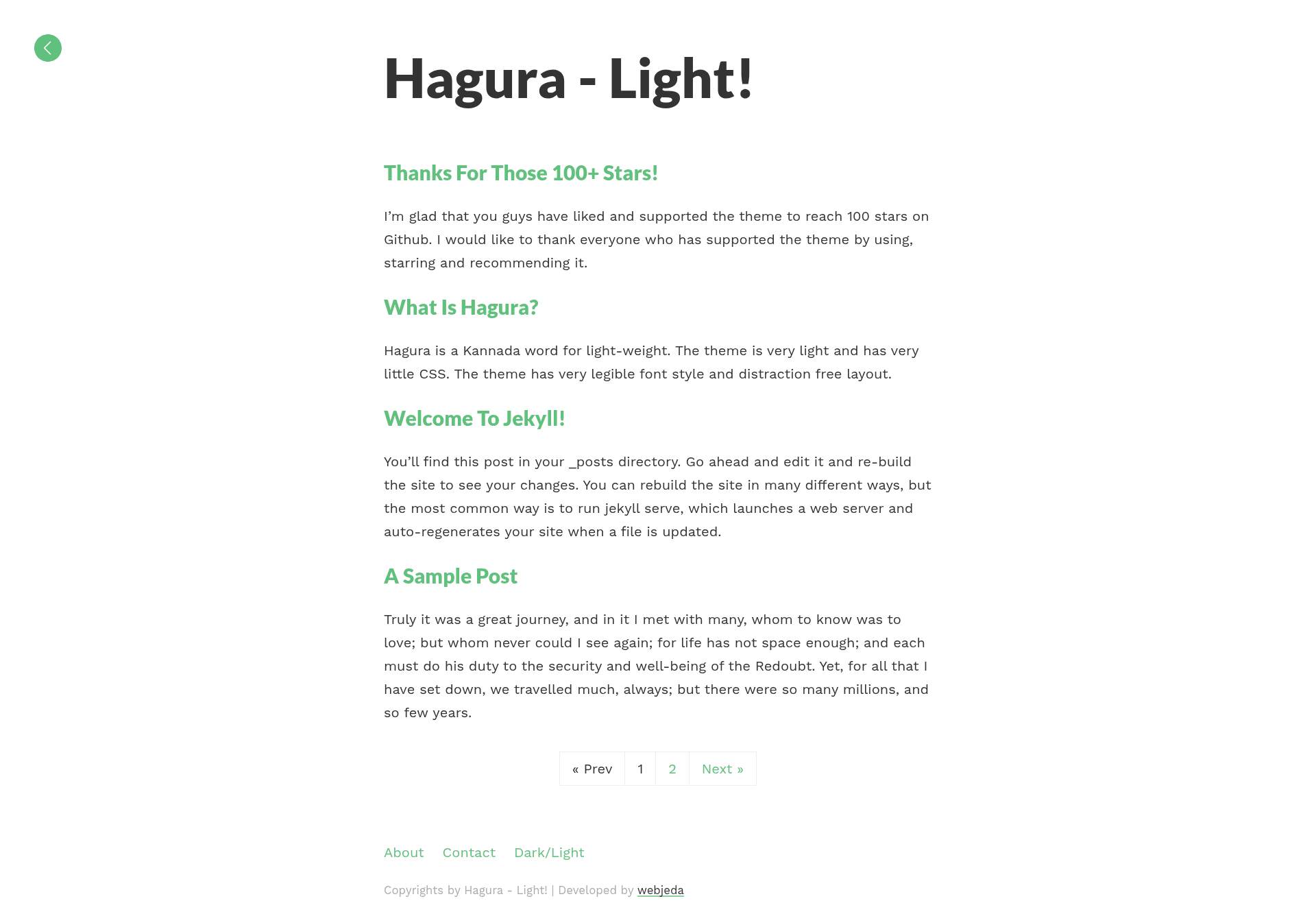
- Switchable light and dark themes — Readers can toggle between the default light theme and a dark theme via a control, with both looks demonstrated in the theme's screenshots.
- Optimized for long-form reading — Suitable fonts and a minimal layout make it easy on the eyes for blogs with long text paragraphs.
- Lightweight and fast — The theme is very light, so pages load instantly even on slow data connections, which the creator notes is ideal for smartphone reading.
- Pre-installed integrations — Analytics, Disqus comments, and an HTML compressor are included out of the box; you must update the relevant keys in the _config.yml file.
- Responsive design — The layout adapts to different screen sizes, with a responsive screenshot showing mobile and desktop views.
- Ready for GitHub Pages — Installation is done by forking the repository and setting the GitHub Pages source to master; the site then appears at username.github.io/hagura/.
- MIT licensed — The theme is free to use, modify, and distribute for personal or commercial projects.
Who should use Webjeda Hagura?
- Personal bloggers who publish long articles or essays and want a clean, readable theme with minimal setup.
- Developers who need a fast, responsive Jekyll theme to deploy on GitHub Pages without paying for hosting.
- Writers focused on mobile readers — the theme's lightweight nature and smartphone-first design make it a good fit for audiences on slow connections.
What can you do with Webjeda Hagura?
- Set up a blog quickly: Fork the repository, update the _config.yml with your site details, and publish at username.github.io/hagura/ with comments and analytics already wired in.
- Provide a dark mode for your readers: Use the built-in theme toggle so visitors can switch to a dark appearance, which can reduce eye strain during night reading.
- Customize the theme via development: Make changes on the master branch and create pull requests to modify the layout, styling, or content structure, while the gh-pages branch hosts the live theme.
How does Webjeda Hagura work?
The installation process is simple: fork the GitHub repository, go to the repository settings, and set the GitHub Pages source to master. Your site is then live at https://username.github.io/hagura/. For development, you make changes on the master branch and submit pull requests; the gh-pages branch is used solely to host the theme itself.
FAQ
Is Webjeda Hagura free?
Yes, Webjeda Hagura is released under the MIT License, so it is free to use, modify, and distribute, including for commercial projects.
How do I install Webjeda Hagura?
Fork the repository on GitHub, navigate to Settings, and set the GitHub Pages source to master. Your site will be ready at username.github.io/hagura/ after the build completes.
Does Webjeda Hagura support a dark mode?
Yes, the theme includes a switchable theme that lets readers toggle between the default light appearance and a dark theme, as shown in the theme's screenshots.
What integrations are included?
The theme comes pre-installed with analytics, Disqus for comments, and an HTML compressor. You need to change the relevant key parameters in the _config.yml file before going live.
Can I use Webjeda Hagura for a non-blog site?
The theme is designed specifically for blogs with long text paragraphs, so it is best suited for text-heavy content rather than image galleries or e-commerce sites.