Template details
Zaggonaut
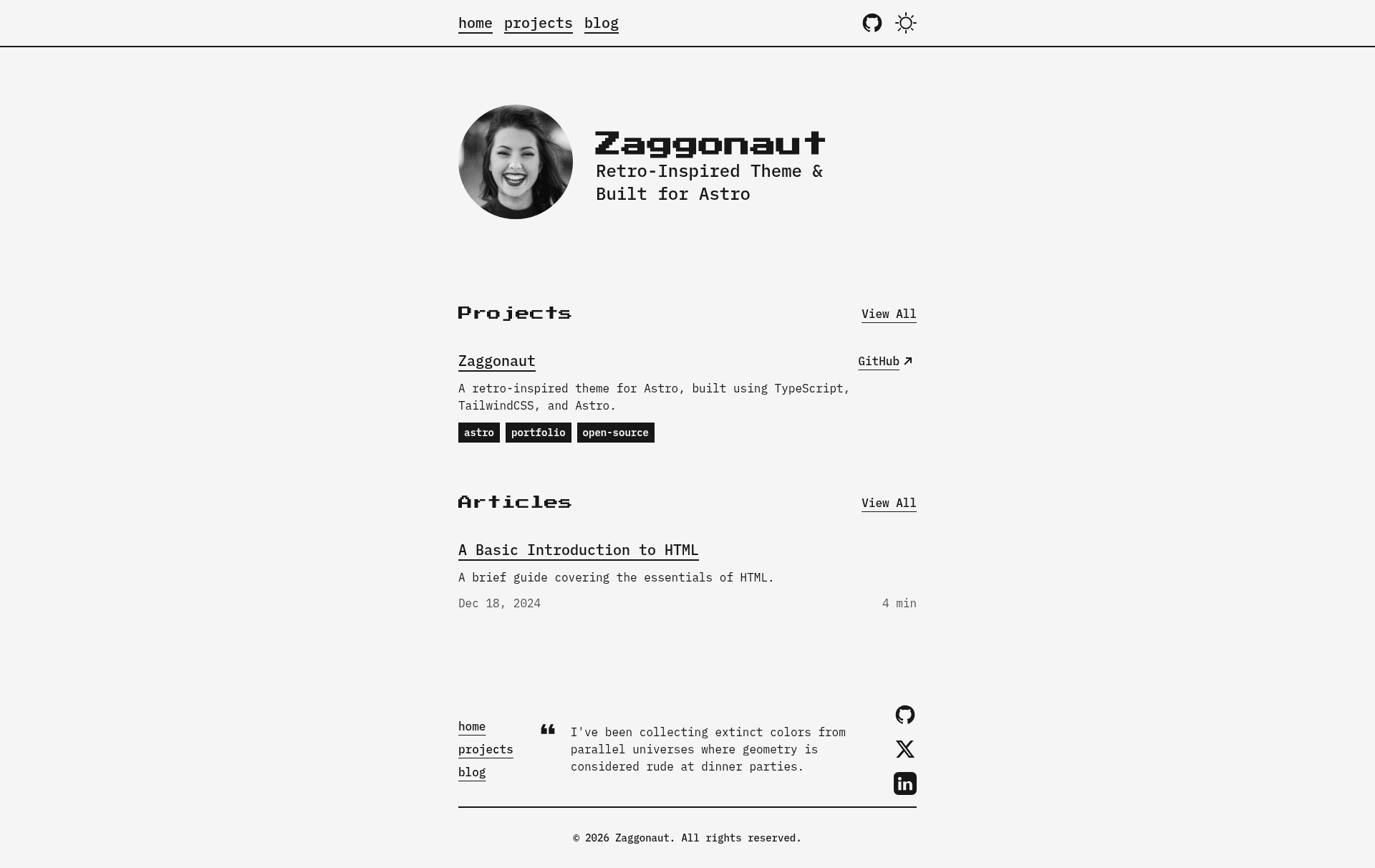
A retro-inspired black & white theme for Astro built with TypeScript, TailwindCSS, and Astro.
About this template
Zaggonaut is a retro-inspired black & white Astro theme built with TypeScript and TailwindCSS that generates a static personal website with blog and project sections from Markdown content.
What is Zaggonaut?
Zaggonaut is a retro-inspired black & white theme for Astro, built using TypeScript, TailwindCSS, and Astro itself. It takes Markdown files from a content directory as input and produces a fully static website with organized blog and project pages. The theme is maintained by RATIU5 and is available as an open-source repository on GitHub. The current version uses Astro 7 and supports only the pnpm package manager.
Key Features
- Content Collections — Blog posts and projects are defined as Markdown files with frontmatter, enabling type-safe content queries within the Astro framework.
- Dark & light mode — Built-in theme switching lets visitors toggle between dark and light color schemes.
- Customizable colors — The entire color palette is controlled by CSS variables in
src/styles/global.css, including eight variables like--color-zag-darkand--color-zag-accent-light. - 100/100 Lighthouse score — The theme is optimized to achieve perfect scores on performance, accessibility, best practices, and SEO.
- Fully accessible — The theme is designed to be accessible to all users.
- Fully responsive — Layouts adapt gracefully to mobile, tablet, and desktop viewports.
- Type-safe — Built with TypeScript, the theme provides compile-time type checking throughout the codebase.
- SEO-friendly — The theme is SEO-friendly, with metadata configuration available in
content/configuration.toml.
Who is it for?
- Personal bloggers — Write Markdown posts in
content/blogs/and get a clean, retro-styled blog with automatic list and detail pages. - Portfolio owners — Showcase projects by adding Markdown files to
content/projects/with frontmatter metadata, creating a professional portfolio. - Developers — Scaffold a new Astro project with
pnpm create astro@latest --template RATIU5/zaggonautand customize the TypeScript and TailwindCSS source.
What can you do with Zaggonaut?
- Start a personal blog — Publish Markdown blog posts with metadata in frontmatter; the theme generates a content-collection-driven blog.
- Showcase your work — Add projects to the projects collection and display them on your portfolio.
- Customize the entire look — Edit CSS variables in
global.cssto change the black-and-white theme to any color palette.
How does Zaggonaut work?
Zaggonaut runs on Astro and uses Content Collections to read Markdown files from the content directory. Your site metadata, social links, and text content are stored in content/configuration.toml; blog posts live in content/blogs/ and projects in content/projects/. After editing these files, Astro builds a static site with HTML, CSS, and JavaScript.
FAQ
Does Zaggonaut support npm?
No. The theme currently supports only pnpm as the package manager because npm throws peer-dependency conflicts. Use pnpm for installation and development.
Which Astro version does Zaggonaut use?
Zaggonaut uses Astro 7, as noted in the project's README. The v1 branch contains the original version of the theme.
How do I change the accent color?
Edit the CSS variables in src/styles/global.css. The theme defines variables such as --color-zag-accent-light and --color-zag-accent-dark; change their values to update the accent color across the entire site.