Template details
Accessible Minimalism
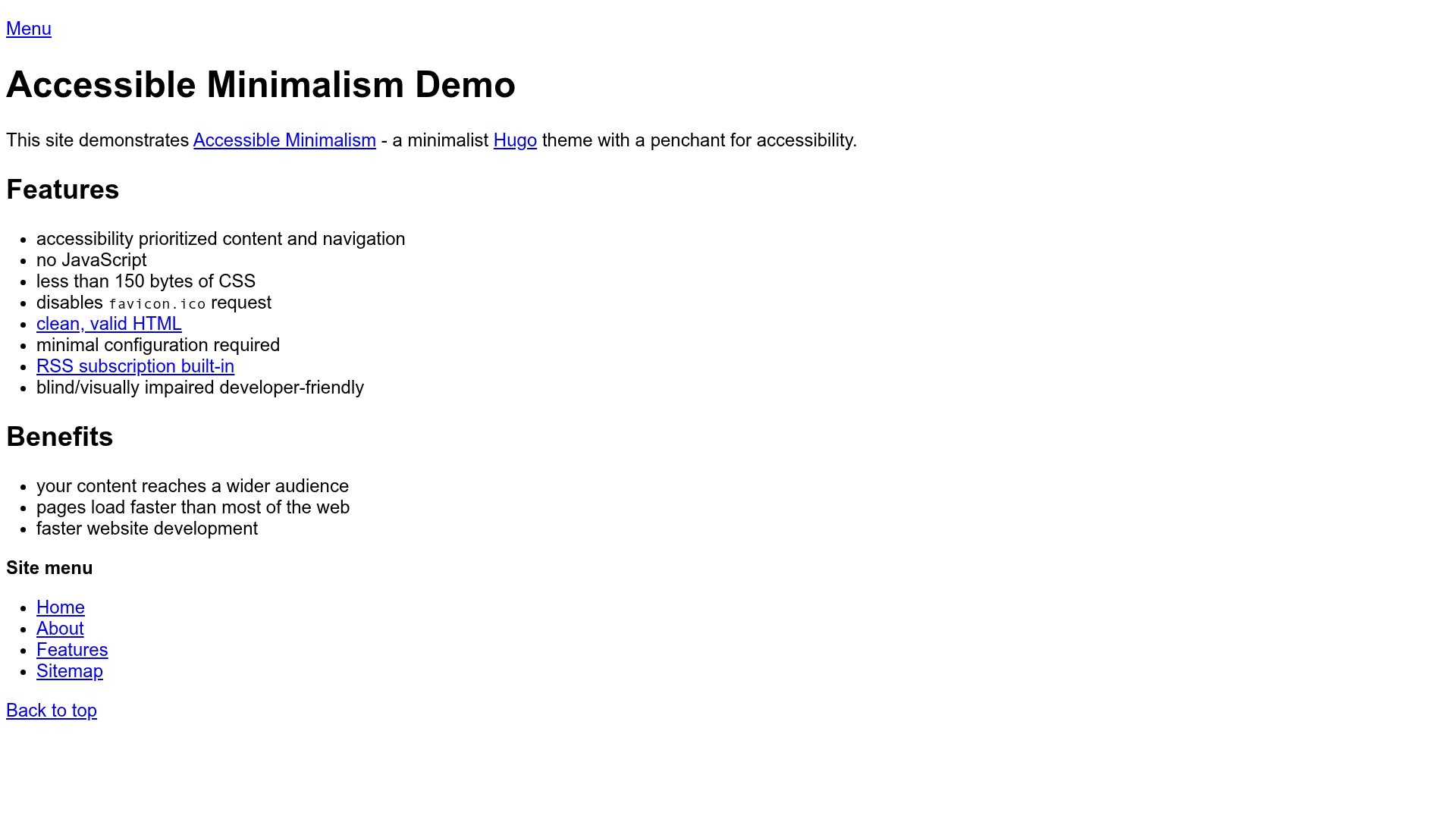
Minimalist Hugo theme focused on accessibility, producing lightweight, semantic HTML5 pages with RSS support.
About this template
Accessible Minimalism is a minimalist Hugo theme for building lightweight, accessible static websites, with semantic markup and built-in RSS support. It takes Hugo content files and configuration as input and outputs clean, low-bloat HTML pages that prioritize screen-reader usability and minimal CSS.
What is Accessible Minimalism Hugo Theme?
Accessible Minimalism is an open-source Hugo theme designed to generate static websites with a strong emphasis on accessibility and minimal markup. It accepts standard Hugo content directories and a hugo.toml configuration file, producing XHTML 1.0 Strict valid and HTML5-friendly pages. The theme is maintained by leonstafford and demonstrated on a Netlify-hosted demo site at accessible-minimalism.netlify.app.
Key Features
- Valid lean markup — Generates XHTML 1.0 Strict valid and HTML5-friendly code, keeping generated markup to a minimum.
- Screen-reader-first semantics — Uses semantic, minimal markup to fully support fully-blind users, a stated priority that takes precedence over partially or fully sighted users.
- Minimal CSS for low vision — Adds only minimal CSS, relying on default browser colors as high-contrast enough, keeping the stylesheet small.
- RSS subscription support — Lets readers pull content on demand via RSS feeds, reducing reliance on email inboxes or social media.
- Simple configuration — Requires only a
hugo.tomlcopied from theexampleSitedirectory, making startup minimal. - Mobile-last development — The theme is developed mobile-last, prioritizing content accessibility over visual flourish on small screens.
Who is it for?
Accessible Minimalism is for Hugo users who prioritize page weight and inclusivity over JavaScript-heavy visuals. It suits bloggers and content publishers who want their articles readable in text browsers like Lynx and in screen readers, and who value RSS feeds for distribution. It also appeals to developers who prefer clean, readable source code and a minimal starting point for a personal or project site.
What can you do with it?
- Content publishers: Create a blog or news-style site using standard Hugo content files and provide an RSS feed so readers can subscribe to updates.
- Accessibility advocates: Build a site that passes W3C validation and remains navigable in Lynx and with screen readers, verified through tools like WAVE and AChecker.
- Minimalist web developers: Use the theme as a clean, unbloated base for a Hugo project, using the bundled
exampleSitedirectory for structure and configuration guidance.
How does it work?
Install Hugo, then add the theme as a git submodule with the command git submodule add --no-single-branch https://github.com/leonstafford/accessible-minimalism-hugo-theme themes/accessible-minimalism. Copy the hugo.toml from the repository's exampleSite folder to your site root, and run hugo server to preview locally at localhost:1313.
Pros and cons
- Pros: Exceptionally lightweight, outputs valid HTML, and requires minimal configuration, making it fast to set up and load.
- Cons: The project explicitly favors fully-blind users over partially or fully sighted users, so visual accessibility aids for low-vision users are intentionally minimal.
Pricing
The theme is free and open source under The Unlicense, allowing you to do whatever you like with the code.
FAQ
Is Accessible Minimalism Hugo Theme free?
Yes, it is released under The Unlicense, a public-domain-style license that permits unrestricted use, modification, and distribution.
How do I install this Hugo theme?
Add it as a git submodule: git submodule add --no-single-branch https://github.com/leonstafford/accessible-minimalism-hugo-theme themes/accessible-minimalism. Then copy the hugo.toml from the exampleSite directory to your site root and run hugo server.
Does the theme support RSS?
Yes, RSS subscription support is one of the project's stated aims, allowing users to pull your content on demand via RSS feeds.
What testing does the theme undergo?
The theme is checked against the W3C validator, tested with Hugo's basic example content, verified in the Lynx text browser and screen readers, and checked with accessibility tools like WAVE and AChecker.