Template details
Astro Docs Template
Astro documentation starter with Markdown/MDX, i18n, Algolia search, sidebar nav, and dark mode.
About this template
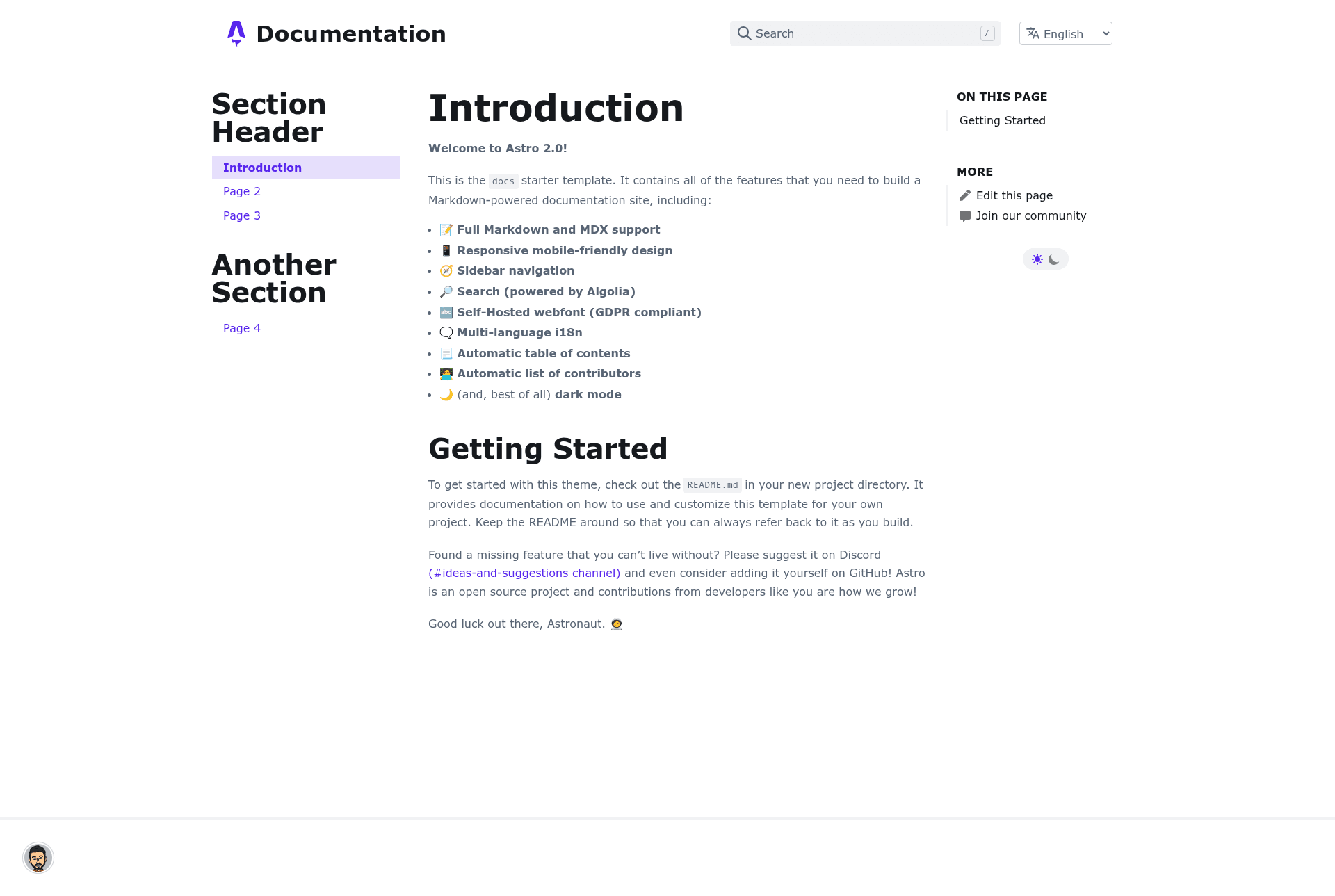
Astro Docs Template is a documentation website starter kit built on the Astro framework that turns Markdown and MDX files into a responsive, multi-language docs site with sidebar navigation, Algolia-powered search, and dark mode.
What is Astro Docs Template?
Astro Docs Template is a GitHub template repository (advanced-astro/astro-docs-template) that scaffolds a documentation site with the Astro static site generator. It takes content authored as Markdown (.md) and MDX (.mdx) files placed under src/content/docs/[lang]/ and generates a production static site in ./dist/ when you run pnpm run build. It installs with the command pnpm create astro@latest -- --template advanced-astro/astro-docs-template and starts a local dev server at localhost:3000 via pnpm run dev. The project is maintained by the advanced-astro organization and ships with a default layout (src/layouts/MainLayout.astro) plus a src/config.ts file that centralizes site metadata, sidebar navigation, and language settings.
Key Features
The template bundles a set of documentation-focused features that work out of the box.
- Full Markdown and MDX support — author content in either format and the template renders it as documentation pages.
- Responsive mobile-friendly design — the layout adapts to small screens without extra work.
- Sidebar navigation — controlled by the
SIDEBARobject insrc/config.ts, organized into section headers and page links. - Search powered by Algolia — integrates DocSearch; add your API key and index name in
src/config.tsand a search box appears in the header. - Self-hosted webfont (GDPR compliant) — font files are served from your own domain, avoiding third-party requests.
- Multi-language i18n — per-language content folders under
src/content/docs/plus aKNOWN_LANGUAGESmap insrc/config.tsenable a language switcher. - Automatic table of contents — generated from page headings with no manual setup.
- Automatic list of contributors — pulls contributor information for each page.
- Dark mode — a built-in toggle that switches the site theme.
Who should use Astro Docs Template?
Astro Docs Template fits anyone who needs a functional documentation site without building a frontend from scratch.
- Open-source maintainers — publish project documentation, API references, and contributing guides from Markdown files without custom frontend code.
- Technical writers — write docs in Markdown or MDX with frontmatter for title and description; the template outputs SEO meta tags and Open Graph data.
- Product teams launching multi-language docs — localize content by adding language directories and updating
KNOWN_LANGUAGESinsrc/config.ts. - Developers who want a quick docs site — preview instantly with the StackBlitz or CodeSandbox links before committing to a local setup.
Use cases
The template supports several concrete documentation scenarios out of the box.
- Open-source projects: publish API reference and user guides by placing
.mdfiles insrc/content/docs/en/and runningpnpm run buildto generate the static site. - Multi-language product teams: create Spanish or other translations by duplicating the content folder, adding an entry to
KNOWN_LANGUAGES, and updating the sidebar config. - Indie hackers and startups: launch a documentation site for a SaaS product with dark mode and search, then deploy the
dist/folder to any static host.
How does the template work?
After scaffolding with create astro, you edit src/config.ts to set your project title, description, default language, sidebar entries, and Algolia DocSearch credentials. Content lives as Markdown or MDX files with frontmatter defining the layout and title/description for SEO. Run pnpm run dev to preview locally or pnpm run build to output a static site to dist/, then follow Astro's deployment guides to go live.
FAQ
Does the template support multiple languages?
Yes. The template includes i18n support out of the box: create a new folder under src/content/docs/ for each language and add the language name to KNOWN_LANGUAGES in src/config.ts. The site header then shows a language switcher.
How do I add search to my docs site?
The template integrates Algolia DocSearch. If your project qualifies for DocSearch (free for open-source projects), put your API key and index name in src/config.ts and the search box automatically appears in the header. If you don't use DocSearch, you can remove the Algolia component by editing src/components/Header.astro.
Can I change the accent color?
Yes. The theme's colors are defined as CSS variables in src/styles/theme.scss. The default is a cool blue accent; change the --theme-accent variable to any color you want.
How do I build and deploy the site?
Run pnpm run build from the project root to generate a static site in ./dist/. You can preview the production build locally with pnpm run preview, and deploy the dist/ folder to any static host, such as Netlify or Vercel, using Astro's deployment guides.