Template details
Astro Flow - Simple Blog
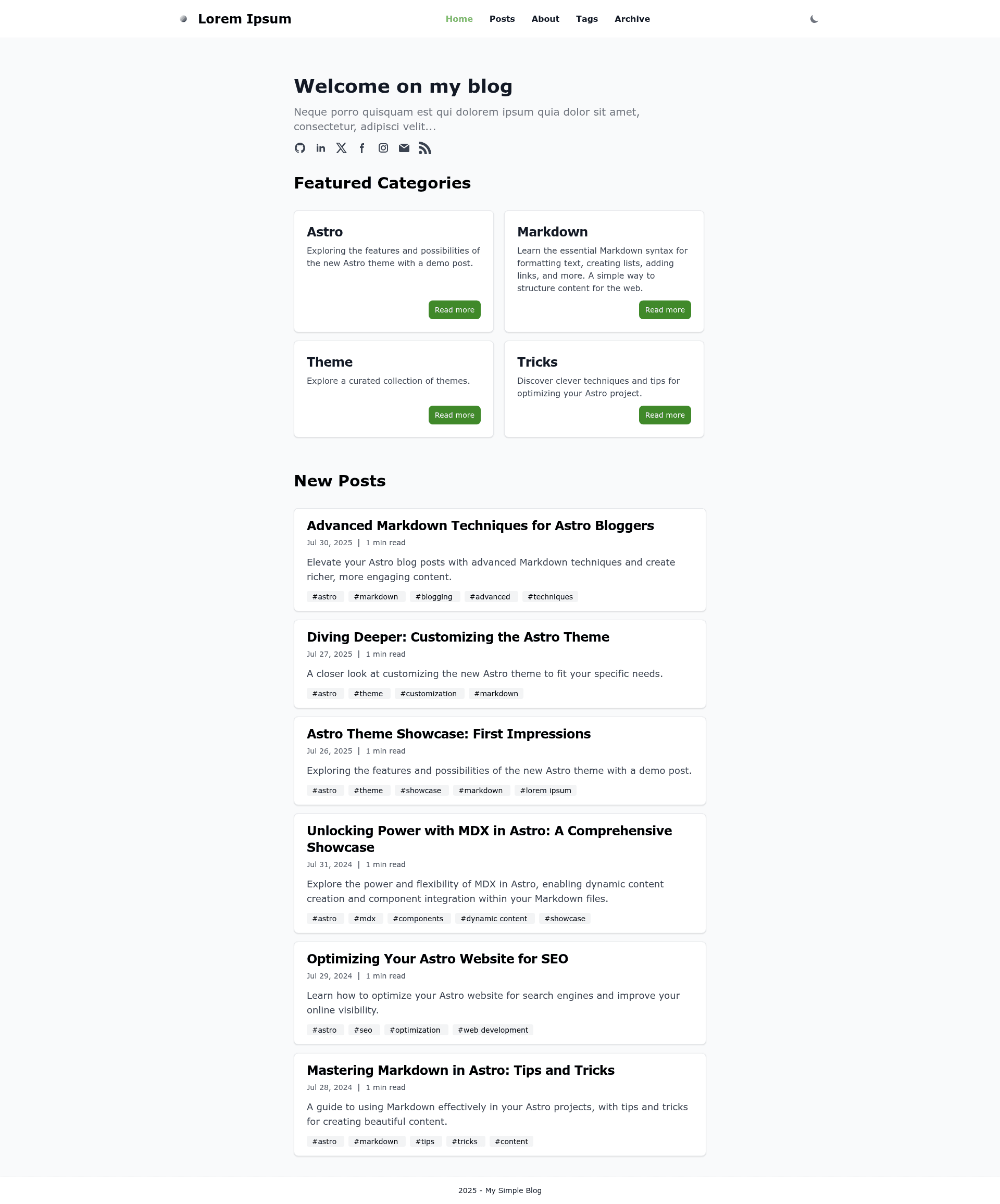
Astro blog theme with Flowbite/Tailwind styling, SEO, RSS, Markdown/MDX, and GitHub Pages deployment.
About this template
Astro Flow - Simple Blog is an open-source Astro blog theme built with Flowbite and Tailwind CSS that generates a fast, SEO-friendly static blog ready for deployment on GitHub Pages.
What is Astro Flow - Simple Blog?
Astro Flow - Simple Blog is a static site template for Astro, the content-focused framework. It takes Markdown or MDX files as input and produces a responsive blog with automatic pagination, RSS feed, sitemap, and SEO metadata. The theme is created by Dawid Ryczko and published under the repository DawidRyczko/astro-flow-blog-theme.
Key Features
Astro Flow combines a small set of integrated features that make it a turnkey blog starter, all configured from a few files.
- Flowbite / Tailwind styling — Uses Tailwind CSS with Flowbite components, making it straightforward to customize colors, spacing, and layout.
- 100/100 Lighthouse performance — The theme reports perfect performance scores in Lighthouse audits out of the box.
- SEO-friendly — Includes canonical URLs, OpenGraph tags, and metadata for search engines and social sharing.
- Markdown & MDX support — Write posts in Markdown or MDX, and use Astro’s island architecture inside MDX content.
- RSS Feed support — Automatically generates an RSS feed for content syndication.
- Google Analytics — Built-in integration for tracking site traffic, configured via the
src/const.tsfile. - GitHub Pages configured — Ships with a GitHub Actions workflow that deploys the site to GitHub Pages.
- Dark / light mode — Includes a theme toggle for light and dark appearances.
Who is it for?
Astro Flow suits anyone who wants a fast blog without a custom build process, especially those already comfortable with Markdown and static hosting.
- Developers looking for a minimal, fast blog starter without pulling in a heavy CMS, and who can configure the site by editing a few files.
- Bloggers looking to publish Markdown posts and get SEO optimizations like canonical URLs, a sitemap, and an RSS feed automatically.
- Open-source maintainers who need a lightweight project blog or documentation site deployed to GitHub Pages.
What can you do with it?
The theme is practical for several content-focused scenarios, from personal publishing to technical documentation.
- Personal bloggers: Publish Markdown or MDX posts and get a production-ready blog with pagination, RSS, and social sharing links.
- Developers: Customize the design using Tailwind utility classes and Flowbite components, then deploy with a single GitHub Actions workflow.
- Technical writers: Use MDX to embed interactive Astro components inside longer articles, expanding beyond plain Markdown.
How does it work?
Setup follows the standard Astro create workflow plus a few file edits. Create a project with npm create astro@latest -- --template DawidRyczko/astro-flow-blog-theme, then edit astro.config.mjs to set the site and base properties. Update src/const.ts with your site settings and replace the placeholder favicon, logo, and OpenGraph image in the public folder. Finally run npm run build and the output is ready for static hosting.
Pros and cons
The theme’s README lists a clear set of pros and cons.
- Pros: 100/100 Lighthouse performance, SEO-friendly markup, sitemap and RSS support, simple configuration, Google Analytics, dark/light mode, responsive design, pagination, social media links, and GitHub Pages support.
- Cons: No image support for posts and no search feature included.
Alternatives
Two existing Astro blog templates are named as inspirations for this theme.
- Astro Zen Blog
- Astro Starter Kit: Blog — the official Astro blog starter.
FAQ
Does Astro Flow support images in posts?
No, the theme lists "No image support for posts" as a con. Posts are intended for text content using Markdown or MDX, and you would need to extend the theme to add image handling.
How do I deploy to GitHub Pages?
Fork or create a repository, go to Settings → Pages, set Source to "GitHub Actions", then run the included workflow named "Deploy Astro site to Pages" from the Actions tab. Make sure the base property in astro.config.mjs matches your repository subfolder or custom domain.
Can I deploy the blog in a subfolder?
Yes, the theme supports subfolder deployment. Set the base property to the subfolder path, for example /astro-flow-blog-theme as used by the demo site at https://dawidryczko.github.io/astro-flow-blog-theme/. If you deploy at the root, set base to '.'.
How do I change the site configuration?
Open the src/const.ts file and update your site title, description, social links, and other settings. Then replace the default /public/favicon.png, /public/logo.png, and /public/og-image.png with your own assets.
Is there a search feature?
No, the theme explicitly lists "No search implemented" as a limitation. You would need to integrate a search solution manually.