Template details
Pixel
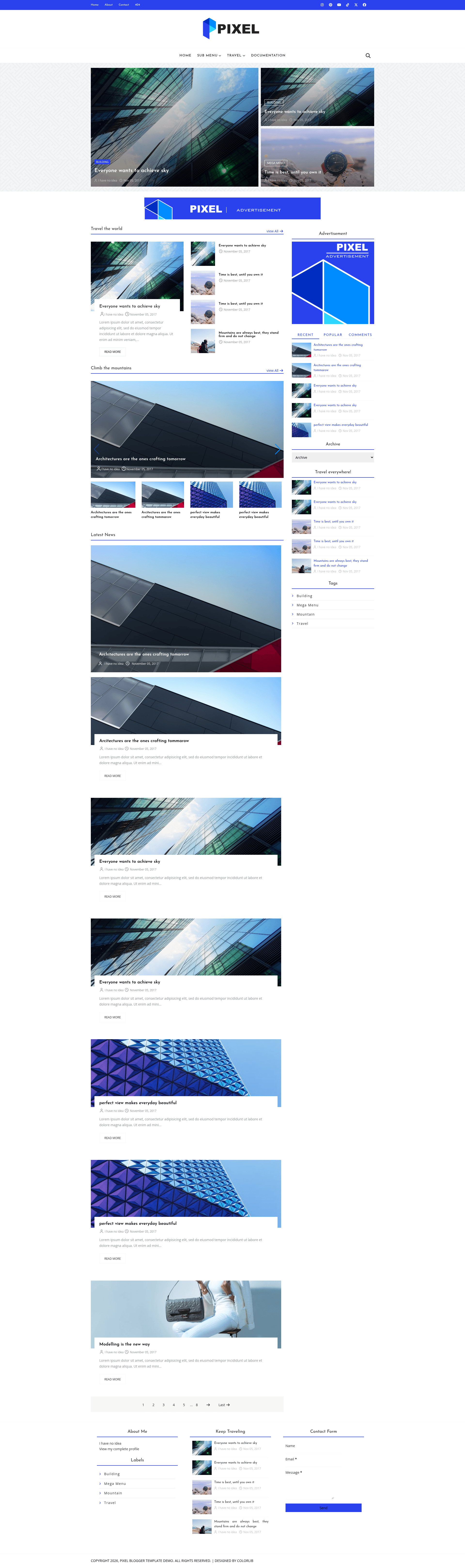
Free news & magazine Blogger template with mega menu, featured post grid, tabbed sidebar and AdSense slots. Zero jQuery, SEO-optimized, vanilla JS. By Colorlib.
About this template
Pixel is a free news and magazine Blogger template (Blogspot theme) by Colorlib, built for online newspapers and content-rich multi-author blogs with a mega menu, featured post grid, tabbed sidebar, and three AdSense ad slots — all running on vanilla JavaScript with no jQuery or CSS frameworks.
What is Pixel?
Pixel is a free, GPL v3-licensed Blogger template designed for news websites, magazine sites, and multi-author blogs. It takes a standard Blogger blog as input — including posts, labels, and widgets — and outputs a responsive, SEO-optimized front end with a featured post grid, mega menu navigation, tabbed sidebar, and dedicated ad placements. The template is maintained by Colorlib and distributed as a single XML file that you paste into Blogger's theme editor, plus an optional demo content XML for preview. The current version is 2.2.0, and the changelog notes that version 2.0 removed all legacy frameworks (jQuery, Bootstrap, Owl Carousel) in favor of hand-written CSS and vanilla JavaScript.
Key Features
Pixel's feature set centers on content presentation and monetization: a label-driven featured grid, mega menus, three AdSense slots, a tabbed sidebar, and magazine-style widgets all run on a vanilla JS foundation.
- Featured post grid — Build a homepage hero from any post label, with a large first story and secondary tiles; the section is optimized for Largest Contentful Paint.
- Mega menu navigation — Turn any menu item into a paged, image-rich mega menu by pointing it at a post label; pages are prefetched for instant arrow flipping.
- AdSense-ready layout — Three built-in ad slots (full-width home banner, post top, post bottom) plus a sidebar ad widget; paste any ad code via the Layout editor.
- Tabbed sidebar — Recent, Popular, and Comments tabs with keyboard-friendly, ARIA-compliant switching.
- Label-driven list and gallery widgets — Magazine-style homepage sections fed by post labels, including a touch-friendly Swiper 11 gallery that supports YouTube videos.
- Mobile-first responsive design — Seven CSS breakpoints from 1200px down to 300px, with a mobile menu and no browser zoom blocking.
- SEO-optimized markup — Exactly one h1 per page, JSON-LD structured data for WebSite, SearchAction, and BlogPosting, plus Open Graph and Twitter card meta tags.
- Fast, dependency-free front end — Zero jQuery, zero CSS frameworks, no render-blocking external assets; preconnect hints, native lazy loading, and right-sized images served by Blogger's CDN. Font Awesome 7 and Google Fonts load non-blocking, and Swiper 11 loads on demand only when a slider is present.
- Accessible — Skip-to-content link, labeled controls, ARIA tab roles, keyboard-friendly navigation, and no user-zoom blocking.
- Easy customization — Change colors from Blogger's theme editor (Theme → Customize → Advanced) with no code; menus and homepage sections are edited through Layout widgets; the footer copyright year updates itself.
Who is it for?
Pixel suits anyone who wants a news-style magazine layout on Blogger without paying for a theme.
- News and magazine publishers who want a fast, AdSense-monetized Blogger theme with a mega menu and featured story grid for high-traffic content.
- Multi-author blogs that need label-driven homepage sections, a popular posts tab, and comment tabs to organize content from several writers.
- Independent journalists and niche media sites that run on Blogger and want a news-style layout with built-in ad slots.
- Developers and designers who customize Blogger themes and need an open-source, vanilla-JS codebase that's easy to modify and redistribute.
What can you do with Pixel?
With Pixel's label-driven widgets and ad slots, you can set up several concrete content and monetization workflows.
- Launch an ad-supported news site: Set up a homepage with a featured post grid, label-driven list widgets, and three ad slots, then connect AdSense through Blogger's Layout editor.
- Organize content with mega menus: Assign a post label to any menu item to create a paged, image-rich mega menu that helps readers browse categories quickly.
- Showcase video content: Use the Swiper-based gallery widget, which supports YouTube videos, to feature multimedia stories on the homepage.
- Build a magazine-style blog with minimal setup: Import the demo content XML, customize colors via the theme editor, and replace sample posts with your own in minutes.
How does Pixel work?
Installation follows Blogger's standard theme workflow: download the ZIP from the GitHub repository, sign in to Blogger, open Theme → Customize → Edit HTML, replace the entire theme code with the contents of Pixel-Blogger-Template.xml, save, and set mobile mode to Desktop to remove Blogger's legacy ?m=1 wrapper. The optional demo content XML can be imported via Settings → Manage blog → Import content to preview the template with sample posts before publishing. After installation, customization is done through Blogger's standard interfaces: colors in Theme → Customize → Advanced, menus and homepage sections via Layout widgets, and ad codes through the advertisement widgets.
Pricing
Pixel is free for personal and commercial use under the GPL v3 license. Attribution to Colorlib is appreciated but not required, and you may use the template on as many blogs as you like.
FAQ
Is Pixel really free?
Yes — Pixel is released under the GPL v3 license, so you can use, modify, and redistribute it for free, including on commercial projects. Attribution to Colorlib is optional.
Does Pixel work with AdSense?
Yes. The template includes dedicated ad widgets (a full-width home banner, post top, post bottom, and a sidebar ad slot), and you can add more ad units through Blogger's Layout editor by pasting your AdSense code.
Will Pixel slow down my blog?
No. The template loads zero render-blocking external assets, removes all legacy frameworks (jQuery, Bootstrap, Owl Carousel) as of version 2.0, and uses native lazy loading, preconnect hints, and on-demand Swiper loading to keep pages fast.
Can I use Pixel on multiple blogs?
Yes, you can use Pixel on as many blogs as you like. The GPL v3 license permits unrestricted use and modification, and there is no limit on the number of sites.