Template details
Astro Terminal Theme
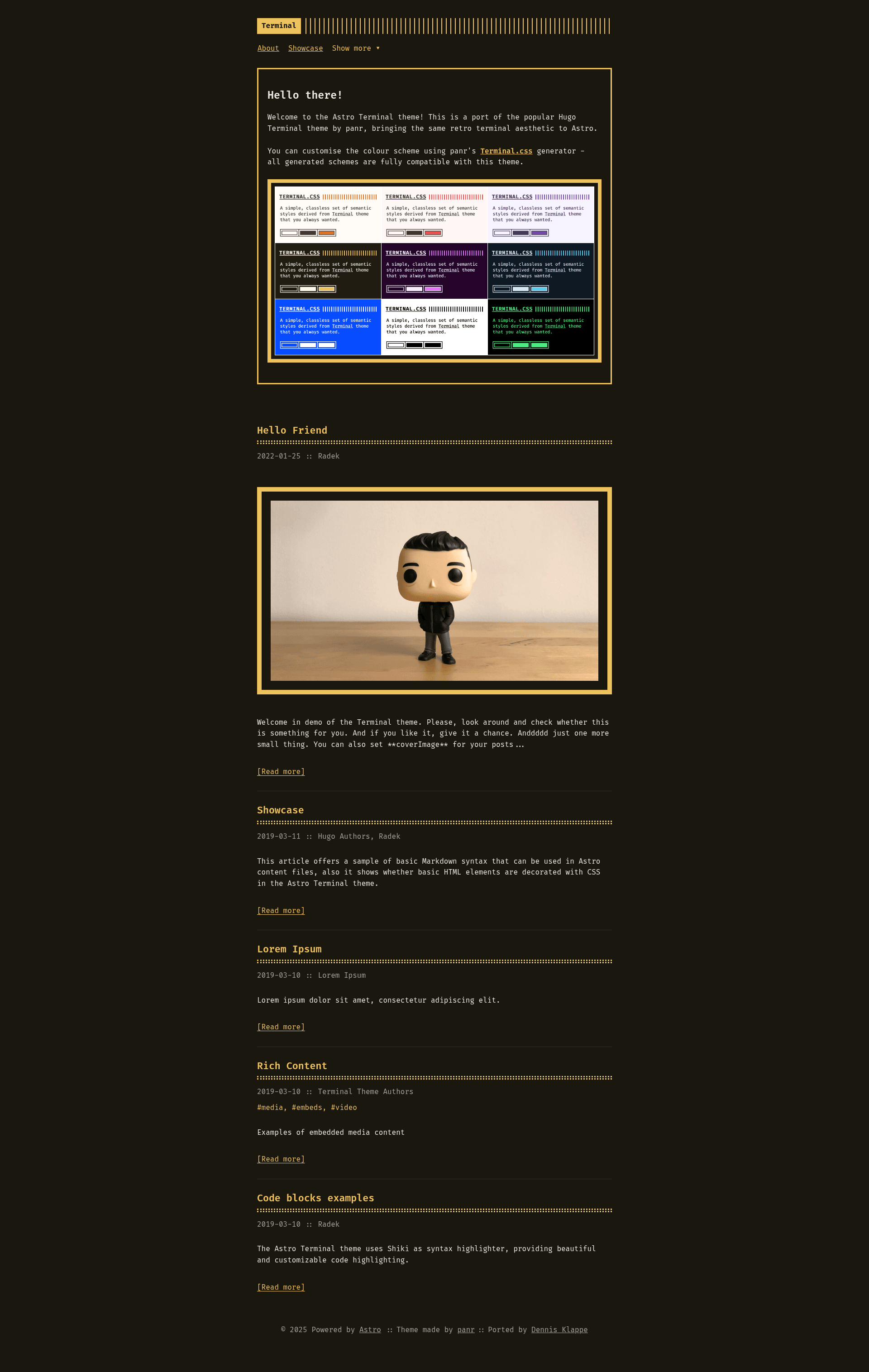
A retro terminal-inspired Astro blog theme with customisable colour schemes, tag support, and RSS, ported from Hugo Terminal.
About this template
Astro Terminal Theme is an open-source blog template for Astro that recreates the retro terminal aesthetic of panr's Hugo Terminal Theme, with customisable colour schemes, tag support, and a built-in RSS feed.
What is Astro Terminal Theme?
Astro Terminal Theme is a port of the popular Hugo Terminal Theme by panr, adapted to the Astro framework by Dennis Klappe. It takes Markdown posts with frontmatter (title, description, pubDate, author, tags) and generates a static blog with a terminal-inspired interface. The theme runs on Astro v5.0.0 or higher and Node.js 18 or higher, and outputs plain HTML that can be hosted anywhere.
Key Features
The theme bundles a set of features that make it stand out from default Astro starters:
- Customisable colour schemes — works with panr's Terminal.css colour scheme generator or by editing CSS custom properties in
src/styles/terminal.css. - Fira Code monospace font — used as the default typeface, easily swappable via
src/styles/fonts.css. - Syntax highlighting — powered by Astro's built-in Shiki integration with a custom monochrome theme matching the terminal aesthetic.
- Fully responsive layout — adapts cleanly to mobile and desktop screens.
- Tag support — organise posts with tags; each tag gets its own page under
/tags/[tag-name]and a tag index at/tags. - Automatic RSS feed — generated from your posts without extra configuration.
The theme is built with modular CSS files (terminal.css, fonts.css, main.css, header.css, menu.css, footer.css, post.css, buttons.css, code.css, syntax.css, pagination.css, gist.css, terms.css) and includes layouts (BaseLayout, PostLayout) and components (Header, Footer, PostCard, Pagination, FormattedDate). It ships with example pages for About, Posts, Tags, and a Rich Content showcase.
Who is it for?
This theme fits several types of users:
- Bloggers who want a distinctive retro terminal look for their personal site without building the styling from scratch.
- Astro developers who prefer a minimal, hackable codebase and want to customise colours, fonts, navigation, and components.
- Fans of the Hugo Terminal Theme who are moving to Astro and want the same visual design with Astro's content collections and build pipeline.
What can you do with it?
Here are concrete ways to use Astro Terminal Theme:
- Publish a blog: write Markdown posts in
src/content/posts/with frontmatter, and the theme renders them as a terminal-styled blog with tag pages. - Customise the design: create a colour scheme using the Terminal.css generator, change the font, and edit navigation in
src/layouts/BaseLayout.astroincluding a dropdown menu. - Deploy to GitHub Pages: use the included GitHub Actions workflow; set your Pages source to "GitHub Actions" and push to the main branch.
How does it work?
Clone the repository (or use it as a GitHub template), run npm install, then start development with npm run dev. Content lives in src/content/posts/, configuration lives in astro.config.mjs, and the production build is created with npm run build. The theme uses Astro's content collections and Shiki for highlighting out of the box.
Pricing
The theme is open source under the MIT License — the same licence as the original Hugo Terminal Theme — and free to use for personal or commercial projects.
Alternatives
- Hugo Terminal Theme — the original theme by panr, built for Hugo instead of Astro.
FAQ
Is Astro Terminal Theme free?
Yes, it is released under the MIT License, so it is free to use, modify, and distribute in personal and commercial projects.
What are the requirements?
Astro v5.0.0 or higher and Node.js 18 or higher are required. The theme was tested with these versions and uses modern Astro features like content collections.
How do I change the colour scheme?
Edit the CSS custom properties in src/styles/terminal.css or generate a new scheme with panr's Terminal.css generator and paste the variables. The theme is fully compatible with generated schemes.
Does the theme support tags?
Yes, posts can include a tags array in their frontmatter. Each tag gets a dedicated page at /tags/[tag-name], and a tag index is available at /tags.
How do I deploy to GitHub Pages?
The repository includes a GitHub Actions workflow. Go to repository Settings → Pages, set Source to "GitHub Actions", then push to the main branch. For a custom domain, update the site and base options in astro.config.mjs.