Template details
Jekyll MDL
A Jekyll theme based on Google Material Design Lite, using cards, highlighted posts, and configurable navigation layouts.
About this template
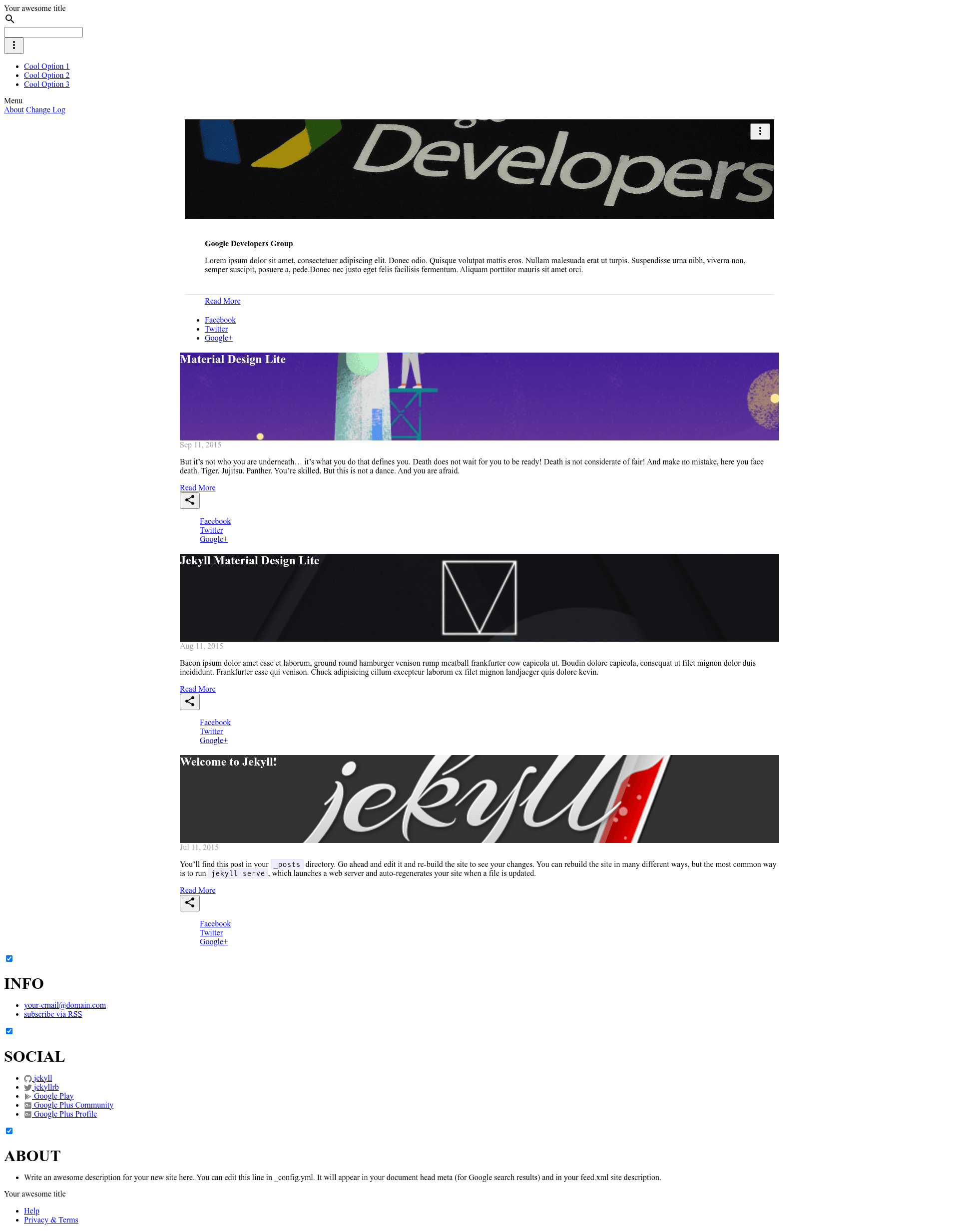
Jekyll MDL is a free, open-source Jekyll blog theme that applies Google Material Design Lite's card-based interface to static sites, turning post front matter into visual cards and full-width hero posts. Built and maintained by the Google Developers Group Managua, it runs entirely within Jekyll's build pipeline and requires no separate frontend tooling.
What is jekyll-mdl?
Jekyll MDL is a Jekyll theme built on Google Material Design Lite (MDL), created by the Google Developers Group Managua with Oscar Cortez as project lead and Byron Corrales as contributor. Its core function is to render a Jekyll blog as a grid of MDL cards, each card displaying the post's image, title, and author. The theme takes Markdown posts with YAML front matter as input and produces a static HTML site, and it is distributed with an Apache 2.0 license.
Key Features
- Material Design Lite styling — Uses MDL's CSS and JavaScript components for cards, fixed navigation, and drawer navigation, giving the site a Google-style Material look without a build step.
- Post cards with required images — Every post must define an
imagein its front matter, which the theme displays on the card along with an optionalauthorin the card footer. - Highlighted hero posts — Setting
highlight: trueon a post makes it span the full 12-column grid instead of appearing as a regular card. - Four navigation and grid layouts — The
_config.ymlfile lets you pick between fixed nav, drawer nav, and with or without the highlight post section. - Custom color themes — Users can generate a custom MDL theme with the official MDL theme creator and add the resulting CSS link to
_includes/head.htmlunder the main stylesheet. - GitHub Pages ready — The demo runs on GitHub Pages and the README lists six live sites that use the theme, all hosted on GitHub Pages.
Who is it for?
Jekyll MDL suits bloggers and developers who want a Material Design look without writing custom frontend code. It's a natural fit for GDG community sites, personal portfolios, and developer blogs that are already hosted on GitHub Pages. Anyone comfortable with Jekyll's standard front matter can configure the theme in minutes by editing _config.yml and adding image URLs to posts.
What can you do with jekyll-mdl?
- Publish an image-driven blog — Add
imageandauthorto each post's front matter and the theme renders them as visual cards with attribution footers. - Highlight a key post — Set
highlight: trueon any post to turn it into a full-width callout above the regular card grid. - Reskin the entire site — Use the MDL theme creator to produce a custom color scheme and drop the generated stylesheet link into
_includes/head.htmlfor a different look. - Switch navigation layout — Toggle between a fixed top nav and a drawer nav, with or without the highlight post, by editing a single value in
_config.yml.
How does jekyll-mdl work?
The theme expects posts with YAML front matter containing layout: post, title, date, categories, and an image. Optional keys author and highlight control the card footer and full-width hero behavior. The layout selection is made once in _config.yml, and Jekyll rebuilds the site to apply it.
FAQ
Is jekyll-mdl free to use?
Yes, it is open-source and licensed under the Apache 2.0 license, so it can be used commercially and modified freely with attribution.
How do I add a custom color theme?
Generate a custom CSS with the MDL theme creator (getmdl.io/customize), copy the generated <link> tag, and place it in the _includes/head.html file under the main CSS.
What front matter does a post need?
A post must have layout: post, title, date, categories, and an image path. You can optionally add author for the card footer and highlight: true to make the post span the full grid width.
Can I use jekyll-mdl with GitHub Pages?
Yes. The demo site runs on GitHub Pages, and the README lists six active sites using the theme, all hosted on GitHub Pages.